What Is a Websearch API? How Does It Work & Why It Matters
Learn what websearch API is, how it works, and why sales teams, recruiters, and VCs use it for real-time competitive intelligence and AI workflows.
Published
Jan 10, 2026
Written by
Chris P.
Reviewed by
Nithish A.
Read time
7
minutes

Search results signal intent before most databases capture it. When a company launches a product, hires an executive, or raises funding, those updates appear in search results within hours. Teams relying on quarterly data exports or static contact lists miss the timing that determines whether outreach lands or gets ignored.
Google processes over 3.5 billion searches per day. That volume makes search rankings a core signal for competitive intelligence, lead generation, and market positioning. But pulling search data manually or through fragile scrapers creates more problems than it solves. Pages change, CAPTCHAs block requests, and proxies get flagged.
This guide explains what a websearch API is, how it works, and why sales teams, recruiters, and AI developers use it to surface context that traditional B2B data providers miss.
Key Takeaways
Websearch APIs provide structured access to search engine results
Send a query through an API request and receive clean JSON with titles, URLs, snippets, and positions instead of scraping HTML and handling CAPTCHAs.
Search visibility signals intent before databases capture it
Product launches, funding announcements, and executive moves appear in search results within hours. Websearch APIs surface these signals while timing still matters.
Search results data becomes actionable when combined with B2B intelligence
Sales teams layer search signals on top of contact data. Recruiters combine search results with candidate profiles. VCs track product launches alongside funding metrics without switching platforms.
CrustData's Web Search API connects serarch results data to GTM systems
Query search results, then enrich companies with headcount growth or pull decision-maker contacts through the same platform where enrichment and routing already happen.
What Is a Websearch API?
A websearch API provides programmatic access to search engine results in a structured format. Instead of scraping HTML from Google or Bing, you send a query through an API request and receive clean JSON with titles, URLs, snippets, and ranking positions.
Traditional web scraping breaks when search engines update their page layouts, introduce CAPTCHAs, or detect automated traffic. A websearch API handles result parsing and schema normalization so your workflows can focus on using the data rather than maintaining infrastructure. You send a query and receive structured JSON with fields like title, URL, snippet, and ranking position.
What a websearch API returns:
Organic results: Titles, URLs, and descriptions of web pages ranked by the search engine
Featured snippets: Direct answers or summaries displayed at the top of results
Knowledge panels: Information boxes about entities like companies or people
Paid ads: Sponsored results with ad copy and landing pages
Local results: Map-based listings for location-specific queries
News results: Recent articles from news sources
Metadata: Search parameters, timestamps, result counts, and source information
The core advantage is reliability. Websearch APIs convert raw search output into consistent data structures that integrate directly into CRMs, enrichment pipelines, and analytics tools without breaking when Google changes its layout.
How Does a Websearch API Work?
The workflow for accessing search results through an API follows four steps, regardless of which provider you use.
Step 1: Send a Query
You make an API request with search parameters that define what you want to retrieve. Most websearch APIs accept parameters for keyword, location, language, and result type. These filters control which search results the API returns and how they're formatted.
For example, a query might specify "OpenAI product launches" as the keyword, "US" for geolocation, and "news" as the source type to exclude web or video results.
Step 2: API Fetches Live Results
The websearch API queries the search engine in real time using your parameters. It handles geo-targeting, language filters, and result type selection so your request matches how a user in that location would see the results.
The API manages the technical layer: proxies, request headers, and rate limiting. You don't interact with the search engine directly.
Step 3: Results Are Parsed and Normalized
Raw HTML from the search engine is converted into structured JSON. The API extracts titles, URLs, snippets, and positions, then organizes them into a consistent schema.
This normalization step separates a websearch API from traditional scraping. When Google updates its page structure, the API provider adjusts the parsing logic so your integration continues working without changes on your end. Teams running data enrichment workflows rely on this consistency to keep pipelines stable as upstream sources evolve.
Step 4: You Receive Structured Data
The API returns clean JSON ready for ingestion. Each result includes fields like title, URL, snippet, and position. This data can be fed directly into CRMs, analytics platforms, or AI pipelines without manual cleanup.
Sample response from CrustData’s Web Search API (searching for ‘crustdata’):
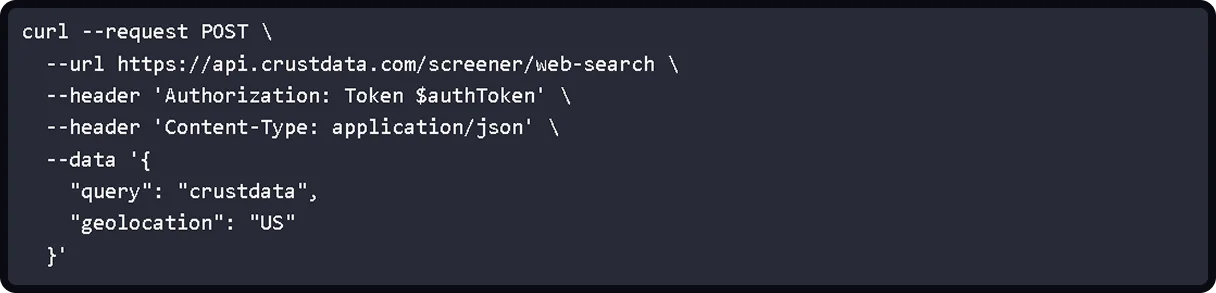
Sample response from CrustData's Web Search API:
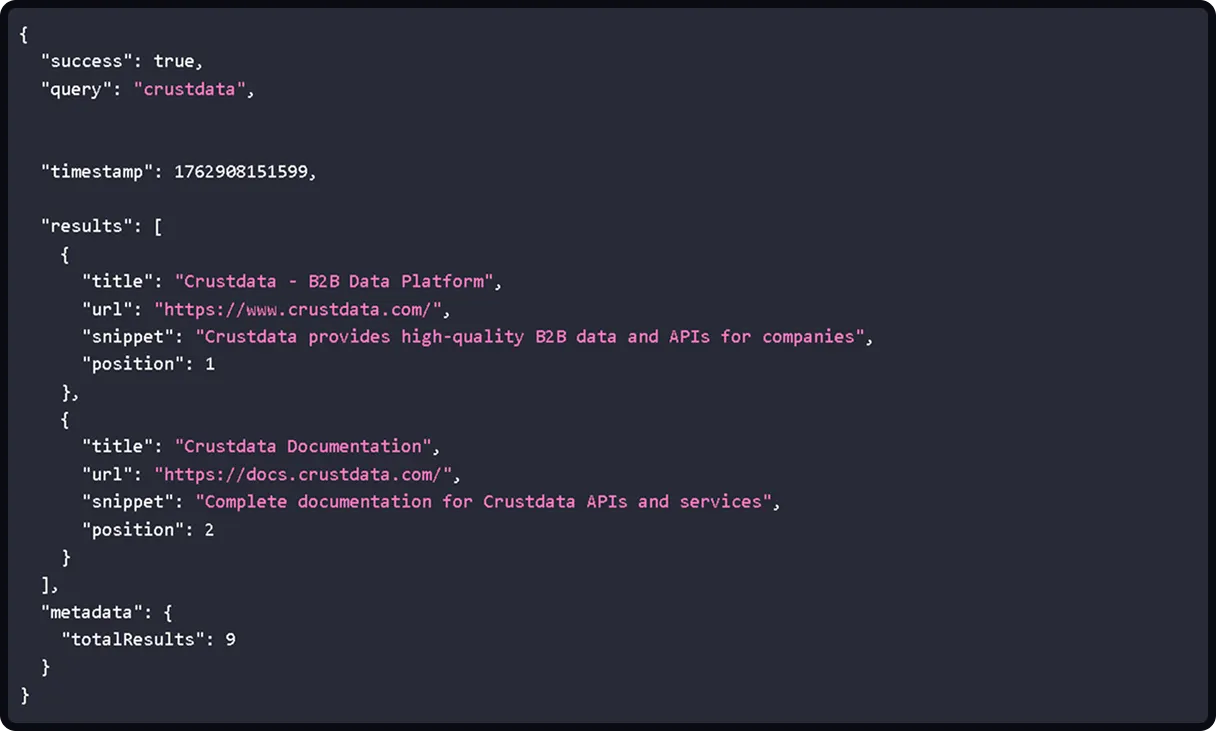
The process takes seconds. Once the response arrives, your systems can route, score, or analyze the data based on your workflow requirements.
Why Teams Use Websearch APIs
Most teams hit the same problems when trying to collect search data at scale. Websearch APIs exist to solve infrastructure and reliability issues that make manual collection impractical.
1. Manual Scraping Is Unreliable
Collecting search results through headless browsers or custom scrapers creates ongoing maintenance work. Pages change layouts, CAPTCHAs block automated requests, and proxies get flagged. What works one week breaks the next.
Websearch APIs handle the infrastructure. You send a query and receive structured JSON without managing proxies, solving CAPTCHAs, or rewriting parsers when Google updates its page structure. The provider absorbs that maintenance cost.
2. Traditional B2B Data Lacks Market Context
B2B databases provide firmographic data like employee count, industry, and location. They don't surface what competitors are saying in search results, how prospects position themselves publicly, or which product launches are gaining visibility.
Search results data fills that gap. It shows what the market sees when searching for a company, product, or person. Teams use it to:
Track competitor messaging and positioning in search results
Find candidates discussing their work on forums or GitHub
Monitor which startups appear in funding announcement results
Identify pain points mentioned in founder interviews and blogs for targeted prospecting
3. AI Workflows Need Live Context
AI agents trained on static datasets miss current events. An agent reasoning over six-month-old data will hallucinate executive names, recommend outdated products, or reference companies that no longer exist.
Websearch APIs ground agents in what's publicly visible right now. When building AI-powered sales tools, teams combine search results data with contact and company information so agents can verify claims, check current positioning, and surface recent announcements instead of working from assumptions.
4 Most Common Use Cases of Websearch APIs
Websearch APIs support workflows where search visibility reveals timing, market position, and competitive context. Teams use them differently depending on whether they're tracking competitors, researching markets, powering AI agents, or monitoring SEO performance. Here are the most common use cases of websearch APIs.
1. Competitive Intelligence
Teams monitor how competitors appear in search results for key terms. When a competitor launches a product, the announcement shows up in search before it reaches most databases. Websearch APIs surface those URLs as they get indexed, so competitive analysis stays current without manual checking.
Common applications include:
Sales teams tracking changes in competitor messaging and positioning
Marketing teams identifying which landing pages rank for target keywords
Product teams discovering what features competitors emphasize in public-facing content
2. Market Research
Research teams use search results data to discover product pages, pricing information, and feature comparisons across markets. Instead of manually visiting dozens of sites, they query search results and extract URLs programmatically.
This approach works for identifying emerging companies in fast-moving categories. When new startups launch, they appear in search results before they show up in traditional B2B databases. Teams running lead generation workflows use search results data to build prospect lists that include recently founded companies.
3. Content Discovery and AI Workflows
Development teams building AI agents need agents that reason over live context. Websearch APIs provide that layer. An agent can query search results to verify claims, check what's currently ranking for a topic, or surface recent articles before generating a response.
This reduces hallucinations. Instead of inventing facts, agents retrieve actual search results and work from what's publicly visible. Sales automation tools use this approach to reference recent company news in outreach. Recruiting platforms surface candidates' GitHub profiles, conference talks, or blog posts.
4. SEO and Search Performance Monitoring
SEO teams track keyword rankings and search results position changes over time. Websearch APIs return consistent position data, so teams can monitor whether their pages are moving up or down for target queries.
The data also shows which competitors rank for the same terms, which featured snippets appear, and how search results features change. Teams use this to identify content gaps and backlink opportunities without manually checking search results.
Websearch API for AI Sales and Recruiting Agents
AI agents need context beyond standard B2B databases. Websearch APIs surface recent announcements, product launches, executive content, and GitHub activity that don’t appear in traditional B2B databases. This matters for specificity. An AI SDR can reference a funding round announced three days ago instead of generic outreach. A recruiting agent can mention a candidate's recent conference presentation instead of template messaging.
The problem is that search results data alone doesn't close the sales process. You find a startup mentioned in TechCrunch, but you still need headcount data, funding stage, and decision-maker contacts to act on it. Teams typically stitch together separate tools and write custom logic to combine them.
Platforms that integrate search results with B2B data eliminate that friction. An agent finds companies launching products via search results, then immediately pulls headcount data and decision-maker contacts in the same workflow. This integration also reduces hallucinations because agents verify claims against live search results instead of inventing facts from stale data.
The workflow looks like this:
The agent identifies prospects using firmographic filters and growth signals, then uses search results to gather personalization details.
It pulls information from company product pages, finds blogs or podcasts featuring the prospect, and surfaces recent interviews.
This context feeds into message generation, so outreach references their actual product strategy or public comments instead of generic talking points.
When to Use a Websearch API
Websearch APIs work when search visibility drives your decisions or workflows depend on what’s publicly indexed.
Use a websearch API if you’re:
Tracking how competitors position themselves in search results
Monitoring product launches as they get indexed
Building AI agents that need to verify claims against live web data
Catching signals like executive moves or funding announcements before they reach traditional databases
Checking hundreds of keywords daily or monitoring search results features across markets
Feeding search results into enrichment pipelines at scale
Skip a websearch API if you’re:
Manually checking a handful of keywords once a week
Focused on historical trends rather than current visibility
Running workflows that don’t depend on what appears in search results
How CrustData Delivers Search Results Data
CrustData offers a Web Search API designed for teams that need search results connected to broader GTM workflows.
The difference shows up in how the data gets used. Most websearch APIs exist as standalone tools. You query search results, then move that data somewhere else to make it useful. CrustData positions search results access alongside company search and live employee data so you can:
Retrieve full content in one call: Set fetch_content=true to return complete HTML from every result URL in the same request. Teams building account-based intelligence workflows use this to validate signals without running separate enrichment jobs.
Control what comes back: Restrict results to specific domains with the site parameter, target regional markets using geolocation codes, or filter by source type when you only need news coverage or scholarly articles.
Search results data matters most when it connects to systems that already handle enrichment, scoring, and routing. CrustData delivers that connection.
Book a demo to see how search visibility fits into workflows that drive decisions.
FAQs
Do Websearch APIs work with search engines other than Google?
Most websearch APIs support Google, and some include Bing, Yahoo, or regional engines. CrustData's Web Search API focuses on Google search results, which accounts for over 90% of global search traffic.
How often should I call a Websearch API?
That depends on your use case. SEO teams might track rankings daily or weekly. Sales teams monitoring competitor launches often query in real time when signals appear. Fixed per-query pricing makes frequent calls manageable.
Can Websearch APIs detect when a company launches a product?
Websearch APIs return whatever appears in search results. If a product launch generates press coverage or appears on the company's site, it will show up in results. Automated monitoring requires regular queries for relevant terms.
Do I need technical skills to use a Websearch API?
Basic API knowledge helps. You need to make HTTP requests and parse JSON responses. Most providers offer client libraries in Python, JavaScript, and other languages to simplify integration.
What's the difference between a Websearch API and a web scraping tool?
Websearch APIs handle the scraping infrastructure. You send a query and receive structured data. Web scraping tools require you to manage proxies, handle CAPTCHAs, and parse HTML yourself.


Products
Popular Use Cases
Competitor Comparisons
95 Third Street, 2nd Floor, San Francisco,
California 94103, United States of America
© 2026 Crustdata Inc.
Products
Popular Use Cases
Competitor Comparisons
95 Third Street, 2nd Floor, San Francisco,
California 94103, United States of America
© 2025 CrustData Inc.
Products
Popular Use Cases
95 Third Street, 2nd Floor, San Francisco,
California 94103, United States of America
© 2025 CrustData Inc.