How to Build an AI Recruiter with Claude (2026 Guide)
An AI recruiter built with Claude can take a hiring manager from a vague hiring requirement to a ranked shortlist of candidates.
Published
Written by
Chris Pisarski
Reviewed by
Manmohit Grewal
Read time
31
minutes


An AI recruiter built with Claude can take a hiring manager from a vague hiring requirement to a ranked shortlist of candidates.
It starts by asking questions about the role, turns the answers into a structured brief, searches an up-to-date people database, evaluates candidates against a defined set of criteria, and explains why each person made the shortlist.
Claude handles the conversation and candidate evaluation. Crustdata provides the people data, while your code keeps track of the hiring brief, scores, and candidates already reviewed.
The hardest part isn't building the AI. It's getting the hiring brief right and making sure the underlying data is reliable. That's where we've seen most implementations fall short.

We tested the search, rule-checking, and funding verification steps on a real hiring role on October 21, 2026. A go-to-market recruiting firm was looking for an account executive in New York. The initial brief returned just 3 candidates out of the top 20 who met every requirement. After refining the brief and adding a funding check, that number increased to 18 out of 20.
There are two ways to build this, depending on what you're trying to achieve.
Claude Code + Crustdata MCP: The fastest way to build and test a working version yourself.
Claude API + tool use: The better choice if you're building an AI recruiter into your own product.
What you'll need:
Claude Code, or an Anthropic API key for a product integration
A Crustdata account, which comes with free credits for new self-serve users
A real job description or hiring brief to test against
A few candidates you already know are a good fit, so you can check whether your search finds them
What does an AI recruiter do?

An AI recruiting agent is software that takes a hiring goal and works through the steps toward it. Those steps include finding people, screening them, writing to them and booking interviews, with a recruiter approving the important decisions.
I scoped mine to the first step: finding and shortlisting people who haven’t applied yet. Screening applicants, scheduling interviews, outreach and syncing to an applicant tracking system (ATS) are separate builds. The shortlist comes back as plain JSON, so you can load it into the ATS you already use.
Hiring step | What an AI recruiter does at this step | Covered in this guide |
|---|---|---|
Sourcing | Turns a role brief into a search, scores the matches, returns a shortlist | Yes |
Screening | Asks applicants screening questions | No |
Scheduling | Books interviews | No |
Outreach | Drafts messages to the shortlist | Only as a next step |
How does an AI recruiter built on Claude work?

It works as a short pipeline, and each stage hands the next one something it can check:
The chat produces a brief.
The brief becomes a search.
The pool that comes back gets scored in layers.
A recruiter reviews the shortlist before anyone is contacted.
Every score is explainable, because the rubric names the evidence behind each weighted item. The loop is agentic, since Claude decides when to call the search tools. It’s never autonomous about who gets contacted.
Part | Who does it | What it produces |
|---|---|---|
Intake chat | Claude | A structured brief in JSON |
Search | The people database (Crustdata) | A pool of matching profiles and a count |
Rule checks and the funding check | Your code | Pass or fail per rule, with the reason |
Ranking and judging | The database’s semantic rank, then Claude | A score and a one-line reason per person |
Memory | Your code | The brief, the rubric and a seen-list per role |
Review | A recruiter | The final shortlist |
Teams we talk to land on the same split. On one of our customer calls, a growth lead at a startup building an AI hiring product explained that the AI’s first job is drawing the role out of the user in enough detail to search on. An in-house talent team at a hardware company described scoring to our team as layers: the database first, Claude as the final judge.
What does the data layer need before the agent is worth anything?

The data layer needs three things from the fields your rubric scores on:
They’re filled in often enough to trust.
They’re fresh enough that the person still holds the job you’re matching.
They’re filled in evenly. If half the pool has a field empty, a rubric that leans on it ranks people by how much they bothered to write.
We’ve seen a team building an AI hiring product leave a data provider over missing fields and slow refresh, so check both before you write a prompt. I checked fill rates on my own sample, and they’re in the table a little further down.
Can’t I just ask Claude for a list of candidates?

No. Claude can’t be the data layer on its own. An independent recruiter on r/recruiting wrote that AI is - great for generating target lists of companies but weak at naming candidates for any role that’s even slightly complicated for context model answers from what it learned in training. The names and current jobs have to come from a database you query at the moment you search and the training data is something not fresh at every point of time.
Which profile fields does the agent read, and how often are they empty?
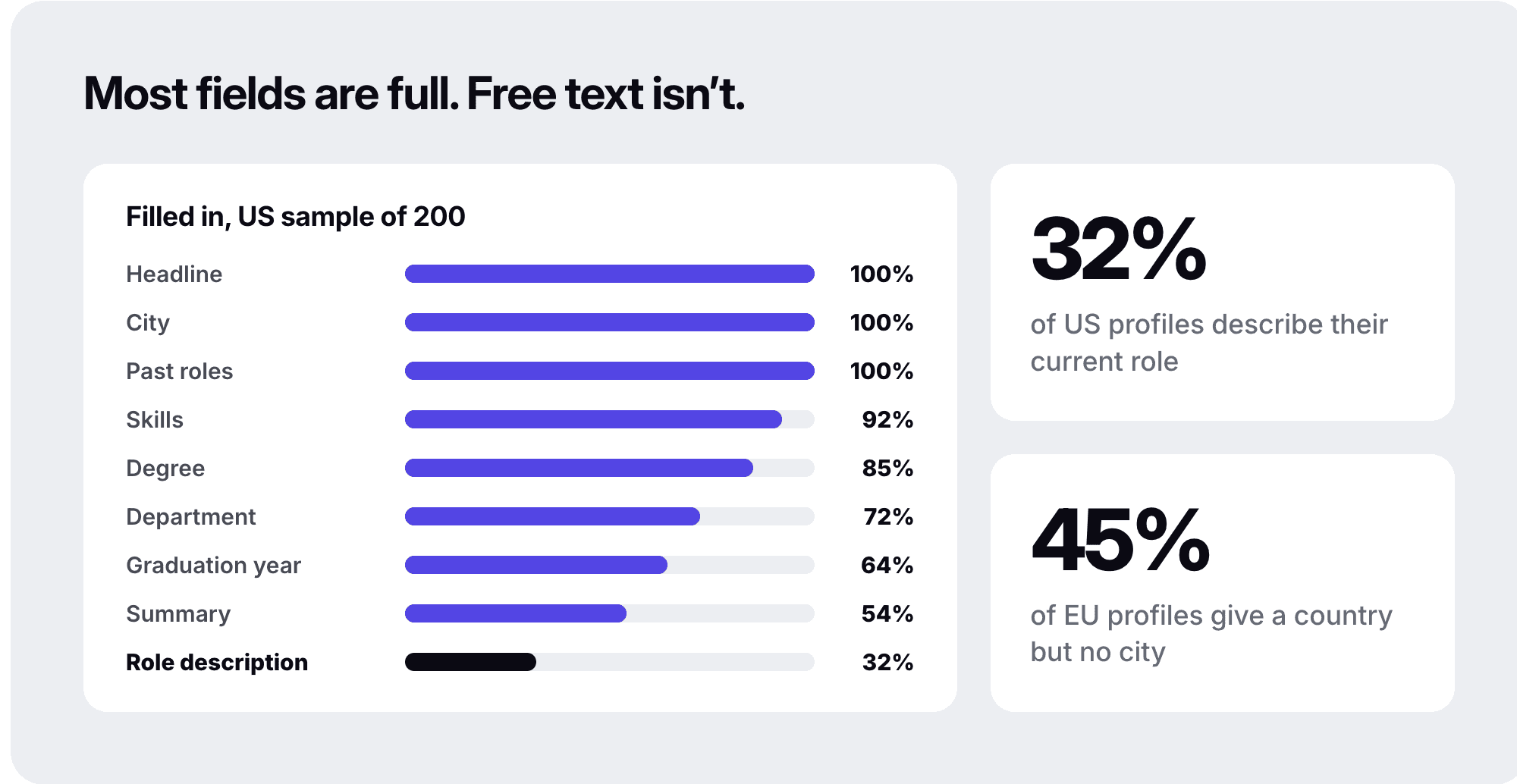
The agent reads six kinds of field, and most of them are filled in on nearly every profile:
the headline
the current title and its start date
the employer’s industry and size
education
skills
past roles
The weak spot is free text, like the description under each role.
I measured fill rates on October 21, 2026, using account executive profiles from our people database. My US sample was 200 profiles in New York. My EU sample was 100 profiles across 10 countries.
Field the agent reads | Why the agent needs it | Filled in (US, n=200) | Filled in (EU, n=100) |
|---|---|---|---|
Headline | Fast relevance check | 100% | 100% |
Current title and its start date | Title match and time in role | 100% | 100% |
Employer industry and headcount | Product company or agency, size cap | 100% | 100% |
City | Location match | 100% | 55% |
Department | Function check | 72% | 62% |
Degree level you can read | Degree rule | 85% | 80% |
Graduation year | Experience estimate | 64% | 92% |
Skills | Keyword layer | 92% | 87% |
Past roles with dates | Career path, tenure | 100% | 99% |
Description under the current role | Keyword layer, judge | 32% | 44% |
Summary | Keyword layer, judge | 54% (n=100) | not measured |
What do I do when a profile field is empty?

Score it as unknown, not as a fail. Two rules follow from the table:
Score an empty field as unknown: a missing degree or summary should show up as “unknown” in the reason. It should never count as a fail, or the agent punishes people for not writing a long profile.
Plan for country-only locations outside the US: in my EU sample, 45% of profiles had a country but no city. A growth lead whose product first focused on European candidates told our team about the same problem, with profiles that listed only a country.
What if someone has more than one current role?

Pick the role that matches the brief before you apply any rule.
This one surprised me. About 1 in 5 profiles in my test listed more than one current role, 156 of the 789 in the finished search. Many people keep a side role next to their main job.
Crustdata marks the primary current role with an is_default flag, but the primary role isn’t always the one the brief is about. If you check the wrong role, someone can pass the 12-month rule on a side role they started years ago.
How do I check what an employer was doing while a candidate worked there?

Join the person’s role dates to the employer’s funding history. In Crustdata, company enrich with fields: ["funding"] returns the dated rounds in funding.milestones. Each milestone carries a date, a round_type and an amount_usd. In my test, 34 of the 35 employers I checked came back with dated rounds.
The join answers two questions recruiters ask about a candidate’s employer:
Did the company grow while they were there? Count the rounds after the role’s start date. In my run, 9 of the top 20 worked somewhere that raised a round after they joined.
Is the company on fire right now? Count the rounds in the last 24 months.
The search firm behind my test brief skips anyone whose employer raised three or more rounds in the last two years. To them, that pace means the company is on fire and the person is unlikely to leave.
from datetime import date, timedelta

def round_dates(company):
    # company = one item from the company enrich response, matches[0]["company_data"]
    milestones = (company.get("funding") or {}).get("milestones") or []
    return sorted({m.get("date") or m.get("funding_date") for m in milestones if m.get("date") or m.get("funding_date")})

def rounds_since(company, since_iso):
    return sum(1 for d in round_dates(company) if d[:10] >= since_iso)

def on_fire(company, today=date(2026, 10, 21), window_days=730, threshold=3):
    since = (today - timedelta(days=window_days)).isoformat()
    return rounds_since(company, since) >= threshold

def raised_during_role(company, role_start_iso):
    return rounds_since(company, role_start_iso[:10]) > 0
from datetime import date, timedelta

def round_dates(company):
    # company = one item from the company enrich response, matches[0]["company_data"]
    milestones = (company.get("funding") or {}).get("milestones") or []
    return sorted({m.get("date") or m.get("funding_date") for m in milestones if m.get("date") or m.get("funding_date")})

def rounds_since(company, since_iso):
    return sum(1 for d in round_dates(company) if d[:10] >= since_iso)

def on_fire(company, today=date(2026, 10, 21), window_days=730, threshold=3):
    since = (today - timedelta(days=window_days)).isoformat()
    return rounds_since(company, since) >= threshold

def raised_during_role(company, role_start_iso):
    return rounds_since(company, role_start_iso[:10]) > 0
from datetime import date, timedelta

def round_dates(company):
    # company = one item from the company enrich response, matches[0]["company_data"]
    milestones = (company.get("funding") or {}).get("milestones") or []
    return sorted({m.get("date") or m.get("funding_date") for m in milestones if m.get("date") or m.get("funding_date")})

def rounds_since(company, since_iso):
    return sum(1 for d in round_dates(company) if d[:10] >= since_iso)

def on_fire(company, today=date(2026, 10, 21), window_days=730, threshold=3):
    since = (today - timedelta(days=window_days)).isoformat()
    return rounds_since(company, since) >= threshold

def raised_during_role(company, role_start_iso):
    return rounds_since(company, role_start_iso[:10]) > 0
Count distinct dates, because the same round can appear twice on the same day.
Company enrich also returns headcount growth as a percentage change over the last month, quarter, six months, year and two years (enrich reference). Use it for “growing now” checks. Use the milestone dates for anything that reaches further back.
How fresh does the data have to be?

Fresh enough that the title and employer you match on are still true on the day you reach out. Every Crustdata record carries an updated_at timestamp, so freshness is a field you can check rather than a promise (data updates).
Use the same three rules across the whole pipeline:
Match on indexed data: search, filter and rank on the indexed database, which supports the most filters and costs the least.
Re-check the shortlist live: before a recruiter writes to someone, read their updated_at. If it’s older than you accept, fetch that one profile from the web with live enrich (enterprise plans or the live add-on).
Watch the candidate bank: for people you want to come back to, a person watcher re-checks them on a schedule and sends only what changed, such as a new job or title.
Should I call the API per search or keep my own copy of the data?

Call the API per search when you’re starting out or your volume is modest. Keep your own copy when search is your product and you want to index and rank the data yourself.
The growth lead I mentioned earlier chose the second. They told our team their whole search product couldn’t depend on a call to someone else’s API, so they keep a copy and add live calls for the records that matter.
Call the API per search | Keep your own copy | |
|---|---|---|
Best for | Internal tools, prototypes, modest volume | Search inside your product, your own embeddings and ranking |
Freshness | Indexed data, live calls for the shortlist | You re-sync on updated_at and re-embed only what changed |
Default rate limits | 15 to 30 requests per minute for indexed endpoints, 10 for live (data updates) | Your own infrastructure |
What you build | The brief, the rules and the loop | All of that, plus storage, sync and search |
If you’re switching from another provider, map your fields before you move any code, and list the ones with no equivalent:
What you store now | Crustdata person field |
|---|---|
Summary or about | basic_profile.summary |
Description under each role | experience.employment_details.current.description and .past.description |
Department | basic_profile.normalized_title.department |
City | basic_profile.location.city |
How fast is each call?

Every call is fast enough for chat except live enrich. I timed one run of each call on October 21, 2026:
Call | Time |
|---|---|
Indexed person search, up to 100 results | 87 to 232 milliseconds |
Indexed person search, 789 results | 548 milliseconds |
Semantic search | 0.9 to 1.7 seconds |
Cached enrich of 3 profiles | 151 milliseconds |
Live enrich, per person | 1.6 to 3.4 seconds |
Run live calls in the background after the shortlist is ready, and keep them out of the chat turn where a user is waiting.
Step 1: What should the intake chat ask? (the fields people forget)
The intake chat should collect every constraint the search needs before the first search runs. A forgotten constraint shows up later as a wrong person in the first batch, and by then you’ve already paid for the results.
My test brief came from a recruiter at the search firm. It asked for account executives in New York who:
graduated between 2012 and 2023
weren’t from big tech
would join a seed or Series A software startup
I turned the graduation window into 1 to 14 years of experience.
My first batch had people from a marketing agency, a PR agency and a research and advisory firm. Every one of them was a rule the brief never stated. The recruiter had hit the same thing in his own search, and told our team he should have ruled out services firms from the start.
“No agencies” means leaving out people whose current employer is a staffing, marketing or PR agency, a consultancy or another services firm. The client wants someone who sold a product from inside a product company.
The table below is the checklist for that role. Paste the first column into your intake prompt.
Question the intake asks | The answer for the worked AE role | Becomes | Why teams forget it |
|---|---|---|---|
Which titles count, and which equivalents? | Account executive and similar titles | Title filter, expanded with autocomplete | It feels obvious |
Where must they be? | New York | City filter | Easy with US data, harder in Europe |
How much experience, minimum and maximum? | About 1 to 14 years | Experience filter with a floor and a ceiling | People give a floor only |
Product company or services firm? | Product company, no agencies, consultancies or staffing | Employer industry include list | Agencies look like good matches on paper |
How big can the employer be? | 2,000 employees or fewer | Headcount filter | The first draft said 10,000 |
What counts as big tech? | A named list of companies | Domain exclusion list | “Big tech” means different things to different people |
Any employers to skip? | Companies that raised three or more rounds in two years | Funding check after the search | It needs company data |
Current employer only, or past ones too? | Current employer only | Which role the rules check | Exclusions can match past roles too |
Minimum time in the current role? | 12 months | Start-date filter | Without it, the list fills with people who changed jobs months ago |
Degree level? | Bachelor’s or master’s | Rule check on education | A certificate holder came back in the first batch |
Which text fields to search? | Title, headline, summary and role description | Plain-language query | Searching titles only misses people |
One example of a good past hire, and why | Supplied by the recruiter | Calibration for the judge | One example shows the recruiter’s taste faster than a list of rules |
Tip: before the agent searches, tell Claude to grill you about the role, and to keep asking follow-up questions until every row above has an answer. This is the cheapest moment to catch a missing constraint. I haven’t run the intake chat with a live recruiter yet. For this role, here’s how I’d open it:
Claude: Should people whose current employer is an agency, a consultancy or a staffing firm count, or only people at product companies?
Recruiter: Product companies only. Our client wants someone who sold software from the inside.
Then lock the brief down:
Read it back: read the parsed brief back to the recruiter and get a yes before the first search runs.
Set a ceiling on experience: “5+ years” with no ceiling pulls in people far too senior to move for the role.
Set a minimum time in role: this skips people who changed jobs a few months ago. My first batch had someone three months into the role.
The output of the intake is a brief your code can store and Claude can reread. This example shows six of the eleven domains I excluded in my run.
{
  "role": "Account Executive (individual contributor)",
  "hiring_company": "Seed or Series A software startup",
  "location": {"city": "New York"},
  "experience_years": {"min": 1, "max": 14},
  "current_employer": {
    "industries_include": ["Software Development", "IT System Custom Software Development", "Technology, Information and Internet", "Computer Software", "Mobile Computing Software Products", "Desktop Computing Software Products", "Embedded Software Products", "Computer and Network Security", "Computer & Network Security", "Data Security Software Products"],
    "max_headcount": 2000,
    "exclude_domains": ["google.com", "meta.com", "apple.com", "amazon.com", "microsoft.com", "salesforce.com"],
    "skip_if_rounds_in_last_24_months_at_least": 3
  },
  "min_months_in_current_role": 12,
  "degree_level": ["bachelor", "master"],
  "search_text_fields": ["title", "headline", "summary", "role description"],
  "query": "account executive closing new business for a B2B software startup, full sales cycle, quota carrying"
}
{
  "role": "Account Executive (individual contributor)",
  "hiring_company": "Seed or Series A software startup",
  "location": {"city": "New York"},
  "experience_years": {"min": 1, "max": 14},
  "current_employer": {
    "industries_include": ["Software Development", "IT System Custom Software Development", "Technology, Information and Internet", "Computer Software", "Mobile Computing Software Products", "Desktop Computing Software Products", "Embedded Software Products", "Computer and Network Security", "Computer & Network Security", "Data Security Software Products"],
    "max_headcount": 2000,
    "exclude_domains": ["google.com", "meta.com", "apple.com", "amazon.com", "microsoft.com", "salesforce.com"],
    "skip_if_rounds_in_last_24_months_at_least": 3
  },
  "min_months_in_current_role": 12,
  "degree_level": ["bachelor", "master"],
  "search_text_fields": ["title", "headline", "summary", "role description"],
  "query": "account executive closing new business for a B2B software startup, full sales cycle, quota carrying"
}
{
  "role": "Account Executive (individual contributor)",
  "hiring_company": "Seed or Series A software startup",
  "location": {"city": "New York"},
  "experience_years": {"min": 1, "max": 14},
  "current_employer": {
    "industries_include": ["Software Development", "IT System Custom Software Development", "Technology, Information and Internet", "Computer Software", "Mobile Computing Software Products", "Desktop Computing Software Products", "Embedded Software Products", "Computer and Network Security", "Computer & Network Security", "Data Security Software Products"],
    "max_headcount": 2000,
    "exclude_domains": ["google.com", "meta.com", "apple.com", "amazon.com", "microsoft.com", "salesforce.com"],
    "skip_if_rounds_in_last_24_months_at_least": 3
  },
  "min_months_in_current_role": 12,
  "degree_level": ["bachelor", "master"],
  "search_text_fields": ["title", "headline", "summary", "role description"],
  "query": "account executive closing new business for a B2B software startup, full sales cycle, quota carrying"
}
Step 2: How do I turn the brief into a search?

Turn every hard constraint in the brief into a filter, and put everything else into one plain-language query that ranks the people who pass the filters.
Crustdata’s Person Search takes both in one request. The semantic search query can be as long as a full job description. Semantic search is currently in beta.
Get the exact values from autocomplete first. Filter values have to match what’s stored. Call Person Autocomplete, which is free, for every title, city and industry in the brief. Then pull every variant of a label before you write an include list. I didn’t, and my corrected search dropped 3 good people whose employers carried a “Computer and Network Security” label I’d left off.
Size the pool before you pay for it. Every search returns total_count. My first brief matched 9,308 people and the finished brief matched 789. Ask for one result to read the count, then widen or tighten the brief before you pull the full pool.
Use exact mode when the filters must hold. With a plain-language query, the default managed mode can add people who match the query but not every filter. Set the top-level mode to exact when every result has to satisfy your filters.
In Claude Code with the Crustdata MCP server, you can ask for the search in plain English:
The same search works as a direct API call:
curl --request POST \
  --url https://api.crustdata.com/person/search \
  --header 'authorization: Bearer YOUR_API_KEY' \
  --header 'content-type: application/json' \
  --header 'x-api-version: 2025-11-01' \
  --data '{
    "filters": {
      "op": "and",
      "conditions": [
        {"field": "basic_profile.location.city", "type": "=", "value": "New York"},
        {"field": "experience.employment_details.current.title", "type": "(.)", "value": "account executive"},
        {"field": "years_of_experience_raw", "type": "=>", "value": 1},
        {"field": "years_of_experience_raw", "type": "=<", "value": 14},
        {"field": "experience.employment_details.current.company_headcount_latest", "type": "=<", "value": 2000},
        {"field": "experience.employment_details.current.company_industries", "type": "in",
         "value": ["Software Development", "IT System Custom Software Development", "Technology, Information and Internet", "Computer Software", "Mobile Computing Software Products", "Desktop Computing Software Products", "Embedded Software Products", "Computer and Network Security", "Computer & Network Security", "Data Security Software Products"]},
        {"field": "experience.employment_details.current.company_website_domain", "type": "not_in",
         "value": ["google.com", "meta.com", "apple.com", "amazon.com", "microsoft.com", "salesforce.com"]},
        {"field": "experience.employment_details.current.start_date", "type": "=<", "value": "2025-10-21"}
      ]
    },
    "mode": "exact",
    "search": {
      "query": "account executive closing new business for a B2B software startup, full sales cycle, quota carrying",
      "mode": "hybrid"
    },
    "limit": 50
  }'
curl --request POST \
  --url https://api.crustdata.com/person/search \
  --header 'authorization: Bearer YOUR_API_KEY' \
  --header 'content-type: application/json' \
  --header 'x-api-version: 2025-11-01' \
  --data '{
    "filters": {
      "op": "and",
      "conditions": [
        {"field": "basic_profile.location.city", "type": "=", "value": "New York"},
        {"field": "experience.employment_details.current.title", "type": "(.)", "value": "account executive"},
        {"field": "years_of_experience_raw", "type": "=>", "value": 1},
        {"field": "years_of_experience_raw", "type": "=<", "value": 14},
        {"field": "experience.employment_details.current.company_headcount_latest", "type": "=<", "value": 2000},
        {"field": "experience.employment_details.current.company_industries", "type": "in",
         "value": ["Software Development", "IT System Custom Software Development", "Technology, Information and Internet", "Computer Software", "Mobile Computing Software Products", "Desktop Computing Software Products", "Embedded Software Products", "Computer and Network Security", "Computer & Network Security", "Data Security Software Products"]},
        {"field": "experience.employment_details.current.company_website_domain", "type": "not_in",
         "value": ["google.com", "meta.com", "apple.com", "amazon.com", "microsoft.com", "salesforce.com"]},
        {"field": "experience.employment_details.current.start_date", "type": "=<", "value": "2025-10-21"}
      ]
    },
    "mode": "exact",
    "search": {
      "query": "account executive closing new business for a B2B software startup, full sales cycle, quota carrying",
      "mode": "hybrid"
    },
    "limit": 50
  }'
curl --request POST \
  --url https://api.crustdata.com/person/search \
  --header 'authorization: Bearer YOUR_API_KEY' \
  --header 'content-type: application/json' \
  --header 'x-api-version: 2025-11-01' \
  --data '{
    "filters": {
      "op": "and",
      "conditions": [
        {"field": "basic_profile.location.city", "type": "=", "value": "New York"},
        {"field": "experience.employment_details.current.title", "type": "(.)", "value": "account executive"},
        {"field": "years_of_experience_raw", "type": "=>", "value": 1},
        {"field": "years_of_experience_raw", "type": "=<", "value": 14},
        {"field": "experience.employment_details.current.company_headcount_latest", "type": "=<", "value": 2000},
        {"field": "experience.employment_details.current.company_industries", "type": "in",
         "value": ["Software Development", "IT System Custom Software Development", "Technology, Information and Internet", "Computer Software", "Mobile Computing Software Products", "Desktop Computing Software Products", "Embedded Software Products", "Computer and Network Security", "Computer & Network Security", "Data Security Software Products"]},
        {"field": "experience.employment_details.current.company_website_domain", "type": "not_in",
         "value": ["google.com", "meta.com", "apple.com", "amazon.com", "microsoft.com", "salesforce.com"]},
        {"field": "experience.employment_details.current.start_date", "type": "=<", "value": "2025-10-21"}
      ]
    },
    "mode": "exact",
    "search": {
      "query": "account executive closing new business for a B2B software startup, full sales cycle, quota carrying",
      "mode": "hybrid"
    },
    "limit": 50
  }'
Graduation year can’t be filtered on in search, which is why I switched the brief to years of experience.
Step 3: How do I score candidates? Four layers, cheapest first

Score in four layers, each cheaper or more certain than the next, so Claude only judges people who already passed the checks a computer can do. On one of our customer calls, an in-house talent team at a hardware AI company described the same order: the database, then keywords, then semantic rank, with an LLM judge at the end.
The table shows how many people were left after each layer in my run on October 21, 2026. That run used eight software labels on the employer’s industry, an 11-domain exclusion list and no “Computer and Network Security” label. The missing label was my mistake, and the recall check in Step 4 is where it showed up.
Layer | What it does | People left |
|---|---|---|
1. Database filters | The hard constraints from the brief | 789 |
2. Rule check on the matching role | Title, time in role, industry, size, degree | 660 |
3. Semantic rank | The query ranks the 660, and we read the top 50 | 50 (9 strong, 41 possible) |
4. Funding check, then judge | Drop employers on fire, then Claude judges the rest | 18 of the top 20 pass the funding check |
Layer 1: Database filters
Put your hard constraints here, because a filter is exact and you only pay for the results that come back. My finished brief’s filters returned 789 people, against 9,308 for the first brief.
Layer 2: Rule check on the role that matches the brief
Run the rules in code, on the current role that matches the brief, and log which rule failed. In my run, 129 of the 789 failed at least one rule:
Rule | People who failed it |
|---|---|
Degree (no bachelor’s or master’s in their education entries) | 62 |
Time in role | 42 |
Industry | 34 |
Size | 8 |
Title | 8 |
The rows add up to more than 129 because some people failed more than one rule.
Layer 3: Semantic rank
Pass the survivors back to the search with the plain-language query, and read the fit tier on each ranked result (semantic search). Of my top 50, 9 came back strong and 41 came back possible.
Layer 4: Funding check, then Claude as judge
Run the funding check from the data-layer section on the top 20, then hand the survivors to Claude with the brief and a rubric. In my run, the funding check removed 2 of the top 20, whose employers had raised four and three rounds since October 2024.
I didn’t run the Claude judge in this test. The rubric below is where I’d start for this role. The weights are my suggestion, so tune them with the recruiter. It works like an interview scorecard, applied to profile evidence instead.
{
  "hard_gates": ["role matches the brief", "current employer passes every exclusion", "12+ months in the matching role"],
  "weights": {
    "sells to businesses, full sales cycle": 30,
    "startup or early-stage experience": 25,
    "evidence of quota attainment in profile text": 20,
    "employer stage and size close to the client's": 15,
    "degree level as briefed": 10
  },
  "unknown_field_rule": "score unknown as half credit and say 'unknown' in the reason",
  "output": "score 0-100 and one line per weighted item naming the evidence"
}
{
  "hard_gates": ["role matches the brief", "current employer passes every exclusion", "12+ months in the matching role"],
  "weights": {
    "sells to businesses, full sales cycle": 30,
    "startup or early-stage experience": 25,
    "evidence of quota attainment in profile text": 20,
    "employer stage and size close to the client's": 15,
    "degree level as briefed": 10
  },
  "unknown_field_rule": "score unknown as half credit and say 'unknown' in the reason",
  "output": "score 0-100 and one line per weighted item naming the evidence"
}
{
  "hard_gates": ["role matches the brief", "current employer passes every exclusion", "12+ months in the matching role"],
  "weights": {
    "sells to businesses, full sales cycle": 30,
    "startup or early-stage experience": 25,
    "evidence of quota attainment in profile text": 20,
    "employer stage and size close to the client's": 15,
    "degree level as briefed": 10
  },
  "unknown_field_rule": "score unknown as half credit and say 'unknown' in the reason",
  "output": "score 0-100 and one line per weighted item naming the evidence"
}
The judge prompt checks the gates before it scores:
You are scoring candidates for the role in brief.json against rubric.json.
For each profile, check the hard gates first.
If a gate fails, score 0 and name the gate.
Otherwise score each weighted item from the profile text only.
Give one line of evidence per item, so a recruiter can explain the ranking to a hiring manager.
Never guess a fact that is not in the profile.
If a field is empty, follow unknown_field_rule.
Return JSON: [{"id": ..., "score": ..., "reason": "..."}]
You are scoring candidates for the role in brief.json against rubric.json.
For each profile, check the hard gates first.
If a gate fails, score 0 and name the gate.
Otherwise score each weighted item from the profile text only.
Give one line of evidence per item, so a recruiter can explain the ranking to a hiring manager.
Never guess a fact that is not in the profile.
If a field is empty, follow unknown_field_rule.
Return JSON: [{"id": ..., "score": ..., "reason": "..."}]
You are scoring candidates for the role in brief.json against rubric.json.
For each profile, check the hard gates first.
If a gate fails, score 0 and name the gate.
Otherwise score each weighted item from the profile text only.
Give one line of evidence per item, so a recruiter can explain the ranking to a hiring manager.
Never guess a fact that is not in the profile.
If a field is empty, follow unknown_field_rule.
Return JSON: [{"id": ..., "score": ..., "reason": "..."}]
For deeper matching across many roles, our guide to shortlisting candidates covers scoring in more detail.
Step 4: How do I fix the brief? Show the first five, then measure the change

Show the recruiter the first five people before you rank the rest, and turn every wrong person into a missing row in the brief. Expect that first batch to be off, even with a good intake, because this is where the recruiter’s unstated preferences come out. A recruiter at a hardware AI company told our team she reads the first few profiles and only then remembers which companies she likes and which she doesn’t.
What if the first batch is wrong?
Each wrong person points to one missing row. The first three examples below came from the recruiter’s own first search. The last two came from my test of the first brief.
Who came back | The row that was missing |
|---|---|
Someone at a marketing or PR agency | Employer type |
Someone at a logistics company | Industry |
A certificate holder | Degree level |
Someone at a 20,000-person company | Size cap |
Someone who started three months ago | Time in role |
Write each correction back into brief.json, so the next search starts from the corrected brief.
When the recruiter rates a handful of profiles, use those ratings to shift the rubric weights, and keep the brief itself as the source of truth. A few ratings with no clear pattern should change nothing.
How do I know the corrected brief actually works?
Measure it against people you already know are good. Wrong people are easy to spot. Missing people aren’t.
A headhunting co-founder told our team he built a list with Claude over a long stretch and still found people it had skipped, because nobody had told it to search the summary field.
For my known-good set, I took the people from my first brief’s first 100 results who met every rule of the finished brief, 17 in all:
Precision: 3 of the first brief’s top 20 met every rule. After the corrected brief, the rule check and the funding check, 18 of the top 20 did. I measured the second number with the same rules that built the list, so it shows the brief working. An independent judge would be a separate check.
Recall: my corrected search kept 14 of the 17 known-good people. All 3 it lost worked at companies labeled “Computer and Network Security”, which I’d left off the include list. That label belongs in the list.
The recall check is the only reason I caught that miss. A stricter brief always looks better on precision, and only the recall check shows the good people it dropped. Run one every time you tighten a brief. Our guide to candidate sourcing with Claude Code covers the recall check in full.
Step 5: How do I avoid paying twice? Enrich only the shortlist

Enrich only the people who survive scoring, and keep a seen-list per role so you never pay for the same person twice. A data lead at a headhunting firm told our team that paying for the same candidates over and over was pure waste. Deep enrichment belongs on the shortlist, not the whole database.
Keep a seen-list: store each person’s crustdata_person_id and profile URL in a file or table per role, including everyone you’ve already emailed. On the next search, pass the profile URLs in post_processing.exclude_profiles so the same people don’t come back (Person Search reference). The list takes up to 50,000 profile URLs (API reference).
Re-enrich only what changed: compare each record’s updated_at with the date you last enriched it, and skip anyone whose record hasn’t changed.
Re-check the shortlist live, in the background: live enrich fetches one profile from the web at request time and is available on enterprise plans or with the live add-on (data updates). It’s the slower call, so run it after the shortlist is ready.
Contact details last: request business email, personal email or phone only for people a recruiter has approved, because each contact type is billed separately. Contact enrichment is on enterprise plans (pricing).
Watch the candidate bank: a person watcher sends a notification when someone you saved changes jobs or titles, so you can come back at the right time.
How do I connect it to Claude?

There are three routes, and all of them reach the same Crustdata data:
Claude Code with the Crustdata MCP server. MCP is the protocol Claude uses to call the Crustdata tools.
The Claude API with tool use, inside your product. Your own code calls the Crustdata API and hands the results to Claude.
Claude Cowork, if you don’t write code.
My October test covered the data steps, so read the three routes below as setup guides.
Option A: Claude Code with the Crustdata MCP server
Add the MCP server from your terminal. Then run /mcp inside Claude Code, pick crustdata and sign in (MCP server docs):
claude mcp add --transportclaude mcp add --transportclaude mcp add --transportOr install the Crustdata plugin instead. It registers the same server and adds ready-made skills, and you sign in with /crustdata:login (plugin docs):
Then give your AI recruiter its own skill: a file at .claude/skills/ai-recruiter/SKILL.md that Claude reads when the task matches.
---
name: ai-recruiter
description: Run the AI recruiter loop for an open role. Use when the user wants candidates for a role.
---

1. Grill the user about the role until every row in intake-checklist.md has an answer. Read the brief back and wait for a yes. Save it to roles/<role>/brief.json.
2. Use Crustdata autocomplete for every title, city and industry in the brief.
3. Search with exact mode. Show the total count before pulling results.
4. Exclude everyone in roles/<role>
---
name: ai-recruiter
description: Run the AI recruiter loop for an open role. Use when the user wants candidates for a role.
---

1. Grill the user about the role until every row in intake-checklist.md has an answer. Read the brief back and wait for a yes. Save it to roles/<role>/brief.json.
2. Use Crustdata autocomplete for every title, city and industry in the brief.
3. Search with exact mode. Show the total count before pulling results.
4. Exclude everyone in roles/<role>
---
name: ai-recruiter
description: Run the AI recruiter loop for an open role. Use when the user wants candidates for a role.
---

1. Grill the user about the role until every row in intake-checklist.md has an answer. Read the brief back and wait for a yes. Save it to roles/<role>/brief.json.
2. Use Crustdata autocomplete for every title, city and industry in the brief.
3. Search with exact mode. Show the total count before pulling results.
4. Exclude everyone in roles/<role>
If you’d rather not build the loop yourself, the plugin includes a ready-made sourcing command, /crustdata:candidate-sourcing. It searches Crustdata’s people and company data and returns a scored shortlist for a job description (Claude for recruiting).
Option B: The Claude API with tool use, inside your product
When the AI recruiter is a feature your users talk to, your backend runs the loop with the Claude API and exposes the people database as tools. Claude decides when to call them. Your code calls Crustdata and returns the results. I haven’t run this loop in production, so treat the code below as the shape I’d start from.
import anthropic
import requests

client = anthropic.Anthropic()
CRUSTDATA = {"authorization": "Bearer YOUR_API_KEY", "x-api-version": "2025-11-01"}

tools = [
    {
        "name": "search_people",
        "description": "Search the people database. Use filters for hard constraints and query for ranking.",
        "input_schema": {
            "type": "object",
            "properties": {
                "filters": {"type": "object"},
                "query": {"type": "string"},
                "limit": {"type": "integer"},
            },
            "required": ["filters", "query"],
        },
    },
    {
        "name": "autocomplete",
        "description": "Get exact stored values for a person search field.",
        "input_schema": {
            "type": "object",
            "properties": {"field": {"type": "string"}, "query": {"type": "string"}},
            "required": ["field", "query"],
        },
    },
]

def run_tool(name, args):
    if name == "search_people":
        body = {"filters": args["filters"], "mode": "exact",
                "search": {"query": args["query"], "mode": "hybrid"},
                "limit": args.get("limit", 20)}
        r = requests.post("https://api.crustdata.com/person/search", headers=CRUSTDATA, json=body)
    else:
        r = requests.post("https://api.crustdata.com/person/search/autocomplete",
                          headers=CRUSTDATA, json={"field": args["field"], "query": args["query"], "limit": 10})
    return r.text

system = open("intake_and_rubric.md").read()  # the checklist, the rubric and the judge prompt
messages = [{"role": "user", "content": "I need an AE for a seed-stage software startup in New York."}]

while True:
    response = client.messages.create(
        model="claude-opus-5-5", max_tokens=16000,
        system=system, tools=tools, messages=messages,
    )
    messages.append({"role": "assistant", "content": response.content})
    if response.stop_reason != "tool_use":
        break  # Claude is asking the user a question or has finished
    results = [
        {"type": "tool_result", "tool_use_id": block.id, "content": run_tool(block.name, block.input)}
        for block in response.content if block.type == "tool_use"
    ]
    messages.append({"role": "user", "content": results})

print(next((b.text for b in response.content if b.type == "text"), ""))
import anthropic
import requests

client = anthropic.Anthropic()
CRUSTDATA = {"authorization": "Bearer YOUR_API_KEY", "x-api-version": "2025-11-01"}

tools = [
    {
        "name": "search_people",
        "description": "Search the people database. Use filters for hard constraints and query for ranking.",
        "input_schema": {
            "type": "object",
            "properties": {
                "filters": {"type": "object"},
                "query": {"type": "string"},
                "limit": {"type": "integer"},
            },
            "required": ["filters", "query"],
        },
    },
    {
        "name": "autocomplete",
        "description": "Get exact stored values for a person search field.",
        "input_schema": {
            "type": "object",
            "properties": {"field": {"type": "string"}, "query": {"type": "string"}},
            "required": ["field", "query"],
        },
    },
]

def run_tool(name, args):
    if name == "search_people":
        body = {"filters": args["filters"], "mode": "exact",
                "search": {"query": args["query"], "mode": "hybrid"},
                "limit": args.get("limit", 20)}
        r = requests.post("https://api.crustdata.com/person/search", headers=CRUSTDATA, json=body)
    else:
        r = requests.post("https://api.crustdata.com/person/search/autocomplete",
                          headers=CRUSTDATA, json={"field": args["field"], "query": args["query"], "limit": 10})
    return r.text

system = open("intake_and_rubric.md").read()  # the checklist, the rubric and the judge prompt
messages = [{"role": "user", "content": "I need an AE for a seed-stage software startup in New York."}]

while True:
    response = client.messages.create(
        model="claude-opus-5-5", max_tokens=16000,
        system=system, tools=tools, messages=messages,
    )
    messages.append({"role": "assistant", "content": response.content})
    if response.stop_reason != "tool_use":
        break  # Claude is asking the user a question or has finished
    results = [
        {"type": "tool_result", "tool_use_id": block.id, "content": run_tool(block.name, block.input)}
        for block in response.content if block.type == "tool_use"
    ]
    messages.append({"role": "user", "content": results})

print(next((b.text for b in response.content if b.type == "text"), ""))
import anthropic
import requests

client = anthropic.Anthropic()
CRUSTDATA = {"authorization": "Bearer YOUR_API_KEY", "x-api-version": "2025-11-01"}

tools = [
    {
        "name": "search_people",
        "description": "Search the people database. Use filters for hard constraints and query for ranking.",
        "input_schema": {
            "type": "object",
            "properties": {
                "filters": {"type": "object"},
                "query": {"type": "string"},
                "limit": {"type": "integer"},
            },
            "required": ["filters", "query"],
        },
    },
    {
        "name": "autocomplete",
        "description": "Get exact stored values for a person search field.",
        "input_schema": {
            "type": "object",
            "properties": {"field": {"type": "string"}, "query": {"type": "string"}},
            "required": ["field", "query"],
        },
    },
]

def run_tool(name, args):
    if name == "search_people":
        body = {"filters": args["filters"], "mode": "exact",
                "search": {"query": args["query"], "mode": "hybrid"},
                "limit": args.get("limit", 20)}
        r = requests.post("https://api.crustdata.com/person/search", headers=CRUSTDATA, json=body)
    else:
        r = requests.post("https://api.crustdata.com/person/search/autocomplete",
                          headers=CRUSTDATA, json={"field": args["field"], "query": args["query"], "limit": 10})
    return r.text

system = open("intake_and_rubric.md").read()  # the checklist, the rubric and the judge prompt
messages = [{"role": "user", "content": "I need an AE for a seed-stage software startup in New York."}]

while True:
    response = client.messages.create(
        model="claude-opus-5-5", max_tokens=16000,
        system=system, tools=tools, messages=messages,
    )
    messages.append({"role": "assistant", "content": response.content})
    if response.stop_reason != "tool_use":
        break  # Claude is asking the user a question or has finished
    results = [
        {"type": "tool_result", "tool_use_id": block.id, "content": run_tool(block.name, block.input)}
        for block in response.content if block.type == "tool_use"
    ]
    messages.append({"role": "user", "content": results})

print(next((b.text for b in response.content if b.type == "text"), ""))
In a real product, each user reply goes back into messages and the loop runs again. That’s how the intake keeps asking until the brief is complete.
Option C: Claude Cowork, for recruiters who don’t write code
Claude Cowork brings Claude Code’s agentic abilities into the Claude desktop app, and it’s available on paid plans. I haven’t tested this route yet. Here’s how I’d set it up:
Add Crustdata under Customize → Connectors → Add custom connector, using https://install.crustdata.com/mcp.
Keep each role’s brief and rubric in its own project, so the hiring context carries over from one chat to the next.
Ask Claude to grill you about the role before it searches.
Outreach to the approved shortlist is a separate build.
How much does an AI recruiter cost to run?

You pay Crustdata credits per search result and per enriched record, plus the Claude tokens for the conversation and the judging. Crustdata credits cost $0.30 to $0.01 per credit, lower depending on plan. I worked out my test’s costs from the list prices in the pricing docs on October 21, 2026:
Step | List price | Worked example |
|---|---|---|
Autocomplete | Free | Free |
Person search | 0.03 credits per result. Plus 0.1 for each of experience, education or skills you filter on, and another 0.1 for each you get back. Other premium groups cost 0.2 or more. | 789 results, filtering on experience and returning experience and education: about 0.33 per result at list price |
Company enrich (funding) | 2 credits per company | One check per employer on the shortlist |
Person enrich (indexed) | 1 credit for the base profile, up to 6 with all contact data, 9 with every add-on | Shortlist only |
Live person enrich | 7 credits per profile, enterprise plans or the live add-on | Only records older than you accept |
How can I cut the search bill?
Rank first, then check rules on a smaller set. By my math at list price, running the semantic rank on the filtered pool and pulling the top 100 with experience and education costs about 33 credits. Pulling all 789 costs about 260. Your account’s own prices are in the /account/endpoints response, which is free to call (credits docs).
To work out the return on your own roles, track three numbers:
how many of the top 20 meet every rule (3 became 18 in my run)
the credits you spend per shortlist
the time from intake to shortlist
Then compare them with what the same role costs you to source by hand.
Is it legal to use AI in hiring?

Yes, in most places, though several laws put conditions on how you use it. Keep a recruiter making every decision, keep the reasons the agent gives, and check these four:
US adverse impact: under the federal Uniform Guidelines, a selection rate for any race, sex or ethnic group below four-fifths of the highest group’s rate is generally regarded as evidence of adverse impact (29 CFR 1607.4). It’s a rule of thumb, not a safe harbor, and smaller gaps can still count.
Test your filters and rubric before you rely on them. The recruiter’s original brief for my test also asked for top-ranked schools and a graduation window. Run the test on filters like those and keep only the ones that hold up.
New York City (Local Law 144): an automated employment decision tool needs three things (NYC DCWP, National Law Review):
an independent bias audit within one year of use
a public summary of the results
notice to candidates at least ten business days before the tool is used
The law covers tools that substantially assist or replace discretionary hiring decisions. DCWP’s guidance says it doesn’t apply when the tool is used only on people who haven’t applied. So a sourcing-only build like this one likely falls outside it, and using the same tool to screen applicants would bring it inside.
GDPR: when you collect data about people who didn’t apply, Article 14 requires telling them within one month at the latest, or at your first message if you contact them sooner (GDPR Art. 14).
EU AI Act: Annex III lists AI systems used to recruit or select people as high-risk (Annex III). The Digital Omnibus (Regulation (EU) 2026/1744, in force since 27 July 2026) moved those high-risk obligations from 2 August 2026 to 2 December 2027 (summary).
This is a summary, not legal advice. Ask your counsel how these apply to your build.
Do I have to tell candidates an AI is involved?
In New York City, yes, for covered tools. Candidates get notice at least ten business days before an automated employment decision tool is used on them. Whether a sourcing tool counts depends on whether it substantially assists or replaces a hiring decision, so check with counsel. Anywhere else, if someone asks whether they’re talking to AI, tell them.
Where do I start this week?

Build the intake and the data checks first, then the scoring. A good rubric can’t fix a brief that left out the agencies, and agencies were the first thing my test brief let through. Pick one role you’re hiring for and run it through the loop by hand in Claude Code:
Have Claude grill you about the role and save the brief.
Run the search in exact mode and read the count.
Look at the first five, and add a row to the brief for every wrong person.
Run the recall check against people you already know.
When the loop works on one role, move it into your product with the API. You can start on a free Crustdata account or book a demo at crustdata.com.
Frequently asked questions
What is an AI recruiting agent?
Software that works toward a hiring goal across several steps, such as finding people, scoring them and drafting outreach, with a recruiter approving the decisions. The one in this guide takes a role brief in chat, searches a people database and returns a ranked shortlist with reasons.
Are companies actually using AI recruiters?
Yes. The teams we talk to range from startups building AI hiring products to recruiting firms running sourcing agents on Claude. The builds we see working keep a recruiter reviewing the shortlist before anyone is contacted.
Is AI replacing recruiters?
Not in this build. The agent narrows thousands of profiles to a short list with reasons, and a recruiter decides who to call. In my test, the brief only got good once the recruiter’s unstated rules were written into it. The judgment about a client’s taste stays with the recruiter, and the intake is where they pass it to the agent.
What AI system do recruiters use, and should I build or buy?
AI recruiting tools cover different steps of hiring, from finding people to screening applicants and scheduling interviews. Build your own on a people data API when you need your own intake, your own rubric or the agent inside your product. Buy a ready tool when what you need right now is screening or scheduling.
Can I paste a whole job description into the search?
Yes. The plain-language query in Crustdata’s semantic search accepts up to about 32,000 tokens, enough for a full job description (semantic search). Pull the hard constraints out into filters first and set the mode to exact. The query only ranks people, and only filters in exact mode guarantee a constraint holds. Semantic search is in beta, so check the docs before you build on it.
Can Claude replace Boolean search for sourcing candidates?
It replaces the first pass. Claude turns the intake into filters and one plain-language query, so you’re not writing and tuning Boolean strings by hand. The recruiter still reviews the first five people and the final shortlist.
What is passive candidate sourcing?
Finding people who haven’t applied and may not be looking, then deciding who’s worth contacting. The AI recruiter in this guide does the finding and shortlisting. The recruiter does the contacting.
Can an AI recruiter screen resumes or connect to my ATS?
This guide builds sourcing, not resume screening. The shortlist comes back as JSON, so you can load it into the applicant tracking system you already use. Screening inbound resumes is a separate build, and in New York City it can bring Local Law 144 into play.
How is this different from asking ChatGPT, Copilot or Gemini for candidates?
Whichever model you use, a general-purpose chat assistant answers from what it learned in training unless it’s connected to a live people database. The names, current jobs and rules have to come from data you query at search time. The intake and the rubric are what make the shortlist repeatable.
How do I measure the return on an AI recruiter?
Track how many of the top 20 meet every rule, the credits you spend per shortlist and the time from intake to shortlist. In my run, 3 of the top 20 met every rule on the first brief and 18 of 20 on the corrected one, measured against the same rules that built the list.
Do I need to write code?
Not to start. Claude Code with the Crustdata MCP server can run the whole loop from plain-English prompts and a skill file. Claude Cowork does the same from the desktop app. You need code when the AI recruiter becomes a feature inside your own product.