How to Access Employee Data Through an API: Actionable Guide
Discover how to access employee data through an API to pull real-time roles, org structure, and people insights securely into your systems.
Published
Written by
Chris P.
Reviewed by
Nithish A.
Read time
7
minutes

When people ask, "How do I access employee data through API?" they're usually trying to pull either external people data like work experience or internal employee data like performance history directly into their systems without manual exports or stale spreadsheets.
Manual data exports become outdated quickly, which is why 82% of organizations now use APIs internally to access and manage data instead of relying on file-based workflows.
Accessing employee data through an API creates a direct connection between your application and a structured dataset. Your system makes requests and receives up-to-date details like job titles, departments, locations, and who reports to whom inside the organization in a consistent format. No downloading files that lose accuracy within weeks.
This guide covers how to access employee data through an API, the technical requirements before starting, and how to maintain secure, up-to-date results.
Key Takeaways
Valid credentials and correct permissions prevent most access failures
Expired API keys and mismatched access scopes block requests before they reach the data. Set these up correctly from the start.
Field mapping prevents data conflicts across your system
Review the provider's schema before building your integration. Mismatched fields for titles or departments create problems that compound over time.
Filters and pagination handle large datasets without overload
Pull only the records you need by filtering on specific criteria. Use pagination to capture complete datasets without slowing your workflow.
Response handling prevents downstream system conflicts
Normalize job titles, departments, and locations as you ingest data so CRMs, scoring models, and analytics stay synchronized across your stack.
Crustdata delivers company and employee information refreshed often
Regular updates and daily additions keep tools accurate as organizations change, reducing drift between your system and reality.
What It Means to Access Employee Data Through an API
An employee API supplies structured information about people inside a company. You request what you need, such as job titles and people’s contact details, and the system returns records you can feed into your workflows.
This replaces manual export cycles and aligns with several B2B data API use cases, where automated updates outperform spreadsheet-driven processes. Because the responses follow a consistent schema, you can automate updates and reduce manual cleanup.
Different teams use this data for different goals. Sales teams use live employee data to close more deals, especially when changes in decision-maker roles signal a shift in buying authority. HR teams create snapshots of organizational structure. VCs use employee data to identify founders who match their investment criteria, such as those who have reached specific milestones or built teams with relevant experience.
The main advantage is real-time accuracy. Monthly update databases show you what a company looked like weeks ago, when roles and reporting lines have already shifted. Real-time APIs return current information each time you query, so your systems reflect actual changes as they happen. How closely your tools track reality depends on how frequently the provider refreshes their underlying data.
To access the API, you use a key or token, and the provider sets rate limits to protect infrastructure. These limits guide how you structure calls and batch requests.
What You Need Before You Start
Before calling any employee data API, make sure you have the technical and legal basics in place. Here are the requirements that come up across most systems:
Access credentials: This may be an API key, a token, or an OAuth setup managed by your team. Without this, the API won’t return any data.
Clear permission levels: Clear permission levels: Verify that your pricing tier includes access to the specific endpoints and data fields you plan to query. Different subscription levels may limit which employee attributes or company signals you can retrieve.
A list of fields you plan to pull: Job titles, departments, locations, and employment status are common. Knowing what you need upfront helps you avoid extra requests and keeps your integration simple.
Security practices for handling personal data: This includes where responses are stored, how long you keep them, and who inside your team can view them.
Basic familiarity with the provider’s schema and limits: Rate limits, pagination rules, and field definitions prevent confusion during development.
Once these pieces are set, building your first request is straightforward.
Step-by-Step: How to Access Employee Data Through an API
The workflow to access employee data through an API follows a similar pattern, no matter which provider you use. These steps outline what the process looks like from setup to parsing the final response.
Step 1: Choose the Data Source
The first step in this process is to select the platform that will supply the records. Compare B2B data API providers based on coverage, refresh cycles, and endpoint design. These factors determine how accurate your results are and how much maintenance your integration requires.
Some APIs only expose internal HR data, which works for managing your own employees but offers no visibility into other companies. Others provide external company and people data, tracking role changes, new hires, and team growth across the market. For most sales, research, and intelligence use cases, that broader view is what makes the data useful.
Step 2: Authenticate Your Request
Once you've selected your provider, the next step is obtaining and configuring the access credentials that specific platform requires. Authentication controls who can access the API and what data they’re allowed to pull. Most employee data APIs use API keys, bearer tokens, or OAuth-based flows. Without valid credentials, requests are rejected before they reach the data layer.
When setting this up, a few details matter:
Store credentials securely: Never hard-code keys in your application or commit them to source control. Use environment variables or a secrets manager instead.
Check permission scopes carefully: Many APIs limit access by role or dataset. Make sure your token has access to the specific employee fields you plan to request.
Plan for key rotation: Keys expire or need to be rotated for security reasons. Build a process that updates credentials without breaking your integration.
Separate environments: Use different keys for development, staging, and production to avoid accidental data exposure or rate-limit issues.
Authentication failures are one of the most common causes of broken integrations. Setting this up cleanly early on saves debugging time later and reduces the risk of accidental access issues.
Step 3: Build a Basic Request
With authentication in place, you can make your first request. Most employee data APIs use a base URL, an endpoint, and optional query parameters to control what’s returned.
Before scaling anything, review the schema. Check which fields are available, how they’re named, and which ones are optional. This helps you map responses correctly and avoid reworking your integration later.
For example, a basic request to Crustdata's People Discovery API asks for employees at a specific company, returning fields like full name, current title, department, seniority, and location. The API offers two search modes: In-DB search (200M profiles, monthly updates, 60+ filters) and Real-time search (1B+ profiles, live web data, 20+ filters).
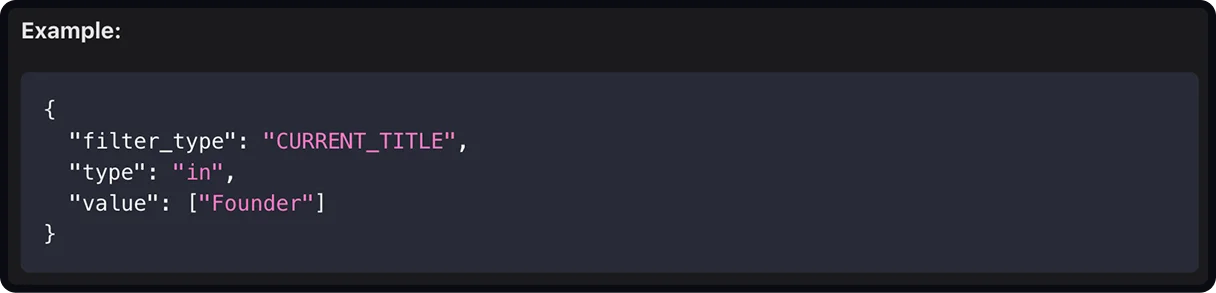
Start small to confirm the response format and field types, then layer in filters or pagination once the basics are working.
Step 4: Filter for the Data You Need
Filters help you pull only the employee records that matter instead of processing full lists. Common filters include role, seniority, department, location, and company attributes.
If you're looking for VP-level and C-suite contacts in Sales or Business Development roles at a target company, you can combine filters for seniority ("VP", "C-Suite"), department ("Sales", "Business Development"), and location ("United States"). The response returns only the 8–12 decision-makers who match those criteria instead of all 200+ employees at the company.
You can also filter at the company level to identify which organizations match your criteria before querying for specific employees. Crustdata's Company Discovery API lets you narrow results by attributes like employee count, funding stage, location, and industry.
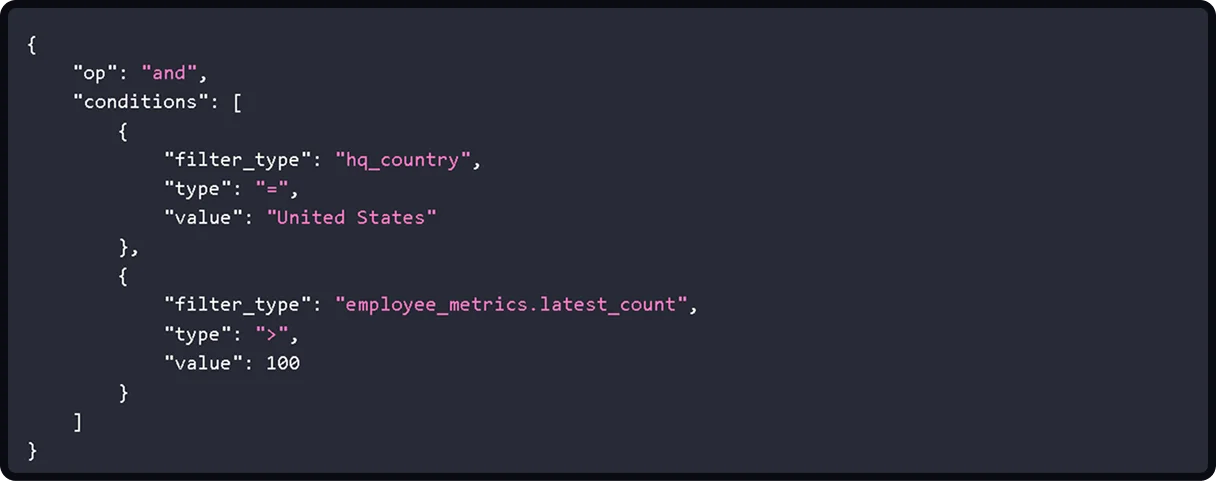
This returns companies matching both criteria. You can then use those results to target specific roles within those organizations, or layer company filters directly into people queries to find decision-makers at companies that fit your ideal customer profile.
Step 5: Handle Pagination
Employee APIs split results into pages to maintain speed and reliability.
For instance, when searching a database, results return in batches. The first request returns your specified limit (say, 50 records) along with pagination information. You can use that information to fetch the next batch of 50 records, then continue until you've retrieved all matching profiles.
Your integration should request each page in sequence until no additional records remain. Missing this step often leads to incomplete employee lists, which can cause silent issues in enrichment, scoring, or reporting.
Step 6: Parse and Store the Response
Once the API returns data, the next step is turning that response into something your systems can actually use. Most employee data APIs return JSON, with nested fields for roles, departments, locations, and company attributes.
Start by mapping only the fields you need into your internal schema. Avoid storing everything by default. Extra fields increase storage costs and make future updates harder to manage. Decide which attributes are required, which are optional, and how your system should behave when values are missing or change over time.
It’s also important to normalize formats as you ingest the data. Job titles, departments, and locations should follow consistent naming rules so downstream tools stay synchronized.
For example, Normalize "VP of Sales," "VP Sales," and "Sales VP" to one standard. Convert "SF" and "San Francisco, CA" to a single format. Standardize "Eng" and "Engineering Team" to "Engineering." Without this, systems treat identical values as different entries.
Step 7: Plan for Regular Updates
Once your integration is live, the work isn’t finished. Employee data pipelines need monitoring to stay reliable as people change jobs or get promoted and the data needs to reflect these changes.
Put basic checks in place to confirm that responses are complete, critical fields like job titles and departments reflect recent changes, and record counts remain consistent over time. Watch for sudden drops, spikes, or missing attributes, as these often signal upstream changes or failed requests.
Logging request outcomes and response structure makes it easier to catch issues early, before they affect routing, scoring, or reporting. This step keeps your integration stable without adding ongoing manual work.
Common Issues When Accessing Employee Data Through an API (and How to Fix Them)
Even well-documented APIs run into issues once you start pulling larger datasets. Most problems fall into a few patterns.
Authentication failures: Expired keys, incorrect scopes, or missing headers are the usual causes. Check your token format and confirm that your service account still has the right permissions.
Unexpected schema changes: Providers sometimes add or rename fields. Build light validation into your integration so you can spot changes before they break downstream jobs.
Rate limits: If you hit limits during bulk pulls, switch to smaller batches or run jobs during quieter hours. Some platforms allow higher limits if you request them.
Slow responses: Large datasets or filters that are too broad can slow queries. Narrow the scope or use more specific filters to reduce response time.
Gaps in coverage: Missing records usually mean the underlying dataset hasn’t been updated yet. A provider with regular refresh cycles reduces this problem, but you should still build fallbacks for incomplete entries.
Most teams solve these issues by adding basic monitoring around request failures, response size, and field-level changes. That way, you catch problems before they reach your users.
Security and Compliance Risks to Look Out For
Employee data needs careful handling, regardless of the system it comes from. Most of the risks show up when teams overlook small details in how requests are made, stored, or shared.
Exposure of personal information: Names, emails, and job details can fall under privacy rules. Limit who can view raw API responses and avoid storing them in logs.
Broad access: Use the smallest permission scope that still lets your application work. Broad keys increase the impact of a breach.
Weak storage practices: If you keep employee records in your database, set clear retention rules and confirm that backups follow the same policy.
Missing audit trails: Track who is making requests and when. This helps with incident reviews and reduces guesswork when something changes.
Unencrypted transport: All requests should go over HTTPS. Anything else puts sensitive information at risk.
Unmanaged refresh cycles: Stale data can create compliance issues when roles or employment status change, but your system doesn’t update alongside it.
Most of these risks are avoidable once you have strong access controls and a predictable refresh schedule.
How Crustdata Helps You Access Employee Data Through an API
The steps in this guide work across most employee data APIs, but common constraints like stale data, rate limits, and coverage gaps show up differently depending on your provider. Crustdata's API design reduces friction in these areas.
The People Discovery API offers In-DB search (200M+ profiles, monthly updates) and Real-time search (1B+ profiles, live from the web). Teams running B2B data API workflows get fresh records without building refresh logic or waiting on month-old exports.
You can narrow results at the API level using filters for seniority, function, recent job changes, company headcount, or funding stage. The API provides:
60+ filters for complex queries when precision matters
20+ filters for real-time search when speed and global coverage are priorities
Combined people and company filters in one request
This matters for sales intelligence operations where pulling 500 employees to find 8 VPs wastes API credits and slows enrichment pipelines. Cursor-based pagination prevents skipped or duplicated entries when records shift during your sync, and field names stay consistent so integrations don't break unexpectedly. You can layer company signals like funding rounds or headcount growth into employee queries without calling separate endpoints.
Book a demo to see how Crustdata delivers current employee and company data for sales, recruiting, and AI workflows.
FAQs
How often should I call an employee data API?
That depends on how quickly your workflows need to reflect staffing changes. Some teams sync daily to keep dashboards current, while others run smaller, targeted updates when a specific trigger fires. The key is to match your update frequency to the roles' shifts in the companies you track.
What formats do employee data APIs usually return?
Most return JSON, but some allow CSV or NDJSON for bulk operations. Check the provider’s documentation to see which formats are supported and how each handles significant responses.
Can I combine multiple data sources into a single workflow?
Yes. Many teams merge internal HR records with external datasets to compare internal structure with market changes. When doing this, choose a consistent identifier, such as a unique person or company ID so that the data can be joined cleanly.
What should I check before moving employee data into a production system?
Run a small-scale test to confirm that field types match what your system expects. Pay attention to null values, optional fields, and naming patterns that might differ from your current setup.
How do I avoid hitting API rate limits during large syncs?
Use batching and schedule non-urgent jobs during quieter periods. If the provider supports it, request a higher bulk sync limit or switch to endpoints designed for large pulls.


Products
Popular Use Cases
Competitor Comparisons
95 Third Street, 2nd Floor, San Francisco,
California 94103, United States of America
© 2026 Crustdata Inc.
Products
Popular Use Cases
Competitor Comparisons
95 Third Street, 2nd Floor, San Francisco,
California 94103, United States of America
© 2026 CrustData Inc.
Products
Popular Use Cases
Competitor Comparisons
95 Third Street, 2nd Floor, San Francisco,
California 94103, United States of America
© 2026 Crustdata Inc.
🎉 We hit $10M ARR!
$600k to $10m in 1.5 years. Our entire GTM is powered by our own APIs.
🎉 We hit $10M ARR in 1.5 years!
