How to Use Claude for Candidate Sourcing (With Claude Code and MCP)
Use Claude Code and a live people database to source candidates. Write a rubric, check pool size, score batches of 25 and test recall against people you know.
Published
Written by
Chris Pisarski
Reviewed by
Manmohit Grewal
Read time
26
minutes

Last updated: October 16, 2026
Claude sources candidates well when you connect it to a live people database over MCP and work in a loop instead of one big search. You write a rubric, check how many people match, pull 25, score them, and search again. When the pool runs dry, you search from a different angle. Before you export, you check that the search finds people you already know should be on the list.
Candidate sourcing is finding and qualifying people for a role before they apply. This guide shows how to do it in Claude Code, step by step, on one hard role. It is built from calls with 8 recruiting teams, including boutique agencies, an executive search firm and an in-house AI talent team. 7 of the 8 worked in batches and searched again after scoring each one. None of the 12 ranking Claude recruiting and sourcing guides we read in October 2026 covers the loop or the recall test, and those are the steps where the list gets fixed.
Start this week:
Connect Claude to a people database (Step 0, one time).
Pick one hard role you are working now.
Write down 10 people who should match it.
Write the rubric into a file Claude reads every session.
Pull the first 25 and score them.
Searching costs 0.03 credits per result returned, plus extra for premium field groups you filter on or get back. A result that touches every returnable premium field costs 2.03 credits, and research-profile or GitHub filters add more (Crustdata pricing docs, checked October 16, 2026). Crustdata credits cost $0.30 to $0.01 per credit, lower depending on your plan. Contact details such as emails and phone numbers are on enterprise plans only.
On time, one executive search consultant told us a research task that took four hours now takes one. Another recruiter said a search that "probably took 20 minutes" found new names that would have been "a day of sourcing" by hand.
What does the Claude candidate sourcing workflow do?
The workflow turns a job description into a ranked, checked shortlist inside Claude Code, with Claude doing the searching and the bookkeeping while a people database connected over MCP supplies current names, titles and employers. You still make the judgment calls, and they come at three points in the loop, which are the rubric, the scores and the recall check.
The steps:
Write the rubric and pick 10 people you know should match.
Check how many people match before you pull anyone.
Pull the first 25 and check which known names appear.
Score the batch and send the scores back to Claude.
When adding more detail stops working, search from a different angle.
Run the recall check again before you export.
Get contact details only for the people you keep.
Export the shortlist and remove people already in your ATS.
Keep the list from going out of date.
Claude Code or Claude.ai? Both can connect to a people database, and Crustdata's MCP connector works on claude.ai, Claude Desktop and mobile once you add it (MCP docs). But Claude Code adds the parts that make sourcing repeatable, because it reads a rubric file at the start of every session, writes shortlists to files on your computer and keeps each role in its own folder. For how the desktop app and Claude Code compare across other recruiting tasks, see our guide on building recruiting workflows with Claude.
This guide is for recruiters who source their own roles, agency founders and talent teams with repeat searches. You do not need to write code, but you do need to be comfortable opening Claude Code in a terminal and editing a text file.
Before you start, have these ready:
Claude Code installed
A Crustdata account
One open role, with the job description and your intake notes
10 names of people who should match that role
An export of your ATS (a CSV) so you can skip people you already have
One folder per role, for example
roles/backend-payments/
Can Claude find candidates without a people database?
Claude can draft the spec and a first company list on its own, but it cannot reliably name current candidates. It answers from what it learned when it was trained, so it cannot know who changed jobs, retired or died since then.
One partner at an executive search firm tried using Claude on its own, with no database, and the first two steps went well. Claude turned his intake notes into a position spec that his team only had to "adjust by 5%". It then listed target companies for the region and revenue band, and he judged it "probably 70%" right. But when he asked for the IT leaders at those companies, the answer fell apart. "It barely can give me any names, and just looking at it, I'm like, that guy died four years ago, that guy retired two years ago, she's not been in that job for eight, like, it was horrible."
Keep Claude for the thinking and give it a live database for the facts, which have to be looked up at the moment you search. The database matters as much as the prompt. As one post in r/RecruitmentAgencies put it, the AI can only work with the database underneath it, and a better prompt cannot fix thin or badly labelled data. Step 6 is where you test the data as well as the prompt.
Step 0 (one-time): Connect Claude to a people database
Connecting takes one or two commands and a browser sign-in. You can install the Crustdata plugin for Claude Code, which adds the data tools and a ready-made candidate sourcing skill, or add the MCP server on its own.
Option A, the plugin (recommended). In your terminal:
claude plugin marketplace add crustdata/skills
claude plugin install crustdata@crustdata-plugin
claude plugin marketplace add crustdata/skills
claude plugin install crustdata@crustdata-plugin
claude plugin marketplace add crustdata/skills
claude plugin install crustdata@crustdata-plugin
Then, inside Claude Code, run /crustdata:login. Your browser opens for a one-time sign-in with no key to copy, though you can set CRUSTDATA_API_KEY in your environment instead if you prefer a key. The plugin includes /crustdata:candidate-sourcing, a skill that finds engineering candidates, checks profiles and drafts outreach (plugin docs).
Option B, the MCP server only:
claude mcp add --transport http crustdata https://install.crustdata.com/mcp
claude mcp add --transport http crustdata https://install.crustdata.com/mcp
claude mcp add --transport http crustdata https://install.crustdata.com/mcp
Then run /mcp inside Claude Code, pick crustdata and sign in with your Crustdata account.
What success looks like. Ask Claude "How many credits do I have?" If it answers with a number, you are connected (MCP docs).
Crustdata covers 1B+ people and 60M+ companies.
For developers: call the API directly instead of MCP
Every request goes to https://api.crustdata.com with two headers, authorization: Bearer YOUR_API_KEY and x-api-version: 2025-11-01 (Person Search docs). The filters and fields in this guide work the same way over the API. The difference is that MCP lets you change the search in plain English ("drop anyone at a company over 1,000 people"), while a script means editing code for each change.
The steps below use Crustdata as the example, but they work with any people database that has an MCP server, since only the filter names and fields change.
Step 1: Write the rubric and pick 10 people you know should match
A rubric tells Claude what makes someone a hire, a maybe or a no, and Claude reads it every session from a file called CLAUDE.md in the role's folder. Without one, Claude guesses from the job description, and the job description is usually the weakest part of the brief. One agency founder called the job description "very, very surface level". A recruiter at a hedge-fund recruiting firm said that pasting a job description and hitting search gives them too many non-target profiles.
The length of the brief also changes the results. One agency tested a one-line brief and a long one with the job description, the intro and example candidates. "And to my surprise, the results were worse in this case." They settled on "something in the middle, not a scorecard, but kind of the main criteria that we are after with some context."
A good rubric has four parts:
Part | What goes in it | Example (illustrative role) |
|---|---|---|
Hard gates | Pass or fail rules. Anyone who fails is dropped. | Based in the US. 5 or more years of backend work. Not currently at a client company. |
Weighted signals | What makes someone stronger, with points that add up to 100 | Payments or fintech systems (30), Go in production (25), Series A to C company (15) … |
Exclusions | People and roles you never want | Interns, contractors, engineering managers, people at current clients |
Examples | 2 or 3 people the client liked, with why | "Liked because she scaled a payments service at a Series B company" |
To set the weights, treat anything the client would reject outright as a gate rather than a weight (our suggestion). Of what is left, give the top three signals about 70 of the 100 points and spread the rest. If several candidates tie, the weights are too flat.
A technical agency learned the difference between a gate and a weight on its first batch. "I think the first batch, I didn't explicitly specify like, hey, this is a hard gate." People outside the US slipped in until the founder made the location rule a gate.
Pick your 10 known names now. Before you search, write down 10 people who should match, such as people you placed before, people who interviewed well, or people you know at the client's competitors. You will use them in Steps 3 and 6 to test the search.
Copy this into roles/<role-name>/CLAUDE.md and fill it in:
# Role: Senior Backend Engineer, Payments (client: Company X)

## Hard gates (fail any = drop)
- Based in the United States
- 5+ years in backend engineering, not counting internships
- Not currently employed at: [client list]

## Weighted signals (total 100)
- Built or ran payments or fintech systems: 30
- Go or another systems language in production: 25
- Worked at a Series A to C company: 15
- Led a migration or scaled a service: 15
- Stayed 2+ years in at least one role: 15

## Exclusions
- Interns, contractors, agency staff
- Engineering managers and directors
- Anyone in their current role less than 6 months

## Examples the client liked
- [profile URL]: liked because they scaled a payments API at a Series B
- [profile URL]: liked because they moved from a large bank to a startup

## Recall list (10 people who should match)
- [name, company] x 10

## Output rules
- Score each person 1 to 4 against this rubric with a one-line reason
- Write results to shortlist.csv in this folder
# Role: Senior Backend Engineer, Payments (client: Company X)

## Hard gates (fail any = drop)
- Based in the United States
- 5+ years in backend engineering, not counting internships
- Not currently employed at: [client list]

## Weighted signals (total 100)
- Built or ran payments or fintech systems: 30
- Go or another systems language in production: 25
- Worked at a Series A to C company: 15
- Led a migration or scaled a service: 15
- Stayed 2+ years in at least one role: 15

## Exclusions
- Interns, contractors, agency staff
- Engineering managers and directors
- Anyone in their current role less than 6 months

## Examples the client liked
- [profile URL]: liked because they scaled a payments API at a Series B
- [profile URL]: liked because they moved from a large bank to a startup

## Recall list (10 people who should match)
- [name, company] x 10

## Output rules
- Score each person 1 to 4 against this rubric with a one-line reason
- Write results to shortlist.csv in this folder
# Role: Senior Backend Engineer, Payments (client: Company X)

## Hard gates (fail any = drop)
- Based in the United States
- 5+ years in backend engineering, not counting internships
- Not currently employed at: [client list]

## Weighted signals (total 100)
- Built or ran payments or fintech systems: 30
- Go or another systems language in production: 25
- Worked at a Series A to C company: 15
- Led a migration or scaled a service: 15
- Stayed 2+ years in at least one role: 15

## Exclusions
- Interns, contractors, agency staff
- Engineering managers and directors
- Anyone in their current role less than 6 months

## Examples the client liked
- [profile URL]: liked because they scaled a payments API at a Series B
- [profile URL]: liked because they moved from a large bank to a startup

## Recall list (10 people who should match)
- [name, company] x 10

## Output rules
- Score each person 1 to 4 against this rubric with a one-line reason
- Write results to shortlist.csv in this folder
Then start the session with this prompt:
Read CLAUDE.md in this folder. Ask me up to 5 questions about anything in the
rubric that is unclear or missing before you search
Read CLAUDE.md in this folder. Ask me up to 5 questions about anything in the
rubric that is unclear or missing before you search
Read CLAUDE.md in this folder. Ask me up to 5 questions about anything in the
rubric that is unclear or missing before you search
For more on turning a job description into criteria, see our guide on turning a job description into a sourced candidate list.
Worked example (illustrative). We use one role throughout, a senior backend engineer for payments at a Series B fintech, US only. The rubric above is filled in for it. The numbers in these boxes are made up to show the method. They are not results from a real search.
Step 2: Check how many people match before you pull anyone
Every search returns a count of how many people match your filters across the whole database, so check it before you pull a single profile. The count tells you whether the rubric is too loose, about right, or too tight.
Ask Claude:
Using only the hard gates in CLAUDE.md, how many people match? Don't pull
profiles yet. Show me the count, then the count after each gate is added
Using only the hard gates in CLAUDE.md, how many people match? Don't pull
profiles yet. Show me the count, then the count after each gate is added
Using only the hard gates in CLAUDE.md, how many people match? Don't pull
profiles yet. Show me the count, then the count after each gate is added
What to do with the number (our suggestion, not a rule):
Count | What it means | What to do |
|---|---|---|
Over about 1,500 | The gates are too loose | Add a gate, or tighten one (seniority, location, company size) |
About 500 to 1,500 | Big but usable | Tighten one gate if you can, otherwise go to Step 3 and let scoring do the narrowing |
About 100 to 500 | A workable pool | Go to Step 3 |
About 50 to 100 | Small | Go to Step 3, and plan to use Step 5 early |
Under about 50 | The pool is thin | Skip ahead to Step 5 and search from a different angle |
Three of the eight teams used the result count to size the search. One in-house team saw "more than like a thousand results" when it targeted one large bank, and "almost like a hundred" for other companies. A recruiter at a hedge-fund recruiting firm described the kind of question Claude asks back, for example "I've found like, you know, 800, but only 100 in the United States."
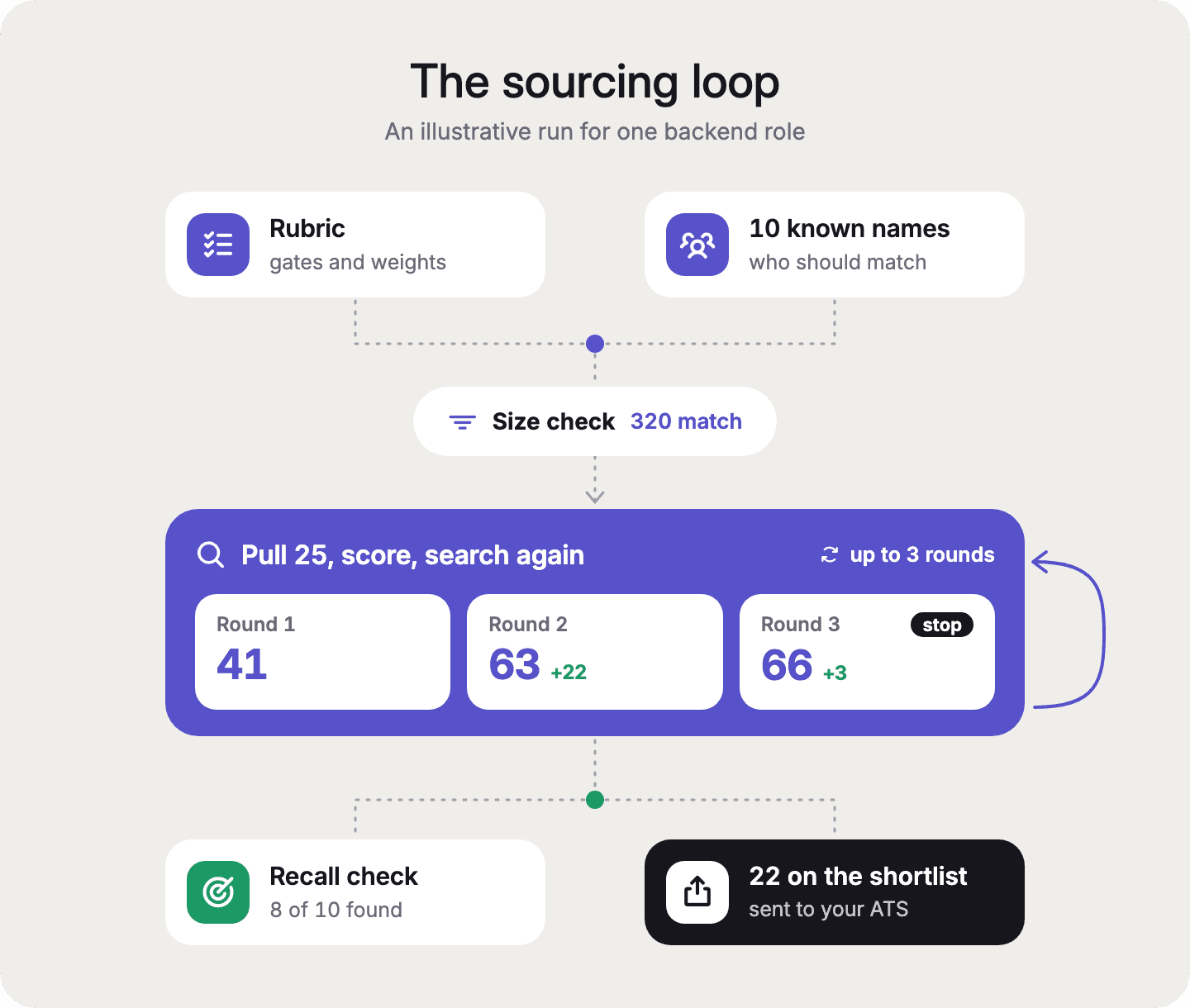
Worked example (illustrative). US backend engineers with 5+ years come to several thousand. Adding payments or fintech experience brings it to about 900. Adding a Series A to C current employer brings it to about 320. That is inside the workable band, so we move on.
For developers: where the count comes from
Person Search returns total_count, the number of people who match your filters across the full database, with every response (Person Search docs). Use a filter-only search for this check. When a request includes a natural-language prompt (search.query), total_count is the size of the population searched, which can be far larger than your filters alone (semantic search docs).
For a full map of where these people work, by company, title and location, see how to build a recruiting market map from a job description.
Step 3: Pull the first 25 and run recall check #1
The first batch is a test of the rubric, so keep it small, at 25 people. Ask Claude:
Pull the top 25 people who pass every hard gate, ranked by the weighted
signals. Write them to shortlist.csv with columns: rank, name, current title,
company, score (1-4), one-line reason, profile URL. Then tell me which of the
10 names in my recall list appear anywhere in the matches
Pull the top 25 people who pass every hard gate, ranked by the weighted
signals. Write them to shortlist.csv with columns: rank, name, current title,
company, score (1-4), one-line reason, profile URL. Then tell me which of the
10 names in my recall list appear anywhere in the matches
Pull the top 25 people who pass every hard gate, ranked by the weighted
signals. Write them to shortlist.csv with columns: rank, name, current title,
company, score (1-4), one-line reason, profile URL. Then tell me which of the
10 names in my recall list appear anywhere in the matches
Read the first 10 people closely, because if the wrong kind of person shows up, the rubric is ambiguous. One in-house recruiter searched for backend engineers with Kotlin, and three of the first profiles were mobile developers, because Kotlin is common in mobile work too. The fix was a rule that a profile had to show Kotlin plus a backend signal such as microservices or APIs, "at least two of those considerations".
Recall check #1. Count how many of your 10 known names appear in the matches. At this point the check costs almost nothing, and it catches a broken gate before you spend three rounds scoring the wrong pool.
Worked example (illustrative). 25 pulled. 4 of the first 10 are mobile engineers who list Go. 5 of the 10 known names appear. We add "backend or API work in the last 3 years" as a gate before scoring.
For developers: the request behind this step
curl --request POST \
  --url https://api.crustdata.com/person/search \
  --header 'authorization: Bearer YOUR_API_KEY' \
  --header 'content-type: application/json' \
  --header 'x-api-version: 2025-11-01' \
  --data '{
    "filters": {
      "op": "and",
      "conditions": [
        {"field": "experience.employment_details.current.title", "type": "(.)", "value": "backend engineer"},
        {"field": "basic_profile.location.country", "type": "=", "value": "United States"},
        {"field": "years_of_experience_raw", "type": "=>", "value": 5},
        {"field": "experience.employment_details.current.title", "type": "(!)", "value": "intern"}
      ]
    },
    "limit": 25
  }'
curl --request POST \
  --url https://api.crustdata.com/person/search \
  --header 'authorization: Bearer YOUR_API_KEY' \
  --header 'content-type: application/json' \
  --header 'x-api-version: 2025-11-01' \
  --data '{
    "filters": {
      "op": "and",
      "conditions": [
        {"field": "experience.employment_details.current.title", "type": "(.)", "value": "backend engineer"},
        {"field": "basic_profile.location.country", "type": "=", "value": "United States"},
        {"field": "years_of_experience_raw", "type": "=>", "value": 5},
        {"field": "experience.employment_details.current.title", "type": "(!)", "value": "intern"}
      ]
    },
    "limit": 25
  }'
curl --request POST \
  --url https://api.crustdata.com/person/search \
  --header 'authorization: Bearer YOUR_API_KEY' \
  --header 'content-type: application/json' \
  --header 'x-api-version: 2025-11-01' \
  --data '{
    "filters": {
      "op": "and",
      "conditions": [
        {"field": "experience.employment_details.current.title", "type": "(.)", "value": "backend engineer"},
        {"field": "basic_profile.location.country", "type": "=", "value": "United States"},
        {"field": "years_of_experience_raw", "type": "=>", "value": 5},
        {"field": "experience.employment_details.current.title", "type": "(!)", "value": "intern"}
      ]
    },
    "limit": 25
  }'
(.) matches values that contain every word you send, in any order, and can also match close misspellings. (!) excludes values that contain the text. The docs warn that several internships can add up to enough years to pass a years-of-experience filter, which is why the example removes interns (Person Search reference). For plain-English ranking, add a search.query (beta) to the same request (semantic search docs).
Step 4: Score the batch and send the scores back to Claude
Scoring works best when your scores live in the sheet and Claude reads them back from there. Add a score from 1 to 4 and a few words of reason next to each person in shortlist.csv. Then send Claude one message that describes the pattern across the batch, instead of 25 separate notes.
One agency starts with 20 people, sends feedback, asks for 20 more, and repeats that two or three times. "Once we are good with the calibration, I'd say, give me 50 more." The same team added up each batch's scores to see whether the rubric was improving, and the total went from 23 on the first batch to 50 on the second.
A sample feedback message:
I scored shortlist.csv. Read the score and reason columns.
Pattern: the 4s all built payments systems at Series B or C companies.
The 1s are mostly consultants at consulting firms, or people at banks with no
startup time.
Update CLAUDE.md: raise "payments systems" to 35 points, lower "Series A to C"
to 10, and add "current employer is a consulting firm" to exclusions.
Then pull 25 more, skipping everyone already in shortlist.csv
I scored shortlist.csv. Read the score and reason columns.
Pattern: the 4s all built payments systems at Series B or C companies.
The 1s are mostly consultants at consulting firms, or people at banks with no
startup time.
Update CLAUDE.md: raise "payments systems" to 35 points, lower "Series A to C"
to 10, and add "current employer is a consulting firm" to exclusions.
Then pull 25 more, skipping everyone already in shortlist.csv
I scored shortlist.csv. Read the score and reason columns.
Pattern: the 4s all built payments systems at Series B or C companies.
The 1s are mostly consultants at consulting firms, or people at banks with no
startup time.
Update CLAUDE.md: raise "payments systems" to 35 points, lower "Series A to C"
to 10, and add "current employer is a consulting firm" to exclusions.
Then pull 25 more, skipping everyone already in shortlist.csv
Turn scores into tiers
A 4 means call first, a 3 is a maybe for the second wave, and 1s and 2s are dropped. If your client reads the sheet, color the rows green, yellow and red.
Know when to stop
Our suggestion is to stop after three rounds, or sooner if two rounds in a row add no new 3s or 4s. One executive search consultant estimated what feedback buys. After the first pass, "if it's 40%, it will be 60%" on the second pass, and 70 to 80% on the third, once you give the tool "at least eight to nine data points". That is one firm's estimate.
On pace, one founder said, "Sometimes I'm scared to, like, over-index on something and then send the tool in the wrong direction." So change one or two things per round. Not everyone narrows, either. A recruiter at a hedge-fund recruiting firm prefers to "start big and then you can just keep adding". Both approaches work as long as your scores stay consistent.
Worked example (illustrative). Round 1 total score: 41 out of 100 possible. Round 2, after the feedback above: 63. Round 3: 66, with only one new 4. We stop scoring and move on.
For developers: skip people you have already seen
Person Search accepts post_processing with exclude_profiles (a list of profile URLs) and exclude_names, so each new batch skips everyone already reviewed (Person Search docs).
Step 5: When adding more detail stops working, search from a different angle
When the pool runs dry, stop adding adjectives and change what the search is anchored on. An anchor is the starting point of the search, such as a list of companies, a set of titles or a timeframe. Changing it brings in people the first search could never reach. 6 of the 8 teams we spoke with did this.
Angle | What you change | Example prompt | Use it when |
|---|---|---|---|
Companies | Search inside a list of target companies, one cluster at a time | "List 20 companies that build payments infrastructure, then find backend engineers at each." | Titles are messy or the role is niche |
Titles | Use the real title variants people use | "Show me the actual title variants for backend engineers at fintech companies, then search all of them." | The right people have odd titles |
Timeframe | Search by when people were at a company or in a role | "Find people who worked at these 15 companies for 2+ years, in any role ending in the last 3 years." | You know where good people came from |
Search by company
A technical agency described Claude building "a cluster of companies that we're going to focus on", working through it until it was exhausted, and then moving on to the next cluster. An in-house recruiter said many recruiters come in asking, "hey, do you know companies that I should target for this kind of search?" Claude can propose that list, and the database fills in the people. A hedge-fund recruiter said it's "much easier to be like, go out, find the people with these titles at these firms, essentially."
Search by title
The same title can mean very different jobs. At hedge funds, "analyst" can be an investor or a back-office role, which is why one recruiter searches "investment associate, investment analyst, analyst, associate, portfolio manager, senior analyst" and more. A technical recruiter looks for hardware engineers who are "actually electrical engineers in disguise". Ask Claude for the title variants that really exist instead of guessing.
Search by timeframe
Search for people who were at a set of companies for a stretch of time, including people who have left. One executive search consultant started with companies spun out in the last 11 years, "then we narrowed it down to seven years."
Two more moves
You can split a role that asks for too much into two searches, as one founder suggested when he asked, "how about we batch them to like a track A and a track B?" Or you can widen the location, for example to everyone within 100 miles of a city.
If you need the people who built one specific product, our guide on finding the people who shipped a product goes deeper.
For developers: fields for each angle
Companies: filter current or past employer with
experience.employment_details.current.company_nameorexperience.employment_details.past.company_name.Titles:
POST /person/search/autocompletereturns the exact title values that exist in the index, which you feed back into the search (Autocomplete docs).Timeframe:
experience.employment_details.past.start_date,experience.employment_details.past.years_at_company_raw, andexperience.employment_details.end_date(across all roles). There is no separate end date for past roles only (Person Search reference).Location:
geo_distancekeeps people within a radius of a place (Person Search reference).
Step 6: Run recall check #2 before you export
A recall check tests your search against people you already know should match. It is the one step that shows you what the search missed. You take the 10 names from Step 1, run the final search, and count how many appear.
An engineering recruiter on r/recruiting said AI sourcing tools "miss a lot of candidates that I found in fairly basic searches." A partner at a hedge-fund recruiting firm described how he would check a search in his own candidate database against 10 people he knows well. If they don't show up, "I know something is not really working right now." An in-house AI talent team asked to check a sample against a list it had "scrubbed and validated" by hand. An executive search consultant caught the search missing "some obvious name" and sent it back.
Ask Claude:
Run the final search again. For each of the 10 people in my recall list,
tell me: found in the results (and at what rank), or missing. For each
missing person, search them by name. If they are in the database, tell me
which hard gate or exclusion dropped them
Run the final search again. For each of the 10 people in my recall list,
tell me: found in the results (and at what rank), or missing. For each
missing person, search them by name. If they are in the database, tell me
which hard gate or exclusion dropped them
Run the final search again. For each of the 10 people in my recall list,
tell me: found in the results (and at what rank), or missing. For each
missing person, search them by name. If they are in the database, tell me
which hard gate or exclusion dropped them
What to do with the result (our suggestion):
Result | What it means | What to do |
|---|---|---|
8 or more of 10 found | The search covers the pool | Export |
Misses are in the database but were dropped | A gate is too strict or a title variant is missing | Fix that rule in CLAUDE.md and re-run Steps 3 and 4 |
Misses are not in the database at all | Coverage for this pool is thin | Source those people by hand, and use other angles for the rest |
If you find only 4 of 10, look at where the misses are before you change anything. If most of them are in the database, the rubric is the problem. If most are missing entirely, no rubric change will find them.

Worked example (illustrative). First check (Step 3): 5 of 10. Final check: 8 of 10. One miss was dropped by the "manager" exclusion because her title is "Engineering Manager, Payments" but she still writes code. We add an exception and she returns. The other miss is not in the database, so we contact him directly.
For developers: look up one person
Search by name with basic_profile.name and the = operator to see whether a person is in the database at all (Person Search docs).
Step 7: Get contact details only for the people you keep
Enrich after the list is final, because every lookup costs credits and most people in early batches get dropped anyway. So ask Claude for full profiles of your 3s and 4s first, and contact details only for the people you will actually call.
For everyone scored 3 or 4 in shortlist.csv, pull their full profile and check
they are still in the role listed. Then get business emails for the 4s only
For everyone scored 3 or 4 in shortlist.csv, pull their full profile and check
they are still in the role listed. Then get business emails for the 4s only
For everyone scored 3 or 4 in shortlist.csv, pull their full profile and check
they are still in the role listed. Then get business emails for the 4s only
From the public docs, checked October 16, 2026:
What you get | Endpoint | Credits | Plans |
|---|---|---|---|
Full profile (work history, education) | Person Enrichment | 1 credit for the base profile, more for extra data (pricing) | All plans |
Business email | Contact Enrichment | 1 per matched person | Enterprise plans |
Personal email | Contact Enrichment | 2 per matched person | Enterprise plans |
Phone number | Contact Enrichment | 2 per matched person | Enterprise plans |
Contact Enrichment charges nothing when no match is found. A verified option returns only business emails that pass a deliverability check, for 0.5 more credits when one comes back (Contact Enrichment docs).
A worked cost for one role (illustrative, arithmetic from published rates). The worked example stops after three batches of 25, or 75 results. At the docs' 2.03 credits for a result that touches every returnable premium field, that is about 152 credits. Full profiles for the 28 people scored 3 or 4 adds 28 credits. Business emails for the 9 people you call first adds up to 9. That is about 189 credits, more if you pull extra profile data or use research-profile or GitHub filters. Multiply by your plan's price per credit, which is $0.30 to $0.01 per credit, lower depending on your plan. Most searches use fewer premium field groups and cost less.
Check the people you keep one more time before you reach out. One agency recruiter, looking at a good candidate who had just joined a new company, said "That's a waste of my time." For enrichment and outreach in more depth, see our guide on candidate enrichment and outreach with Claude.
Step 8: Export the shortlist and remove people already in your ATS
Export the shortlist as a CSV with a one-line reason per person, then remove anyone already in your ATS before it goes to the client. A client should be able to scan it in a minute. An in-house team liked a sheet with "the columns with rank, name, company, the explanation, why the profiles have fit for what we're looking for." An executive search partner asked for "some kind of quick blurb that relates to the priorities of our search", so he could open a call with something specific.
Before you send the shortlist, remove people who are already in your ATS:
Compare shortlist.csv with ats-export.csv. Match on profile URL first, then
on full name plus current company. Move matches to a tab called "already in
ATS". Then write final-shortlist.csv with the columns below.
Compare shortlist.csv with ats-export.csv. Match on profile URL first, then
on full name plus current company. Move matches to a tab called "already in
ATS". Then write final-shortlist.csv with the columns below.
Compare shortlist.csv with ats-export.csv. Match on profile URL first, then
on full name plus current company. Move matches to a tab called "already in
ATS". Then write final-shortlist.csv with the columns below.
Shortlist column | Typical ATS import field |
|---|---|
Name | First name, Last name |
Current title | Current title |
Company | Current employer |
Profile URL | Profile URL / website |
Score and tier | Rating, or a tag |
One-line reason | Notes |
Business email (if pulled) |
Field names vary by ATS, so check your ATS's import template once and save the mapping in the role's CLAUDE.md.
Running two roles at once
Give each role its own folder with its own CLAUDE.md, shortlist and recall list, and open a separate Claude Code session in each folder. That way the rubrics never mix, and you can still compare scores across roles later.
Worked example (illustrative). 28 people scored 3 or 4. 6 of them, all 3s, were already in the ATS and moved to their own tab, leaving 22 on the final sheet (9 call first, 13 maybes).
Step 9: Keep the list from going out of date
Set up a watcher so the list updates itself. A Person Discovery Watcher re-runs your search on a schedule and sends you people who newly match (docs). A Person Entity Watcher tells you when someone on your list starts a new job (docs). Without one, lists age fast. An in-house AI talent team said of its talent maps, "as soon as we finish them, they're like, already out of date." For when to reach out, see our guide on catching candidates at the right time.
What breaks when Claude sources candidates, and how do you fix it?
Most runs break in one of a handful of ways, such as credits running out mid-batch, Claude calling the pool exhausted too early, or the wrong specialists slipping in. Each one shows up as a symptom you can fix in CLAUDE.md or in the next prompt.
Symptom | Likely cause | Fix |
|---|---|---|
Claude stops partway through a batch | Credits ran out | Check your balance first ( |
Claude says the pool is exhausted, but you know it isn't | The search used one angle too long | Change the angle (Step 5). One founder said the tool claimed "the universe is already spent when in reality I know it's not spent." |
Results got worse after you added more context | The brief is too long | Cut back to gates, weighted signals and a few lines of context |
Managers and directors show up | Seniority wasn't stated | Add seniority as a gate or an exclusion |
People who just joined their company | No tenure rule | Add a minimum time in the current role |
The wrong kind of specialist, such as mobile instead of backend | One skill matches several jobs | Require two signals together (Step 3) |
Outreach reads like you've been watching someone | Too many personal details | One personal detail per message, written into CLAUDE.md |
On candidate data and fairness, score people only on the job criteria in your rubric, never on age, gender, ethnicity or anything that stands in for them. Don't rank by how active someone is in public posts or code, since many strong people have little public activity. Keep a person making the final call on every candidate, and follow your company's rules for storing candidate data.
How do you source your first role with Claude this week?
Take the hardest role on your desk and run it through every step once, using the checklist at the top of this page. The first role takes the longest, because you are writing the rubric and the recall list from scratch. After that, each new role starts from a copy of the last folder, so most of the setup carries over.
The two habits that matter most are scoring every batch before you ask for more and checking the final list against your 10 known names before anything goes to a client. Start with the plugin and a Crustdata account at crustdata.com, or book a demo if you want help setting up your first role.
Frequently asked questions about Claude candidate sourcing
Should I paste the whole job description into Claude? You can paste it, but don't stop there, because job descriptions are often vague or inflated and a raw one tends to return the wrong people. Add hard gates, weighted signals, exclusions and two or three example profiles in CLAUDE.md. Medium-length briefs did better than both one-liners and very long ones for one agency we spoke with.
How can AI be used in candidate sourcing? AI is most useful for turning a brief into search criteria, running the searches and ranking the results with a reason for each person. A recruiter still sets the rubric, scores the batches and makes the final call. Teams we spoke with asked for 20 to 25 people at a time, scored them, then asked for more. One team moved to batches of 50 only after the scores settled.
How do I expand a candidate pool that has run dry? Change the angle instead of adding more detail. Search inside a list of target companies, use the real title variants, or search by timeframe, such as people who spent two or more years at a set of companies. You can also split the role into two searches or widen the location.
How do I find which companies to target for a search? Ask Claude to propose a list of companies that build what your client builds, at the right size and stage, and then check it. Claude's own list is a fair first draft. The database then confirms which of those companies actually employ people who match.
Can the shortlist include contact details? Yes, on enterprise plans, where Contact Enrichment returns business emails, personal emails and phone numbers per matched person and charges nothing when it finds no match. Pull contact details only for the people you will call, after scoring.
How do I know a candidate is still at the company listed? Re-check the final shortlist just before outreach, because people move between your search and your first message. Ask Claude to confirm each person's current employer and start date, and add a minimum time in the current role if people who just switched jobs keep showing up.
What is the difference between sourcing and recruiting? Sourcing is finding and qualifying people for a role, usually before they apply. Recruiting covers the rest, from screening and interviews to offers and closing. This guide covers sourcing, up to a shortlist your client can act on.



Products
Popular Use Cases
Competitor Comparisons
95 Third Street, 2nd Floor, San Francisco,
California 94103, United States of America
© 2026 Crustdata Inc.
Products
Popular Use Cases
Competitor Comparisons
95 Third Street, 2nd Floor, San Francisco,
California 94103, United States of America
© 2026 Crustdata Inc.
Products
Popular Use Cases
Competitor Comparisons
95 Third Street, 2nd Floor, San Francisco,
California 94103, United States of America
© 2026 CrustData Inc.
🎉 We hit $10M ARR!
$600k to $10m in 1.5 years. Our entire GTM is powered by our own APIs.
🎉 We hit $10M ARR in 1.5 years!
