B2B Data Quality Guide: Importance & Best Practices
Discover what you need to know about B2B data quality and learn how you can keep data accurate, reliable, and effective for better sales performance.
Published
Written by
Chris P.
Reviewed by
Nithish A.
Read time
7
minutes

According to a 2025 IBM Institute for Business Value report, 43% of chief operations officers now identify data quality as their most significant data priority, and over a quarter of organizations estimate they lose more than $5 million annually because of it.
For B2B teams, that loss shows up in wasted SDR time, inflated bounce rates, and AI-driven workflows that produce personalization errors when the data they depend on is outdated or incomplete. Fixing bad data reactively is expensive. Preventing it requires understanding what data quality actually means and building the right systems around it.
This guide covers what B2B data quality is, why it directly affects revenue, and the specific practices that keep your database reliable over time.
Key Takeaways
Data quality is a revenue problem, not an IT problem
Outdated records waste rep time, inflate bounce rates, and break AI-driven workflows that depend on accurate data to function correctly.
All six dimensions of data quality must work together
A record can be accurate but incomplete, complete but outdated, or timely but inconsistently formatted. A gap in any one dimension reduces the usefulness of the rest.
Prevention is cheaper than cleanup
Validating data at entry, deduplicating on record creation, and automating re-verification on a 90-day cycle costs far less than fixing degradation after it compounds.
Real-time data sources solve the decay problem at the source
Most providers serve cached records aged 30 to 90 days. Platforms that crawl at the moment of request eliminate the fundamental reason that databases go outdated.
What Is B2B Data Quality?
B2B data quality measures how well your data serves its intended purpose. A record that looks complete at import can be outdated, duplicated, or formatted inconsistently with the rest of your database. Data quality is not a single metric; it is a combination of 6 dimensions that together determine whether your data is fit for use.
Accuracy: How closely a record reflects current reality. If your CRM lists someone as VP of Sales at a company they left a month ago, the record is inaccurate regardless of how complete it looks.
Completeness: Whether all required fields are populated. A contact without a verified email or direct dial is less useful for prospecting, even if the name and company are correct.
Consistency: How uniformly the same contact appears across all systems. "Acme Corp" in one tool and "Acme Corporation" in another creates duplicates, mismatched reports, and broken automations.
Timeliness: How recently a record was verified. A contact whose details have not been checked or updated in six months carries real risk, given how fast roles and companies change.
Uniqueness: The degree to which duplicate records exist in your database. Duplicates inflate database size, distort reporting, and create friction for reps who reach the same contact twice.
Validity: Whether data conforms to the correct format and rules. A phone number entered as free text rather than a standard format breaks automations and integrations downstream.
Accuracy is the most critical of the 6, but no single dimension tells the full story. A record can be accurate but missing half its fields. It can be complete but 3 months out of date. It can be timely, but formatted differently across every system it touches. Strong B2B data quality requires all 6 dimensions to work together, because a gap in any one of them reduces the usefulness of the others.
Why B2B Data Quality Matters
Poor B2B data quality is a revenue problem, not an IT problem. Its effects show up directly in pipeline efficiency, rep productivity, campaign performance, and increasingly, in AI tool output. Here is why maintaining it matters:
Reduces wasted selling time: Reps working from outdated or incomplete records spend time chasing contacts who have moved on, dialing numbers that no longer connect, and personalizing outreach around roles that no longer exist. That time comes directly out of selling capacity.
Protects campaign performance: Email campaigns sent to outdated lists drive up bounce rates, damage sender domain reputation, and reduce deliverability for future sends. Once your domain reputation declines, recovery takes weeks.
Keeps AI tools reliable: As AI-driven sales tools become standard, data quality becomes a prerequisite for getting value from them. An AI agent that references a contact's old job title, or personalizes outreach around a company the prospect left months ago, produces outreach that feels automated and careless.
Stops compounding decay: B2B contact data decays continuously because people change jobs, companies restructure, phone numbers change, and buying committees turn over. At current job mobility rates, at least one key contact often leaves mid-sales-cycle, stalling deals at the worst moment.
7 Best Practices for Maintaining B2B Data Quality
Data quality degrades continuously. The practices below treat it as an ongoing operational discipline rather than a one-time cleanup project.
1. Validate Data at the Point of Entry
Every new contact entering your database, whether through a form fill, CSV import, or manual entry, should pass validation checks before it reaches your CRM. The goal is to stop bad data at the door because cleaning it later costs far more in time and effort than preventing it.
Start by setting required fields that block record creation until critical information is provided. Use dropdown picklists instead of free text fields wherever possible. When reps select from a pre-defined list rather than typing, you eliminate the inconsistencies that create duplicates downstream. Configure validation rules to automatically reject malformed email addresses, incomplete phone numbers, and missing company names.
For CSV imports specifically, run a pre-import check that flags records with missing required fields, duplicate emails, and invalid formats before any data touches your CRM. Many teams skip this step and import entire lists unchecked, then spend weeks cleaning the result. A 30-minute pre-import audit prevents that entirely.
For teams using web forms, enable real-time email verification at the field level so the system confirms deliverability before the form submits. A prospect entering a typo in their email address gets flagged immediately, rather than entering your CRM as a dead record.
2. Run Quarterly Data Audits
A quarterly cadence gives you enough frequency to catch degradation before it compounds without turning data maintenance into a full-time job. Each audit should work through the following checks:
Completeness audit: Pull a report of all records missing required fields. Job title, company size, and direct email are the fields most commonly left blank. Set a threshold and work through the gap systematically rather than trying to fix everything at once.
Freshness audit: Filter for contacts that have not been verified or updated in the last 90 days. Flag these for re-verification rather than discarding them, as many will still be valid. A contact untouched for several months carries real risk given how frequently roles and companies change.
Consistency audit: Sample a few hundred records and check formatting against your standards. Look specifically at phone number format, job title capitalization, and company name variations. Even a small inconsistency rate across a large database produces enough bad records to cause real issues in segmentation and reporting.
3. Deduplicate Regularly Using Fuzzy Matching
Duplicate records are one of the most damaging and least visible data quality problems. They inflate database size, distort pipeline reporting, and cause reps to reach the same prospect multiple times. Most teams underestimate their duplicate rate because exact-match logic misses near-duplicates like "Jane Smith" at "Acme Corp" and "J. Smith" at "Acme Corporation" which are two records that refer to the same person.
Tools like Dedupely for HubSpot or Duplicate Check for Salesforce handle this automatically using fuzzy matching logic that catches name variations, company name differences, and partial email matches. Run deduplication monthly, not just during quarterly audits, and establish clear merge rules before each pass. Decide which record wins on each field, how activity history gets combined, and who gets notified when a merge affects an active deal.
Set duplicate detection to trigger automatically when records are created as well. Most CRMs support this natively. If a new contact enters with an email that already exists in your CRM, flag it before saving rather than creating a second record. Prevention is cheaper than reconciliation.
4. Treat Enrichment as an Ongoing Process
Most teams run a one-time enrichment pass at implementation, then consider the job done. Six months later, the database has drifted back toward being incomplete because new contacts enter with gaps, and existing records accumulate changes that never get updated.
Enrichment happens at 3 points, each requiring different handling:
Backfill enrichment on existing records with missing fields, a one-time project at implementation
New contact enrichment is triggered automatically on record creation
Re-enrichment of existing records as they decay, on a scheduled cycle tied to your quarterly audit
For re-enrichment, pipe contacts flagged in your freshness audit directly into your B2B data enrichment workflow rather than handing them to a rep for manual research. Prioritize by account value, since high-value accounts in active deals warrant more frequent checks than cold contacts in unworked segments.
5. Automate Re-verification on a 90-Day Cycle
Manual re-verification does not scale. Contact data decays continuously, and no team has the capacity to chase that volume by hand, which is why most organizations let their data degrade until the problem becomes impossible to ignore.
The fix is to build re-verification into your workflow programmatically. Flag any contact record older than 90 days for re-verification, then route those profiles through your enrichment API automatically. Crustdata's People Enrichment API accepts multiple profile URLs in a single call, making it straightforward to batch-process flagged contacts without separate requests for each one.
Here’s how an example input looks like using Crustdata’s API
# Re-verify a batch of contacts older than 90 days
# Pass multiple profile URLs in a single request
curl 'https://api.crustdata.com/screener/person/enrich?profile_url=
https://www.example.com/in/contact1/,
https://www.example.com/in/contact2/,
https://www.example.com/in/contact3/' \
--header 'Authorization: Token $auth_token'
Here’s an example of the output Crustdata’s API will give that you can sync back to your database:
json
{
"name": "Sasikumar M",
"location": "Bengaluru, Karnataka, India",
"title": "Software Developer I",
"last_updated": "2025-01-03T15:42:35.717396+00:00",
"skills": ["JavaScript", "Node.js", "Python", "Docker", "Microservices"],
"current_employers": [
{
"employer_name": "Drongo AI",
"employee_title": "Software Developer I",
"start_date": "2024-07-01T00:00:00",
"end_date": null
}
],
"education_background": [
{
"degree_name": "Master of Computer Applications",
"institute_name": "PES University",
"end_date": "2023-10-01T00:00:00"
}
]
}
Note: Full response includes 90+ people datapoints covering employment history, education, certifications, and more.
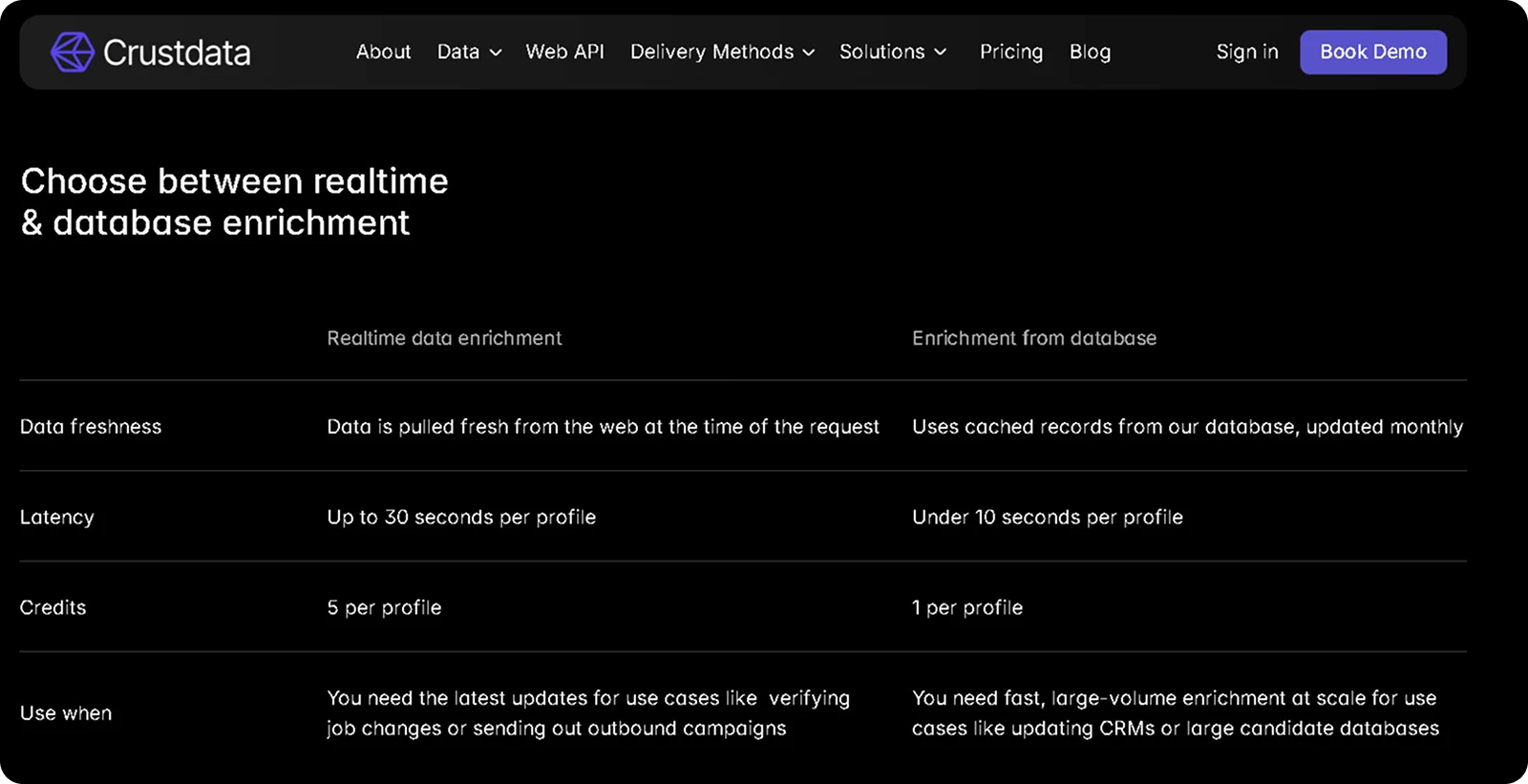
The response returns current job title, employer, location, skills, education, and employment history pulled from live sources at the moment of the request, not from a cached snapshot. For contacts where data is not immediately available, Crustdata auto-enriches within 30 to 60 minutes.
Pair this with your bounce data feedback loop. Any contact that hard-bounced in a campaign should skip the 90-day queue and go straight into re-verification. Bounce data is the most reliable signal that a record has decayed, and acting on it immediately, rather than waiting for the scheduled cycle, keeps your active outreach lists cleaner.
6. Standardize Formatting Across All Systems
Inconsistent formatting is a quiet contributor to data quality problems that most audits miss. Two records can be accurate and complete but fail to match in a deduplication check because one phone number is formatted as "+1 (415) 555-0100" and another as "14155550100". A job title entered as "VP, Sales" in one system and "Vice President of Sales" in another breaks segmentation filters that rely on exact matching.
At a minimum, standardize these 4 fields:
Phone numbers in a single consistent format, for example, +14155550100, with country code, no spaces or brackets
Job titles in title case without abbreviations
Company names in a consistent, recognizable form
Country fields using ISO 3166 codes rather than free text
These cause the most downstream breakage when inconsistent.
Enforce standards through CRM validation rules rather than relying on reps to format correctly, and run a retroactive cleaning script quarterly to normalize records that slipped through. When adding or updating integrations, review your field mappings carefully. A phone number formatted correctly in your CRM can arrive at your outreach tool in a different format if the sync mapping was not configured to handle the conversion.
7. Replace Static Databases with Real-Time Data Sources
The six practices above are necessary but reactive, as they fix degradation after it occurs rather than prevent it. The structural cause of B2B data decay is that most providers serve cached records aged 30 to 90 days. By the time a job change appears in a static database, the window for timely outreach has often already closed. Real-time data sources solve this by crawling at the moment of request rather than from a pre-built cache.
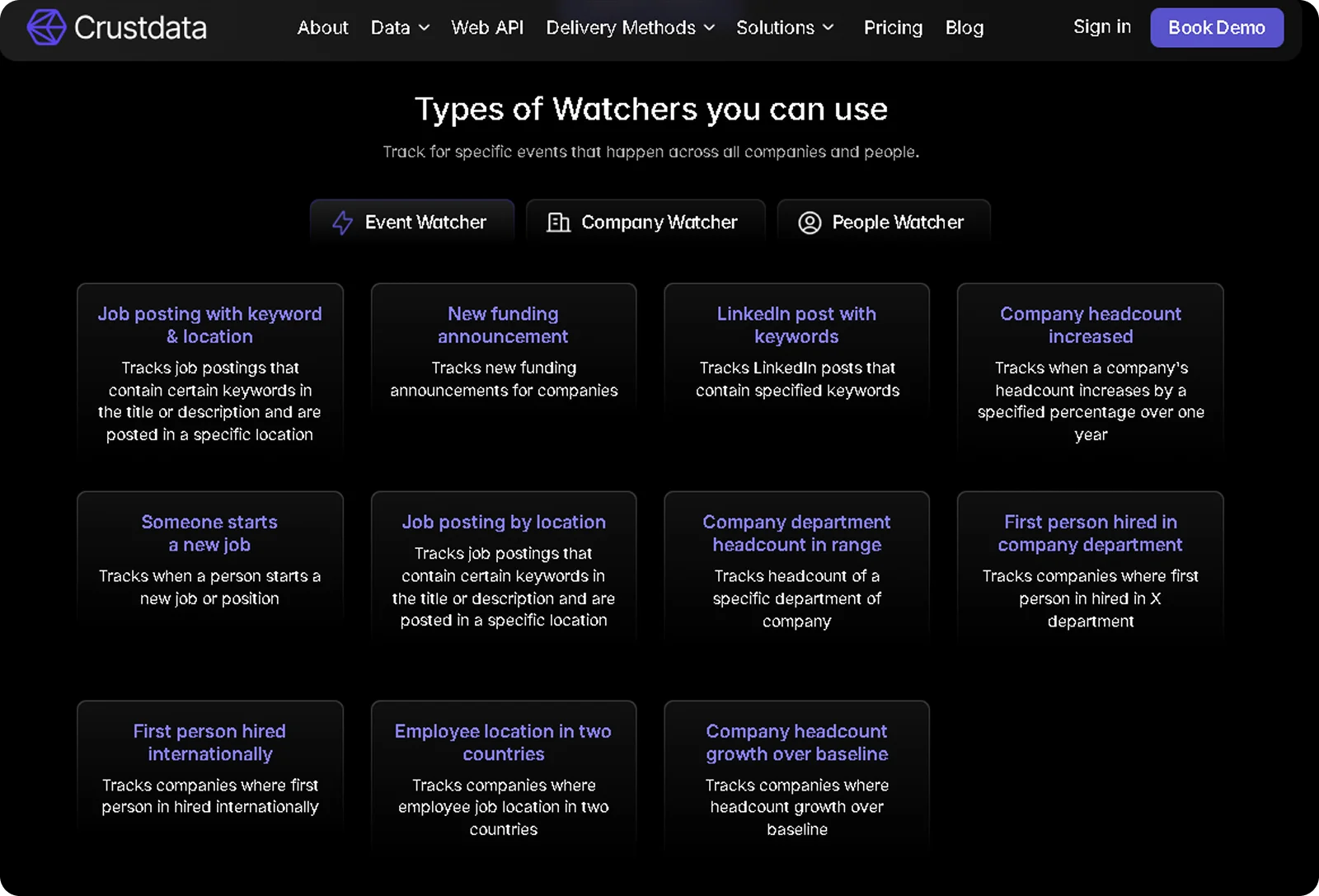
Crustdata's Watcher API, for instance, takes this further by sending webhook alerts the moment a tracked event occurs, covering job changes, funding announcements, headcount shifts, and department-level hiring signals, without requiring your system to poll for changes.
When a tracked contact switches companies, your system receives a notification within hours rather than at the next monthly database refresh. For teams running AI agents, real-time sourcing is not optional. An AI agent referencing a contact's former role or a company's outdated headcount produces personalization errors that are worse than no personalization at all. The data freshness requirements for AI-driven outreach are fundamentally higher than for manual prospecting.
How to Measure B2B Data Quality
Tracking data quality requires moving beyond gut feel and into measurable metrics. The 6 metrics below form a monthly dashboard that gives operations teams a clear view of database health and where to focus cleanup efforts.
Email validity rate: The percentage of email addresses that pass validation checks. Rates below 90% signal that a verification campaign is overdue.
Completeness rate: The percentage of records with all required fields populated. Track this per field to identify which attributes decay fastest.
Duplicate rate: The percentage of records with a matching entry elsewhere in the database. Rising duplicate rates indicate a gap in entry validation.
Data freshness: The average number of days since each record was last verified. Flag records older than 90 days for re-verification.
Phone connect rate: The percentage of dialed numbers that reach the intended contact. Declining connect rates are an early signal of data decay before bounce rates show it.
Consistency score: The percentage of records that match your formatting standards for fields like phone number, job title, and company name.
Review these metrics monthly. When a metric dips below its target, you have a specific, actionable problem rather than a vague sense that the data is getting worse.
Why Crustdata Is Built for B2B Data Quality
The best practices above treat data quality as a maintenance problem. Crustdata solves it at the architecture level, by crawling data in real time at the moment of request rather than serving records from a database that was last refreshed weeks ago.
Here is how Crustdata approaches each dimension of data quality:
Real-time enrichment: Data is pulled fresh when you make API calls, not served from cached records aged 30 to 90 days. A contact who changed jobs yesterday appears with their current role today.
Watcher API: When a contact switches companies, raises funding, or earns a certification, webhook alerts fire within hours so your team acts on the signal while it is still relevant.
10+ verified sources aggregated into unified records: Multi-source aggregation removes the blind spots that single-database providers create. Job boards, company websites, funding databases, and professional profiles are combined and cross-validated.
250+ company datapoints and 90+ people datapoints: Complete profiles cover the completeness dimension without requiring multiple subscriptions. Firmographic data, headcount growth by department, funding history, technology stacks, and web traffic trends are all included.
95+ company filters and 60+ people filters with full nested boolean logic.: Precise targeting means your lists start clean, rather than requiring post-export cleanup to remove irrelevant records.
Developer-first API infrastructure: Code samples, error handling documentation, and webhook setup instructions support teams building internal sales tools and AI agents that require data quality as a baseline, not an afterthought.
If your outreach is underperforming, your AI tools are generating personalization errors, or your SDRs are spending time correcting records instead of prospecting, the problem is almost certainly your data quality. Crustdata gives you the infrastructure to act on accurate, current signals the moment they happen.
What would your pipeline look like if every contact in your CRM was verified within the last 24 hours?
Book a demo to see how Crustdata keeps your B2B data accurate in real time.


Products
Popular Use Cases
Competitor Comparisons
95 Third Street, 2nd Floor, San Francisco,
California 94103, United States of America
© 2026 Crustdata Inc.
Products
Popular Use Cases
Competitor Comparisons
95 Third Street, 2nd Floor, San Francisco,
California 94103, United States of America
© 2026 CrustData Inc.
Products
Popular Use Cases
Competitor Comparisons
95 Third Street, 2nd Floor, San Francisco,
California 94103, United States of America
© 2026 Crustdata Inc.
🎉 We hit $10M ARR!
$600k to $10m in 1.5 years. Our entire GTM is powered by our own APIs.
🎉 We hit $10M ARR in 1.5 years!
