How to Choose a B2B Data Provider in 2026 [8 Criteria]
Learn how to choose a B2B data provider and find what to look for to ensure accurate, compliant, and reliable data for better sales and growth.
Published
Written by
Chris P.
Reviewed by
Nithish A.
Read time
7
minutes
Poor data quality costs organizations an average of $12.9 million annually, according to Gartner research. The losses compound through bounced emails, disconnected phone numbers, and deals that never start because contacts changed jobs three months before your outreach.
Choosing the right B2B data provider used to mean finding the biggest database - all the reliable databases updated quarterly or monthly, so freshness was standardized. That changed when real-time crawling became technically feasible, compliance frameworks, including GDPR and CCPA, created legal requirements for data sourcing, and API-first architecture enabled developers to build intelligence directly into their systems rather than exporting CSV files manually.
This guide covers 8 criteria for selecting B2B data providers in 2026. Each one reveals whether a provider delivers fresh data when you need it or serves cached snapshots that were stale before you clicked export.
Key Takeaways
Compliance is infrastructure, not policy
Providers who can't immediately explain data sourcing, provide Data Processing Agreements, or show functional opt-out mechanisms haven't built compliance into their systems from the ground up.
Verification methodology determines data accuracy
Providers who refuse sample testing, quote accuracy without methodology, or lack credit-back guarantees for bad data typically know their numbers do not hold up under scrutiny.
Advanced filtering eliminates manual work
Providers offering 5-15 basic filters force hours of post-export scrubbing, while those delivering 60-95+ filters with nested boolean logic let you export lists you can use without having to manually remove unqualified leads.
API-first architecture enables automation
Platform-centric tools lock data behind UIs requiring manual exports, while API-first providers with webhook infrastructure let you build intelligence directly into workflows and receive instant updates.
9 Criteria for Selecting B2B Data Providers in 2026
The right provider should pass every one of these tests. Miss even one and you’re either paying for contacts who already switched jobs, risking compliance violations that trigger fines, or dealing with integrations that break your workflows. Here are the criteria you should look out for when choosing a B2B data provider.
1. Data Freshness and Update Architecture
Contact data doesn’t stay fresh forever. A candidate who changed jobs yesterday still shows as “active” in databases that refresh quarterly or even monthly. The difference between providers comes down to how they handle updates.
Here’s what separates providers:
Batch database model: Pre-compiled databases updated monthly, or quarterly. Data sits in storage between refreshes.
Real-time crawling: Data pulled fresh at the moment of your API request, not served from cache.
Hybrid approach: Cached baseline with real-time verification layer before delivery.
What to evaluate:
Update frequency and methodology (batch intervals vs on-demand)
Job change detection speed (hours vs weeks vs months)
Verification timing (at point of export vs pre-compiled weeks ago)
Transparency about data age and last-verified timestamps
This matters because most providers refresh data every 30-90 days. If someone accepted another offer in between the updates, monthly or quarterly databases won’t reflect that until the next refresh cycle. Real-time systems catch changes within hours, not after your outreach already bounced.
Ask providers: “If I export a contact today, how old is the data I’m getting?” Vague answers reveal batch models masquerading as fresh data.
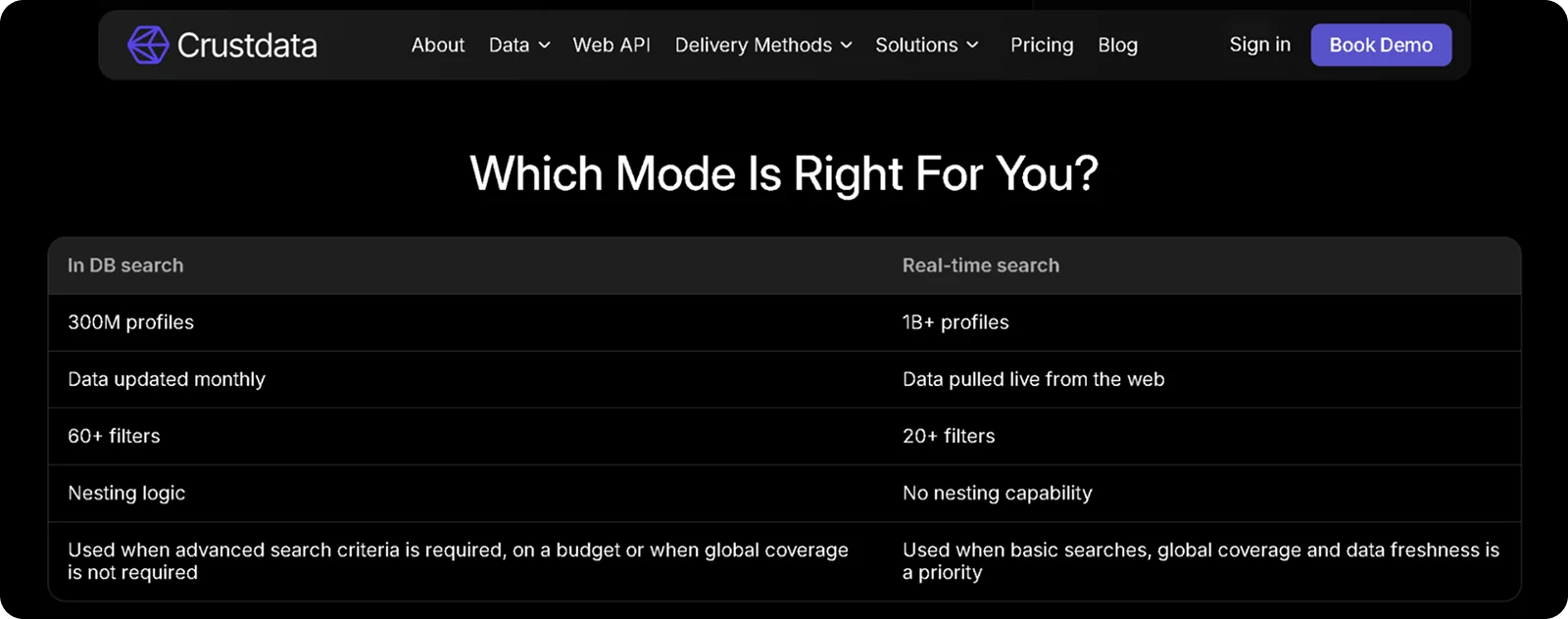
Crustdata, for instance, offers both in database search and real-time search depending on your needs, while some providers only offer the batch model.
2. Data Accuracy and Verification Standards
“Verified” means different things to different providers. Some run automated SMTP checks for email verification. Others use human validation to check if a person still works at the same company. Some don’t verify at all and hope you won’t test their claims.
What to evaluate:
Stated accuracy rates and how they measure them (independent testing vs self-reported)
Verification process: SMTP validation, phone number testing, activity confirmation
Credit-back policies for bounced emails or disconnected numbers
Source transparency: public web crawling vs purchased databases vs resold lists
Request a trial with contacts matching your ICP. Run them through an independent email verification tool like NeverBounce or ZeroBounce. Test a sample of phone numbers for connect rates. Check the web and social networks to see if they still work at the company mentioned by the data provider.
Below are the benchmarks that matter:
Email deliverability: Above 95% is the industry threshold. Rates below 89% signal a verification problem that will damage your sender domain's reputation over time.
Phone connect rate: An average of 16.6% is a strong benchmark for direct dials. Declining connect rates are often the earliest signal of data decay before bounce rates make it obvious.
Data completeness: Above 90% on required fields is a workable target. Track this per field rather than as a single overall score, since some fields decay faster than others.
Match rate on enrichment: Above 70% is a good benchmark. A score below 50% indicates coverage gaps that will affect your workflow at scale.
Field fill rate by datapoint: Verified email and current job title should be above 80% on any reputable provider. Ask specifically about fill rates for the fields your team relies on most, not just overall completeness figures, since providers often have strong coverage on basic fields but thin coverage on department, seniority, or direct dial.
Providers who refuse sample testing, quote accuracy without methodology, or lack credit-back guarantees for bad data typically know their numbers don’t hold up under scrutiny.
3. Coverage Depth Across Data Types
Contact info alone doesn’t tell you if someone’s ready to move or if a company is hiring. Incomplete profiles force you to subscribe to multiple tools or waste time on manual research.
Core data categories:
People data:
Current title, department, seniority level
Complete work history with start and end dates
Skills, certifications, education background
Contact data:
Verified business emails
Direct phone numbers
Company-level data:
Firmographics: headcount, revenue, industry, location, founding year
Funding history: stage, amount raised, investors, most recent round
Tech stack: current tools and recent software adoptions
Growth signals: headcount trends, new office openings, hiring velocity
Behavioral and intent signals:
Job changes and promotions with real-time alerts
New role postings by department or function
Profile updates and new certifications
Funding announcements and geographic expansion
Ask providers the following before you commit:
How many datapoints do you provide per person and per company?
What are the sources and how many sources do you collect data from?
Which fields update in real-time versus batch?
Do you offer historical data for trend analysis?
Can I search and filter on all available fields?
Different use cases need different depth. Recruiters need a complete work history and skills. Sales teams need funding signals and a tech stack. Investors need headcount trends and hiring patterns. Make sure the provider covers what you actually use.
4. Geographic Coverage and Regional Performance
A provider with strong US data often delivers completely different accuracy in Europe or Asia. Database size claims mean nothing if half the contacts are in regions you don’t target.
Evaluate the following:
Primary market focus and actual coverage areas (not just claimed global reach)
Regional accuracy rates from independent testing, not marketing materials
Local data sources: partnerships with regional providers vs relying solely on global scraping
Compliance infrastructure per region (GDPR for EU, CCPA for California, LGPD for Brazil)
Provider patterns you’ll see:
US-focused providers typically deliver 85-95% accuracy in North America but drop to 60-75% in EMEA or APAC. European specialists excel in EU markets with built-in GDPR compliance but lack depth elsewhere. Multi-source aggregators maintain more consistent accuracy worldwide by combining regional and global data.
If a provider only shares overall accuracy without regional breakdowns, assume their performance varies significantly by market.
5. Compliance Infrastructure and Data Sourcing
Regulations like GDPR and CCPA turned data privacy from a checkbox exercise to a core business risk. Buying data without understanding sourcing and compliance processes creates legal exposure you inherit the moment you sign a contract.
What to verify with each provider:
For GDPR compliance (EU customers)
Legitimate interest basis documented for B2B prospecting activities
Functional opt-out mechanisms and deletion workflows
Data Processing Agreement provided upfront, not after signature
Transparent disclosure of data storage locations and processors
For CCPA compliance (California and expanding states)
Consumer rights processes for access, deletion, and opt-out requests
Data broker registration completed where legally required
Privacy policy with compliant disclosure standards
Data sourcing models and risk levels are:
Lower risk: Public web sources, including company websites, job boards, and publicly available profiles. Real-time crawling on-demand creates less exposure than static storage.
Higher risk: Purchased databases with unclear origin, resold contact lists, or data aggregated without a transparent sourcing method.
Questions that expose compliance gaps:
Where does your data originally come from before reaching your system?
How old is the average record you’re serving?
Do you provide working opt-out mechanisms for individuals?
Are you registered as a data broker in jurisdictions requiring it?
Can you provide a Data Processing Agreement right now?
Providers who deflect these questions or need to “check with legal” likely haven’t built compliance into their data architecture. The best providers answer immediately because compliance is infrastructure, not an afterthought.
6. Search Precision and Filter Capabilities
Basic filters force manual scrubbing after export. If you can only search by title and location, you’re spending hours deleting irrelevant contacts from every list you pull.
Essential filtering dimensions:
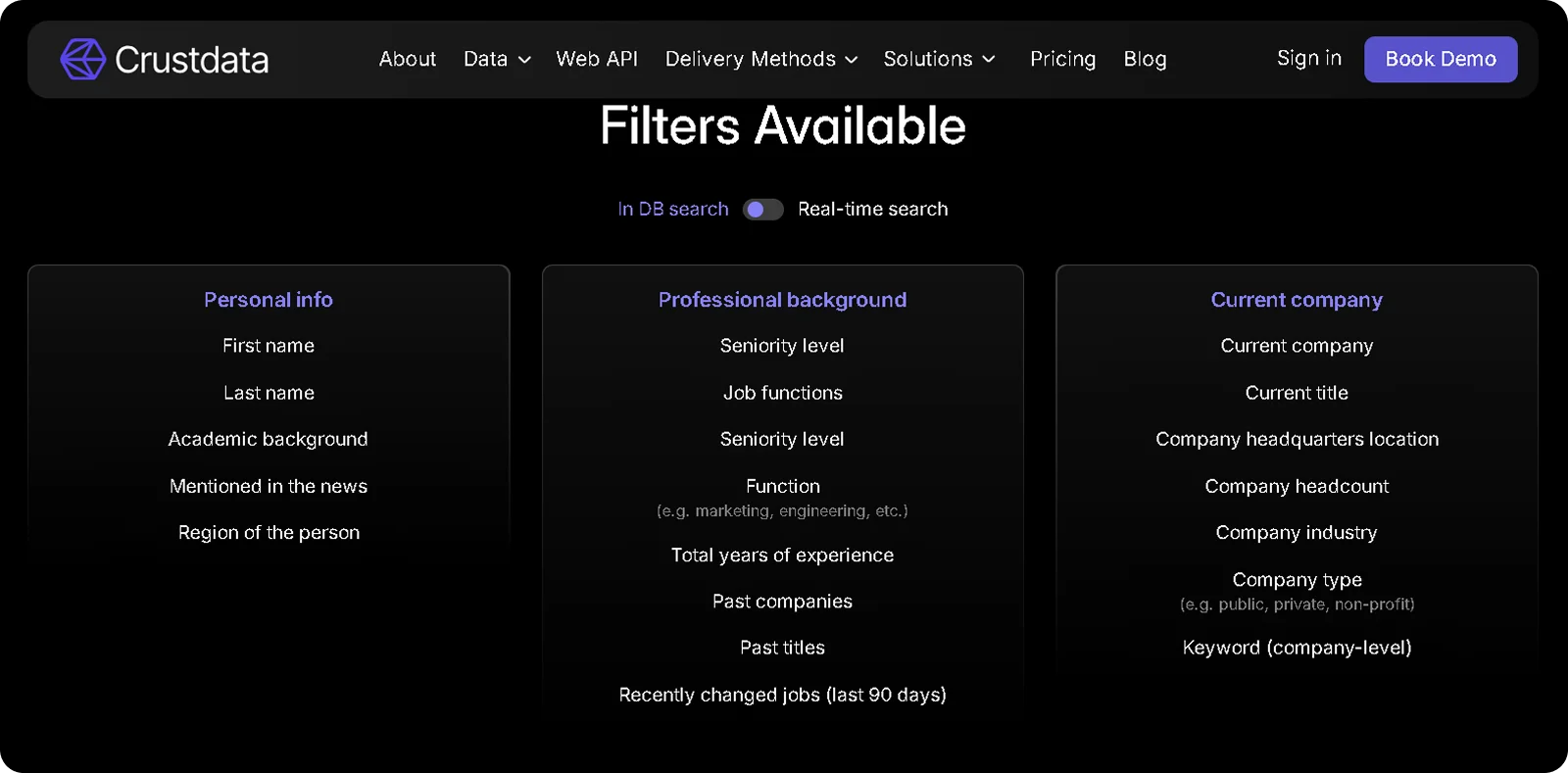
People search:
Current job title, seniority level, department, and years in current role
Skills, certifications, education background, and degree level
Current employer, past companies, and complete work history with dates
Location filtering by country, city, state, and remote work status
Recent activity signals, including job changes, promotions, and profile updates
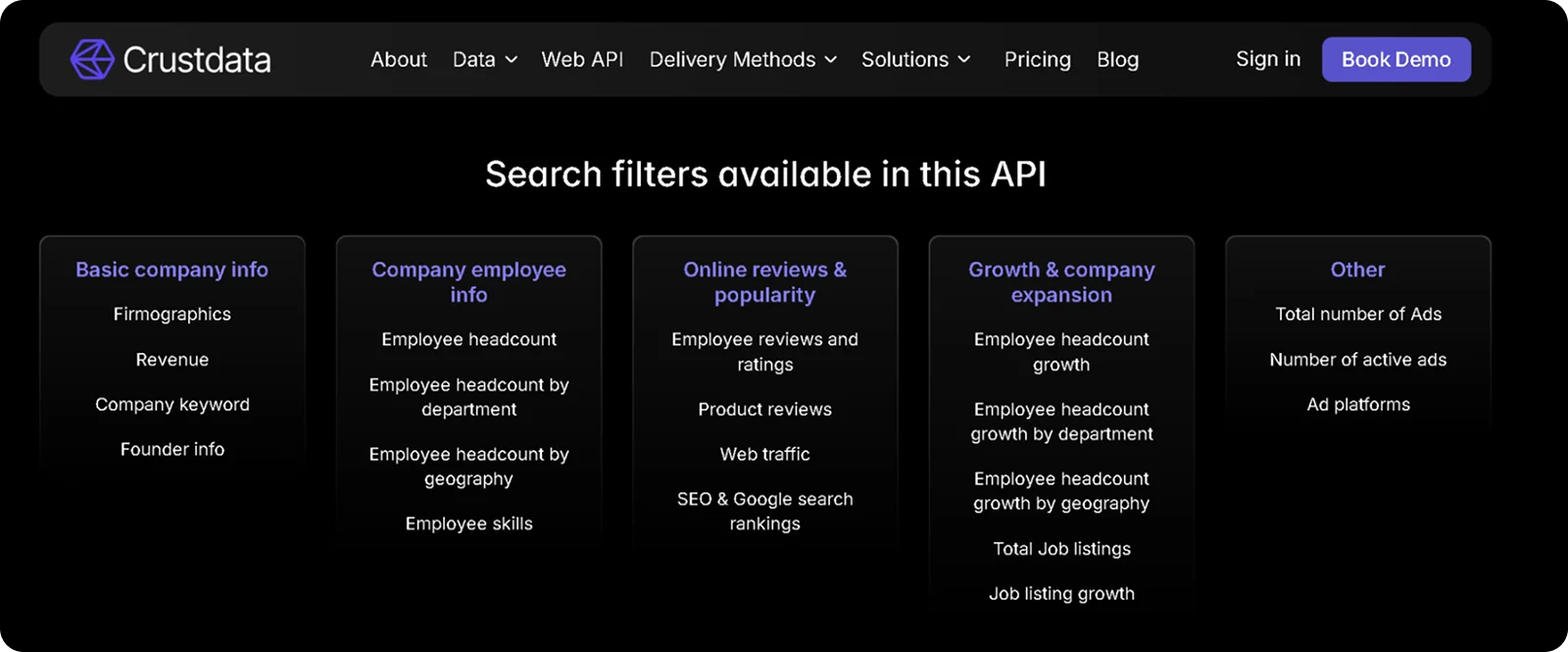
Company search:
Size ranges by headcount and revenue
Industry classification and subcategories
Geographic presence (headquarters, offices, employee distribution)
Funding stage, total raised, and recent financing rounds
Tech stack, hiring activity, and growth trajectory
Boolean logic with nested AND/OR operators lets you build complex queries that match your actual ICP without compromise. Negative filters exclude companies, titles, or industries you don’t want. Saved searches refresh automatically on daily or weekly schedules. Custom scoring ranks results by multiple criteria rather than forcing a single-dimension sort.
Basic providers offer 5-15 total filters with no boolean support. Intermediate providers give you 20-40 filters with limited AND/OR logic. Advanced providers deliver 60-95+ filters, with full nested combinations, so you can define exactly who you’re looking for.
The difference shows up immediately. Providers with weak filtering dump broad lists that require hours of manual cleanup. Strong filtering exports lists you can use within minutes.
7. API Quality and Developer Experience
Platform-centric tools lock data behind UIs that require manual exports and CSV uploads. If you’re building AI agents, custom workflows or tools, API-first providers let you build data directly into your workflows.
Core API capabilities: The best B2B data providers should have a REST API with comprehensive documentation and working code examples in common languages. They should also have bulk enrichment endpoints to process thousands of records without making individual calls.
Real-time infrastructure: Webhook delivery sends instant notifications when contacts change jobs, companies raise funding, or new roles get posted. You configure triggers once and receive updates automatically, rather than polling APIs hourly to check for changes. Retry logic and delivery guarantees ensure you don’t miss critical signals when systems go down.
Developer experience signals: Interactive API explorers let you test endpoints before writing code. Clear error messages explain what went wrong and how to fix it. Transparent rate limits show exactly what you can call and when. Technical support that actually understands API questions, rather than routing everything to account managers.
Support and onboarding quality: Technical support quality matters as much as documentation. Look for providers who route API questions directly to engineers rather than account managers, offer a structured onboarding process beyond pointing you at docs, and provide a responsive support channel for technical questions. A provider who cannot support you at implementation will not support you when something breaks in production.
Architecture models: Platform providers build UI-first tools with limited API access gated by pricing tier. API-first providers treat developers as primary users and add optional UIs later. The difference shows in documentation quality, endpoint coverage, and whether advanced features require opening a support ticket.
The table below compares architecture side-by-side:
Architecture Type | Primary Interface | API Access | Webhook Support | Best For |
|---|---|---|---|---|
Platform-First | UI/Dashboard | Limited, gated by tier | Rare | Manual workflows, small teams |
API-First | API/Webhooks | Full programmatic access | Native support | Automation, developers, AI agents |
Ask providers if you can test their API during trials, what the rate limits actually are, and whether webhook infrastructure exists or if you're stuck polling for updates.
8. Pricing Model and Cost Structure
Credit-based models sound straightforward until you discover phone reveals cost 5-10x more than emails, credits expire monthly with no rollover, and your team exhausts the entire quota by mid-month.
Here are common pricing structures and what they mean:
Per-seat subscription: Fixed monthly cost per user with unlimited searches but capped monthly exports. You pay the same amount whether someone uses the tool daily or never logs in.
Credit-based consumption: Pay per contact revealed or field enriched, with variable costs that scale unpredictably. Emails might cost 1 credit while phone numbers cost 5-8 credits, and unused credits disappear at the end of the month.
Usage-based API: Charges per request or record processed, scaling directly with actual consumption. Volume discounts typically apply as usage increases.
Custom enterprise pricing: Tailored contracts based on usage patterns, data needs, and integration requirements. Pricing aligns with specific use cases rather than one-size-fits-all tiers.
The accuracy factor changes everything. A provider charging $1 per contact at 75% accuracy delivers a true cost of $1.33 per usable lead. Another provider charging $0.50 per contact at 95% accuracy costs just $0.53 per usable lead. Comparing sticker prices without factoring in accuracy creates false savings that disappear when half your list bounces.
Cost comparison:
Provider | Price per Contact | Accuracy | Effective Cost per Usable Lead |
|---|---|---|---|
Provider A | $1.00 | 75% | $1.33 |
Provider B | $0.50 | 95% | $0.53 |
The following are cost variables that affect your actual spend:
Phone number reveals prices differently from email lookups
API access is sometimes restricted to specific pricing tiers
Overage charges when you cross usage thresholds
Platform fees are separate from data consumption costs
Volume discounts that kick in at different usage levels
Questions to ask during evaluation:
What’s included in each pricing tier versus paid add-ons?
Do unused credits roll over or expire? What actions trigger additional charges?
Are there volume discounts for high-usage scenarios?
What’s the effective cost per contact after adjusting for accuracy rates?
Understanding how pricing scales with your actual usage patterns matters more than finding the lowest advertised rate. A provider charging more per contact but delivering 95%+ accuracy often costs less per successful outreach than cheaper alternatives with 70% accuracy.
9. Integration Capabilities and Ecosystem Compatibility
A provider with excellent data delivers limited value if it cannot connect cleanly to the tools your team already uses. Integration friction adds manual work, creates data quality gaps between systems, and slows down the workflows you are trying to automate.
CRM integrations: Native connectors to Salesforce, HubSpot, and Pipedrive should sync contact and company data bidirectionally without requiring custom middleware. Check whether enrichment triggers automatically on record creation or require manual initiation, and whether activity history, field mapping, and deduplication rules carry over cleanly during sync.
Sales engagement integrations: Direct connections to outreach tools like Outreach, Salesloft, and Apollo mean enriched contacts flow straight into sequences without CSV exports. Ask whether the integration supports real-time enrichment during sequence enrollment or only batch enrichment on a schedule.
API and webhook infrastructure: Beyond CRM connectors, evaluate whether the provider offers a REST API with full endpoint coverage, bulk enrichment for high-volume workflows, and webhook delivery for real-time event notifications. This is what enables custom integrations into internal tools, AI agents, and data pipelines that go beyond off-the-shelf connectors.
MCP compatibility: Model Context Protocol support is increasingly relevant for teams building AI agents that need to query B2B data programmatically. Providers with MCP-compatible APIs allow AI models to access contact and company intelligence directly within agent workflows without requiring custom integration layers.
Questions to ask:
Which CRMs and outreach tools do you connect to natively?
Does enrichment trigger automatically or require manual initiation?
Is webhook delivery included or gated behind a higher pricing tier?
Do you support MCP for AI agent integration?
Why Crustdata is the Best B2B Data Provider
The 8 criteria above separate providers that deliver fresh intelligence from those serving aging databases. Crustdata was built to excel across every single one.
We don’t compile quarterly snapshots and expect them to be accurate when you export them. Our infrastructure crawls data in real-time at the moment of your API request, pulling fresh information instead of serving cached records aged 30-90 days. When a candidate changes jobs or a company raises funding, our Watcher API sends webhook notifications within hours, not at the next batch refresh.
Here’s how Crustdata delivers on each criterion:
Real-time architecture, not batch updates: Data pulled fresh at the point of request with webhook notifications within hours when candidates change jobs or companies raise funding, not at the next quarterly refresh.
Multi-source accuracy: 16+ verified sources aggregated into unified records, eliminating the blind spots that come from single-source databases.
Comprehensive coverage: 250+ company datapoints and 90+ people datapoints deliver complete profiles without needing three different subscriptions for basic information.
Global reach with consistent performance: Multi-source aggregation maintains accuracy across regions, rather than excelling in one market while underperforming in others.
Transparent data sourcing: Public web crawling from verified sources, rather than relying on purchased databases with unclear provenance.
Precision targeting: 60+ people search filters and 95+ company search filters with full nested boolean logic, build exact ICP matches without post-export scrubbing.
Developer-first infrastructure: Built for programmatic workflows and AI agent integration with native webhook support instead of forcing manual CSV exports.
Usage-based pricing: Costs scale with actual consumption instead of forcing annual minimums with expiring credits.
Responsive technical support: API questions are routed directly to engineers, with onboarding support that gets your first integration working rather than pointing you at documentation alone.
Whether you’re building AI agents needing current context, powering recruiting platforms where timing determines who reaches candidates first, or running high-velocity outbound where stale data kills conversion, the infrastructure matters more than database size claims.
Ready to work with real-time B2B data instead of cached databases?
Book a demo to see Crustdata’s APIs in action.


Products
Popular Use Cases
Competitor Comparisons
95 Third Street, 2nd Floor, San Francisco,
California 94103, United States of America
© 2026 Crustdata Inc.
Products
Popular Use Cases
Competitor Comparisons
95 Third Street, 2nd Floor, San Francisco,
California 94103, United States of America
© 2026 CrustData Inc.
Products
Popular Use Cases
Competitor Comparisons
95 Third Street, 2nd Floor, San Francisco,
California 94103, United States of America
© 2026 Crustdata Inc.
🎉 We hit $10M ARR!
$600k to $10m in 1.5 years. Our entire GTM is powered by our own APIs.
🎉 We hit $10M ARR in 1.5 years!
