B2B Data Cleansing: Everything You Need To Know [Step-by-step]
Discover everything you need to know about B2B data cleansing and learn how to fix inaccurate records and keep your database reliable.
Published
Written by
Chris P.
Reviewed by
Nithish A.
Read time
7
minutes
B2B data cleansing is the process of identifying and fixing inaccurate, duplicate, incomplete, and outdated records in your business database. According to Validity's 2025 State of CRM Data Management report, 76% of organizations say less than half of their CRM data is accurate and complete, and 37% report losing revenue directly because of it. Cleansing is one half of maintaining long-term B2B data quality; enrichment is the other.
This guide covers what B2B data cleansing involves, how it differs from enrichment, how to run the process correctly, and how to keep your database clean over time.
Key Takeaways
B2B data cleansing fixes what already exists in your database. It is not the same as data enrichment, which adds missing information from external sources
Always cleanse before you enrich. Running enrichment on dirty data wastes credits and adds new information on top of records that should have been fixed or removed first
Preventing dirty data from entering your system in the first place is more efficient than cleaning it after the fact
Annual cleansing is not enough for any team running active outreach or automated workflows. Problems build silently across multiple field types long before they surface visibly
What Is B2B Data Cleansing?
B2B data cleansing sits at the foundation of any working data strategy, but it is one of the most confusing terms in the space. Many teams use cleansing, enrichment, and scrubbing interchangeably. They are not the same thing, and doing them in the wrong order creates more problems than it solves.
Term | What it does |
Data cleansing | Fixes errors, removes duplicates, and standardizes formats in existing records |
Data enrichment | Adds missing information to existing records from external sources |
Data scrubbing | A targeted subset of cleansing focused specifically on removing corrupt or duplicate records |
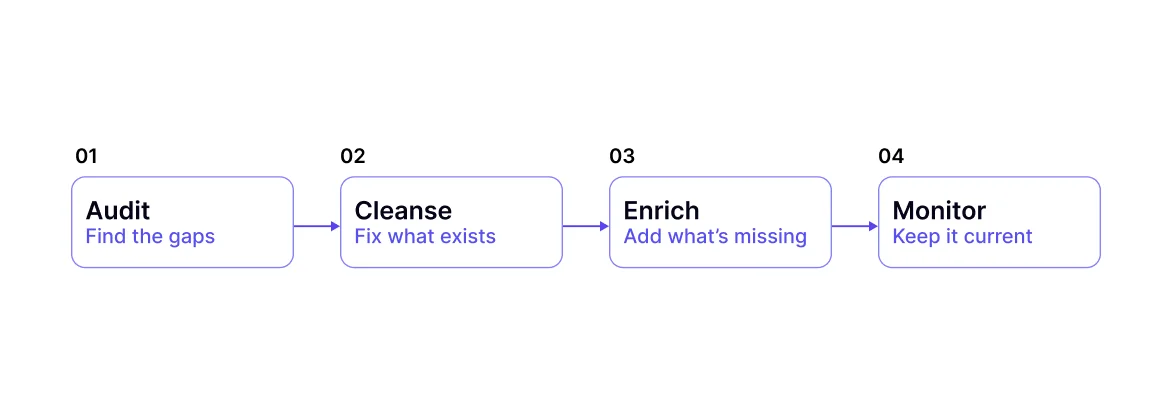
The order matters because if you enrich before cleansing, you spend credits filling in missing fields on records that are duplicated, wrong, or should not exist at all. You end up with a cleaner-looking version of the same bad database. Cleanse first, then use enrichment to fill the gaps that cleansing reveals. For a deeper look at how enrichment works after cleansing, see our guide to the best B2B data enrichment tools.
Why B2B Data Cleansing Matters
Bad data does not sit quietly in your CRM. It actively damages every process that touches it. According to the Salesforce 2026 State of Sales report, sales reps spend only 28-30% of their week on actual selling. The rest goes to research, CRM updates, and chasing contacts that turn out to be wrong or outdated.
The downstream effects of dirty data show up across the entire pipeline:
Bounced emails damage your sender's reputation and reduce deliverability across all future campaigns, not just the one where the bounce occurred
Misrouted leads go to the wrong reps or the wrong sequences, slowing the pipeline and increasing time to first meaningful contact
Duplicate records inflate pipeline reports and make forecasting unreliable, because the same opportunity appears multiple times with different data attached
Inaccurate firmographics push the wrong accounts through ICP filters, sending reps after companies that will never qualify
Broken AI and automation: When AI sales agents or automated sequences act on bad records, every downstream action compounds the error at scale
The bigger your pipeline and the more automation you run, the more expensive dirty data becomes. A single wrong field in a record that feeds a routing rule or a scoring model can misplace dozens of accounts before anyone catches it.
Common B2B Data Quality Problems
Not all data quality problems look the same or carry the same risk. Some corrupt your outreach results immediately. Others degrade slowly and only become visible when pipeline numbers stop making sense. The table below covers the most common issues teams encounter.
Problem | What it looks like | Impact |
Duplicate records | Same contact or company entered more than once | Wasted outreach, inflated pipeline numbers |
Outdated contact data | Wrong job title, email address, or employer | Bounced emails, outreach to the wrong person |
Incomplete records | Missing industry, headcount, or revenue fields | Failed segmentation and broken lead scoring |
Inconsistent formatting | Mixed date formats, phone styles, name conventions | Broken integrations and unreliable reports |
Inaccurate firmographics | Wrong revenue range, headcount, or industry code | Poor ICP targeting and wrong deal size expectations |
Some databases have several of these problems running simultaneously. A cleansing audit tells you which is worst and where to start, rather than fixing things at random and missing the root causes.
B2B Data Cleansing vs. Data Enrichment
These two processes solve different problems and need to run in a specific order. Confusing them is one of the most common reasons data quality programs underdeliver.
Data cleansing fixes what is already in your database. It removes duplicates, corrects formatting errors, updates wrong fields, and removes records that should not be there. Data enrichment adds what is missing. It pulls external data to populate fields such as job titles, company firmographics, funding stage, and technographic signals from verified sources.
If you enrich before cleansing, you spend credits filling in missing fields on duplicate or incorrect records that will be removed or merged anyway. You also risk enriching a record with the right information for the wrong person, which may look clean but still produces the same bad outcomes as a blank field. What you should do is cleanse the database first.
Then use enrichment to fill the gaps that cleansing surfaces. For a full breakdown of how enrichment works after cleansing, see our guide to B2B data enrichment API use cases.
How to Cleanse B2B Data: A Step-by-Step Process
B2B data cleansing is not a single tool or a button you press. It is a process that runs in a specific order, and each step depends on the one before it being done correctly. Skipping steps or doing them out of order consistently produces a database that looks cleaner but still fails in practice.
Step 1: Audit your database
Profile the data before touching anything. A proper audit identifies where duplicates, missing fields, wrong formats, and outdated records are concentrated across your database. It tells you the size of the problem, which fields have the worst accuracy, and which records need the most work.
Without an audit, cleansing efforts get applied unevenly. Teams fix the problems they can see while missing the ones driving the most damage. Run the audit first, then use the output to prioritize what to fix and in what order. The audit also gives you a baseline to measure improvement after cleansing is complete.
For Salesforce databases, Validity DemandTools has a solid auditing module. HubSpot users can use the native data quality command center. For a lighter approach, exporting your CRM and running pivot tables on key fields like industry, domain, and record owner gives you a usable picture of where the gaps are concentrated.
Step 2: Deduplicate records
Merge or remove duplicate contacts and companies. Standard deduplication tools match exact records, but most duplicates in a real database are near-matches: "John Smith" and "J. Smith" at the same company, or the same company entered with slightly different name formatting. Use fuzzy matching logic to catch these rather than relying on exact-field matching alone.
When merging duplicates, decide in advance which record wins. The most recently updated record is usually the better source for contact fields. The older record may hold engagement history that should be preserved. Define the merge rules before running deduplication at scale to avoid losing data that still has value.
Dedupely and Dedupe.io both handle fuzzy matching for Salesforce and HubSpot, and Cloudingo covers deduplication alongside basic normalization for teams that want both in one tool.
Step 3: Standardize formats
Align date formats, phone number conventions, job title naming styles, and company name formats across all records. This step matters more than most teams expect, because inconsistent formatting can silently break integration logic. A routing rule built around "VP of Sales" will miss "VP, Sales" and "Vice President of Sales" unless formats are standardized first.
Standardization also affects reporting. If the same industry appears as "SaaS", "B2B SaaS", and "Software as a Service" across different records, your segmentation reports will split that audience into three separate buckets and undercount each one.
Validity DemandTools includes a standardization module for Salesforce records. For teams on HubSpot, Operations Hub workflows can automate field formatting on record creation and updates, catching formatting issues before they accumulate rather than after.
Step 4: Validate contact data
Check that emails, phone numbers, and key fields are current and reachable before any outreach runs against them. Email validation checks syntax, domain validity, and whether the mailbox actually exists. A high bounce rate in your outbound campaigns is a sign that this step was skipped or completed too long ago, making it inaccurate.
Phone validation is worth running separately for any team doing cold calling. An outdated phone number is less immediately visible than a bounced email, but wastes just as much rep time over the course of a campaign. Neverbounce covers both email and phone validation through a real-time API for teams that want a single tool handling both.
Not every record can be fixed. Once validation runs, you will have three categories of unfixable records to deal with:
Archive: Move records with valuable engagement history to a separate inactive list. The contact data may be outdated, but a record of years of interaction with your company still has reference value. Keep it out of the active database, but preserve it somewhere accessible.
Delete: Remove records with no engagement history, no recoverable data, and no path to re-activation. Keeping a blank or completely inaccurate record in your system inflates your contact count, skews your reporting, and wastes enrichment credits if it accidentally gets pulled into a future re-enrichment run.
Flag for manual review: When two conflicting records exist and a human might resolve them with context, the system cannot; flag instead of auto-merging. This is common with subsidiary records, companies that changed names, and contacts who appear under two different email domains at the same employer.
Step 5: Fill gaps with enrichment
Once records are clean, use enrichment to add the missing fields that cleansing surfaced. This is the right point to bring in external data because you are now enriching records you know are correct, not filling in information on records that may still be duplicated or inaccurate.
Enriching clean records also produces higher match rates, since the domain and company name fields that enrichment APIs use to look up records are now standardized and accurate.
Crustdata's firmographic data and enrichment endpoints pull from 10+ verified sources at the moment of each request, so the fields returned reflect the current company state rather than a stored snapshot that may already be outdated by the time it reaches your CRM.
Step 6: Set a recurring cadence
A database that was clean in January will need significant work by June, depending on how much your target market shifts. Build a recurring schedule based on how fast your data changes, not on calendar convenience. The cadence table in the next section gives you a starting point by pipeline stage.
Once you have run a full cleansing cycle, set a baseline to measure against. Without a before-and-after comparison, it is impossible to know whether the cleansing worked or whether the same problems will resurface in three months.
Here are key metrics to track after each cleansing cycle:
Email bounce rate: Should drop below 2% after a full validation pass. If it stays above that after cleansing, the validation step did not catch enough dead records.
Duplicate rate: Track the percentage of records flagged as duplicates before and after each cycle. A well-maintained database should see this number decline over time as data-entry controls improve at the source.
Field fill rate: Measure what percentage of active records have key fields populated, including industry, headcount, funding stage, and primary email. This tells you where enrichment needs to focus after cleansing.
Enrichment match rate: A higher match rate after cleansing than before confirms your domain and company name standardization is working. A persistent low match rate after cleansing points to formatting issues that were not fully resolved.
Lead scoring accuracy: Run a sample of recently scored accounts through a manual ICP check. If accounts that score highly still fail a basic qualification review, inaccurate firmographics are still getting through.
Track these metrics after every cleansing cycle and compare them against your baseline. If the metrics do not improve, the process has a gap that needs to be found before the next cycle runs.
How Often Should You Cleanse B2B Data?
The right cadence depends on how actively your team uses the data and how fast the underlying contacts and companies change. A cold account list that feeds quarterly campaigns has very different needs from an active outreach sequence or an automated pipeline where every action depends on the record feeding it.
Pipeline stage | Recommended cleansing cadence |
Cold accounts, top of funnel | Quarterly |
Active outreach sequences | Monthly |
Accounts in open opportunities | Before each touchpoint |
Automated AI agent workflows | Point-of-execution validation |
For teams running automated prospecting pipelines or AI agents, periodic cleansing still leaves a window where dirty data can corrupt downstream actions. A contact who changed roles three weeks ago, or a company that was acquired last month, will not appear in a database that was last cleaned 60 days ago.
Point-of-execution validation, where the record is checked against live sources as it enters the workflow, closes that gap entirely.
Signs Your B2B Data Needs Cleansing Now
These are the signals that usually surface first when a database has been collecting problems for a while:
Email bounce rate is high across outbound campaigns
Multiple records exist for the same contact or company in your CRM
Reps regularly update contact details manually before sending outreach
Lead scoring returns accounts that clearly do not fit your ICP
Pipeline reports do not match what reps report in deal reviews
Enrichment tools return low match rates on your existing records
Automated sequences reach contacts who left their company months ago
Segment reports show the same audience split across slightly different field values
Any one of these points to a cleansing problem. More than two appearing at the same time means the database has been building up issues for a while and needs a full audit before the next campaign goes out. Waiting until a campaign fails to act on these signals is the most expensive way to find out.
How Crustdata Helps You Maintain Clean B2B Data
Most data quality problems come down to timing. A database can pass a cleansing audit in January and be significantly out of date by April as contacts change roles, companies restructure, and funding rounds close. Periodic cleansing catches problems after they have already affected your pipeline.
Crustdata pulls from 10+ verified sources at the moment of each API request, so the records your workflows act on reflect current reality rather than a stored snapshot. Enriching at the point of request means the firmographic fields you add are accurate when they enter your CRM, not when a provider last crawled them.
For each company your team targets, a single API call returns:
Firmographic data: Covers industry, headcount, revenue range, headquarters, and company type
Headcount growth percentages: Tracks changes across six-month, one-year, and two-year windows
Funding signals: Surfaces total investment raised, funding stage, and most recent round date
Technographic signals: Pulls tool usage from job postings and company descriptions
Web traffic trends and employee skill distribution: Indicates company scale and growth trajectory
95+ company filters and 20+ people filters: Builds precise target lists based on live data
Real-time enrichment APIs: Turns a company name or domain into a full 250+ data point profile from 10+ verified sources
The Watcher API closes the gap that periodic cleansing cannot. Rather than waiting for your next scheduled review, it fires a webhook the moment a relevant event occurs at a target account, including a role change, a funding round, or a headcount spike. For teams running AI sales agents or trigger-based outreach, this shifts data maintenance from a scheduled cleanup task to a continuous live signal.
Want to see how your current database holds up against live signals?
Book a demo to see how Crustdata's enrichment and Watcher APIs work in practice.
FAQs
What is the difference between B2B data cleansing and data scrubbing?
Data cleansing covers the full process of fixing a database: removing duplicates, correcting wrong fields, standardizing formats, and validating contact data. Data scrubbing is a narrower term for one part of that process, usually removing corrupt or duplicate records only.
Most teams use the terms interchangeably, but scrubbing alone does not address formatting issues, incomplete fields, or inaccurate firmographics.
How do you know when your B2B database needs cleansing?
The clearest signals are a rising email bounce rate, duplicate records appearing regularly, reps manually updating contact details before outreach, and lead scoring surfacing accounts that clearly fall outside your ICP. Low match rates from enrichment tools are also a strong sign that the underlying data is too inconsistent to enrich reliably.
Can B2B data cleansing be automated?
Partially. Deduplication, format standardization, and email validation can all be automated with the right tools. But some parts require human judgment, particularly deciding which of two conflicting records is correct or whether a company reflects a subsidiary or parent entity.
The most effective approach combines continuous automated checks with periodic manual reviews on fields where automation is most likely to get it wrong.


Products
Popular Use Cases
Competitor Comparisons
95 Third Street, 2nd Floor, San Francisco,
California 94103, United States of America
© 2026 Crustdata Inc.
Products
Popular Use Cases
Competitor Comparisons
95 Third Street, 2nd Floor, San Francisco,
California 94103, United States of America
© 2026 CrustData Inc.
Products
Popular Use Cases
Competitor Comparisons
95 Third Street, 2nd Floor, San Francisco,
California 94103, United States of America
© 2026 Crustdata Inc.
🎉 We hit $10M ARR!
$600k to $10m in 1.5 years. Our entire GTM is powered by our own APIs.
🎉 We hit $10M ARR in 1.5 years!
