How to Choose a Sales Intelligence Platform in 2026 [8 Steps]
Learn how to choose a sales intelligence platform that improves prospecting, supports your workflows, and helps your team work with fresher data.
Published
Written by
Chris P.
Reviewed by
Nithish A.
Read time
7
minutes
Choosing a sales intelligence platform is harder than it looks. The market has grown to roughly $5 billion in 2026, platforms have multiplied, and feature lists look increasingly similar across vendors. With so many options making similar claims, it is easy to end up with a tool that looks right in a demo but does not fit the workflow.
This guide covers 8 steps to evaluate and choose a sales intelligence platform that fits how your team actually works, not how a vendor assumes it does.
Key Takeaways
The biggest differentiator in 2026 is not database size. It is data freshness and accuracy at the moment of use
Most platforms underdeliver because the workflow was never defined before the tool was chosen, not because the tool itself was wrong
Contact data, company signals, intent data, and technographics are four distinct data types. Not every platform covers all four equally well
CRM integration depth matters more than the number of integrations listed. A platform that syncs poorly with your CRM will not get used
Always test a provider on your actual ICP records before signing a contract. Demo data is curated. Your pipeline is not
What a Sales Intelligence Platform Actually Does
A sales intelligence platform collects, organizes, and delivers data about companies and contacts to help revenue teams identify who to target, when to reach out, and what to say. The category covers four distinct data types, and most platforms specialize in one or two rather than covering all four equally well.
Data type | What it covers | Primary user |
Contact data | Verified emails, phone numbers, job titles, org charts | SDRs and BDRs running outbound |
Firmographic and company intelligence | Industry, headcount, revenue, funding stage, growth signals | AEs, RevOps, GTM leaders |
Intent and buying signals | Research behavior, topic surge data, account engagement patterns | Marketing and ABM teams |
Technographic data | Technology stack detection, tool adoption and migration signals | Sales engineers and AEs |
Knowing which data types your workflow depends on narrows the field significantly before any demos are booked. A team running outbound prospecting needs contact data and company signals. A team building AI agents or automated pipelines needs all four, with data freshness at execution being the deciding factor rather than a secondary consideration.
8 Steps to Choose the Right Sales Intelligence Platform
Each step below builds on the one before it. Skipping ahead or doing them out of order is how teams end up with a tool that looked right in a demo but does not fit the actual workflow six months in.
Step 1: Define the Specific Workflow Problem You Are Solving
Start here before looking at a single platform. Write out which step in your pipeline is underperforming, what triggers an action at that step, and what success looks like after the fix. Be specific. "Improve prospecting" is not a problem definition. "Reps spend 45 minutes manually researching each account before the first call" is.
Most platforms underdeliver not because the data is wrong, but because the team never agreed on what problem the tool was solving before signing the contract. A clear problem definition also gives you the criteria to measure success at 30, 60, and 90 days after launch. Without it, you are evaluating vendors on features rather than fit, which is how the wrong tool gets chosen almost every time.
Step 2: Identify Which Data Types Your Workflow Depends On
Map your workflow to the four data types in the table above. This step eliminates a large portion of the market immediately because most platforms specialize rather than cover all four equally well.
Outbound prospecting teams need verified contact data and company signals
ABM and demand generation teams need intent data and firmographic signals
Revenue operations teams need enrichment that feeds CRM routing and scoring models
Teams building automated pipelines need all four data types, with freshness at the point of execution being the deciding factor. For a closer look at how data feeds API-based AI agent workflows, the distinction between batch delivery and live crawling becomes the sharpest differentiator at this layer
If your workflow crosses more than two categories, look for platforms that cover them natively rather than through add-ons that add cost and reconciliation overhead.
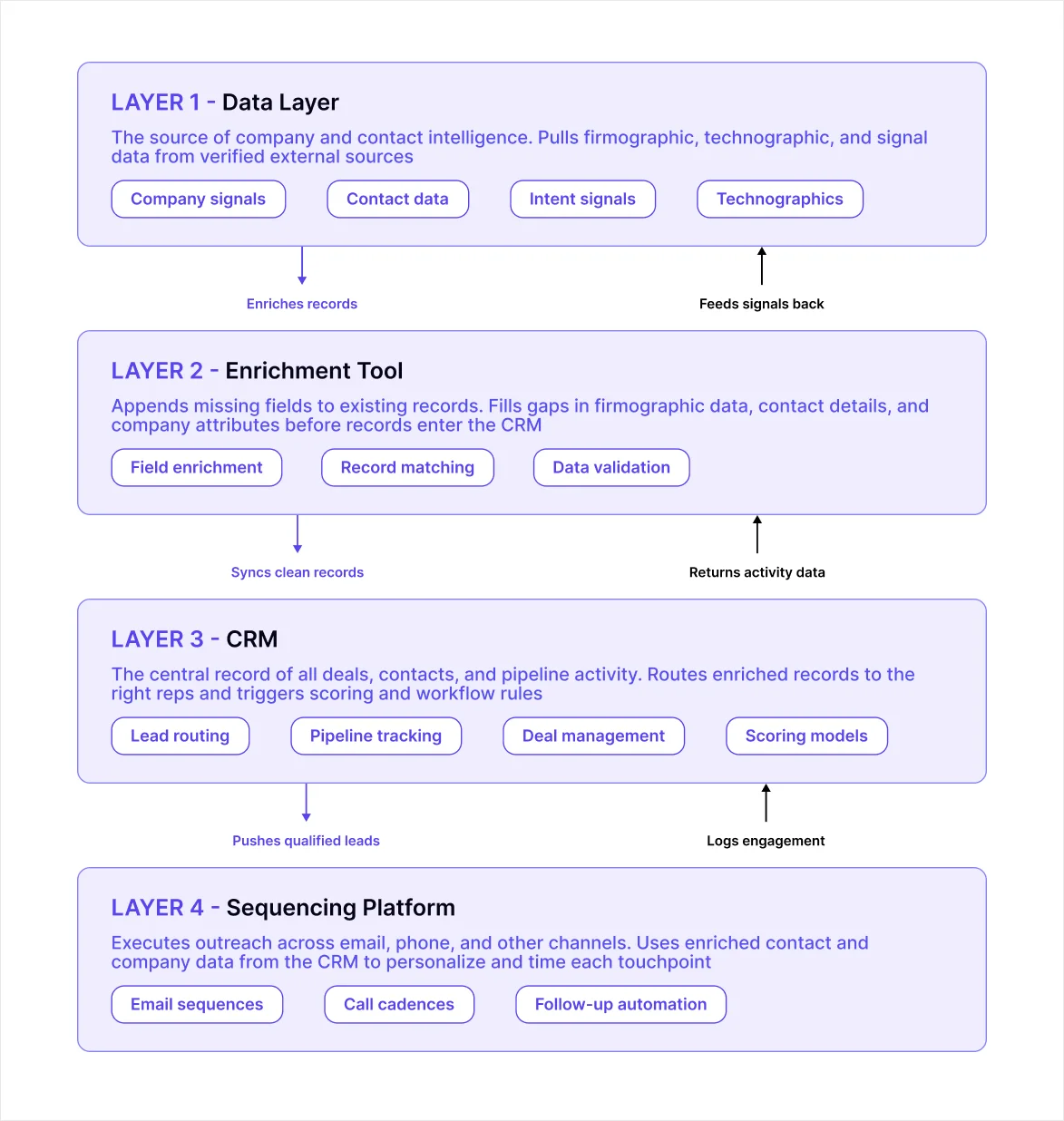
Step 3: Audit Your Current Tech Stack Before Adding Another Tool
List every tool currently touching your data layer. Map where data enters your CRM, where it gets enriched, and where it gets acted on. This step prevents the most common and most expensive mistake in sales technology: buying a platform that duplicates something you already have or creates a new silo rather than closing an existing gap.
If your stack already includes a contact database, an enrichment tool, and a sequencing platform, adding a fourth tool that overlaps with all three does not improve outcomes. It adds reconciliation overhead, creates conflicting field values in the CRM, and gives reps one more tab to ignore.
Step 4: Set Your Data Freshness Requirement
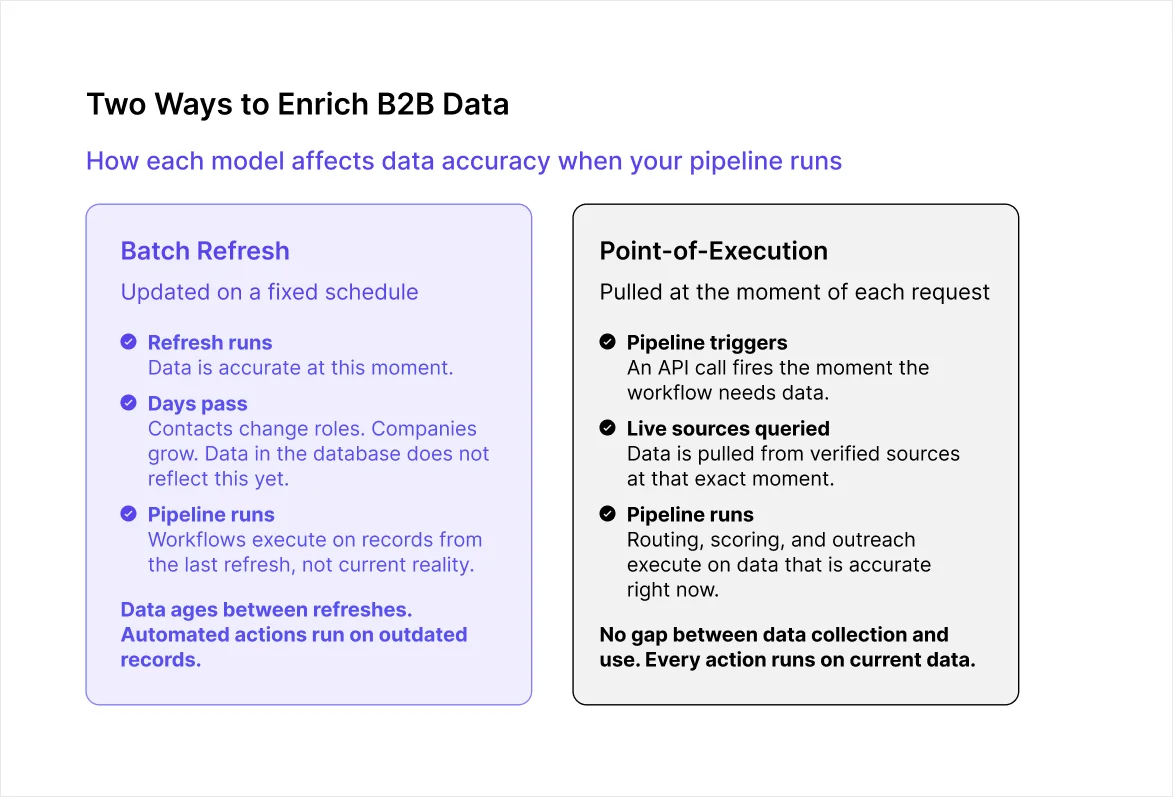
This single step eliminates more platforms than any other evaluation criterion, and most teams skip it entirely until after implementation, when the problem has already compounded across weeks of automated actions.
Workflow type | Freshness requirement | Why it matters |
Manual prospecting and static list building | Monthly or quarterly refresh | Reps verify key details before outreach anyway |
Active outreach sequences | Monthly refresh minimum | Outdated contact data drives up bounce rates and wastes sequence capacity |
CRM routing and lead scoring models | Weekly refresh or better | Stale firmographic data misroutes accounts and corrupts scoring models |
Automated pipelines and AI agent workflows | Point-of-execution enrichment | Every automated action depends on the record being accurate at that exact moment |
The bottom row is where most teams underestimate the requirement. For automated pipelines, a contact who changed roles last week or a company that crossed your headcount threshold yesterday will not appear in a database last refreshed two weeks ago.
For a deeper look at how this affects AI data enrichment workflows specifically, the gap between batch delivery and point-of-execution enrichment is the sharpest differentiator between platforms once automation is involved.
Step 5: Test on Your Actual ICP, Not a Vendor Demo Set
Every vendor demo uses curated data. The accounts look clean, match rates are high, and fields are populated. Your pipeline will not look like that. Before signing anything, request a proof of concept on records that match your real ICP, not a sample the vendor selects for you.
Check these four things on the proof of concept output:
Accuracy: Do key fields like headcount, funding stage, industry sub-vertical, and primary contact email match reality for accounts you already know well?
Fill rate: What percentage of records have those fields populated at all? High accuracy on a small subset is not the same as reliable coverage across your full ICP
Match rate: How many of your target accounts does the provider return a record for? A provider with an 80% match rate leaves one in five accounts out of your pipeline entirely
Freshness gap: Ask when the records in your proof of concept were last verified. A record enriched three months ago is not the same as one enriched this week, and the difference shows up in bounce rates and misrouted leads before it shows up in any dashboard metric
These checks are what separate a reliable production tool from a platform that performs well in controlled conditions. As covered in the guide to firmographic data accuracy challenges, the fields teams rely on most for qualification decisions are also the ones that change fastest and carry the highest risk when wrong.
Step 6: Evaluate CRM Integration Depth, Not Just Compatibility
Most platforms claim to integrate with Salesforce and HubSpot. That claim covers a very wide range of quality. A shallow integration that requires manual field mapping, breaks when CRM properties change, or only syncs one direction is not the same as a native bidirectional sync that triggers routing and scoring workflows automatically.
Before accepting "we integrate with your CRM" as sufficient, ask:
Does enriched data sync bidirectionally, or only from the platform into the CRM?
Do updates trigger existing CRM workflows and routing rules automatically, or does someone need to push the sync manually?
Does field mapping require maintenance when CRM properties are updated?
How long does the sync take? Real-time, hourly, or daily? And what happens to records enriched during a sync delay?
A platform that forces reps to context-switch between tools, run manual exports, or update fields themselves will not get used consistently. The quality of the integration layer, not the data behind it, determines whether a CRM enrichment workflow stays fresh or quietly degrades into another source of stale records.
Step 7: Understand the Real Cost at Your Usage Volume
Entry pricing is rarely the relevant price for any team past the early evaluation stage. Credit-based models, seat-based pricing, and usage-based contracts scale very differently, and the gap between the advertised price and the actual cost at your monthly volume can be significant enough to change the decision entirely.
Before signing, model the full cost by asking:
What is the cost per enrichment credit at your expected monthly volume, including volume discounts if applicable?
Do unused credits roll over, or do they expire at the end of each billing cycle?
What happens when you exceed the monthly limit? Is it a hard cap, a soft cap with automatic overage billing, or a workflow that pauses until the next cycle?
Are onboarding, implementation, and dedicated support included or priced separately?
Is pricing locked at renewal or subject to increase based on usage growth?
The teams that report the worst ROI from sales intelligence tools are almost always the ones that anchor on entry price rather than modelling actual usage volume before committing. A tool that costs $500 per month at the demo stage can easily reach $3,000 per month at production volume if the credit model is not examined carefully before signing.
Step 8: Define the Adoption Plan Before Signing
A sales intelligence platform is only as valuable as the percentage of your team that uses it consistently. Tool adoption failure follows a consistent pattern: a platform gets purchased, configured, and trained on, then quietly stops being used within months because the workflow it was meant to fit was never clearly defined before the contract was signed.
Before signing, define:
Who owns the platform internally and is accountable for adoption metrics
What the onboarding timeline looks like and how long before reps can use it independently without support
How success will be measured at 30, 60, and 90 days after launch, and what the specific metrics are
What the process is for adjusting configuration as the workflow evolves or the team changes
What support the vendor provides after go-live, not just during the initial implementation window
A vendor that cannot answer these questions clearly before the contract is signed will not answer them clearly after it either. The adoption plan is not a post-purchase consideration. It is part of the evaluation.
Mistakes to Avoid When Choosing a Sales Intelligence Platform
Most sales intelligence purchases follow the same script. A vendor runs a polished demo, a spreadsheet fills up with feature checkboxes, and someone picks the tool with the longest list. Six months later, adoption has dropped, and reps are back to doing things manually. These are the mistakes driving that pattern.
Buying on database size rather than ICP accuracy: A provider with 300 million records sounds more reliable than one with 100 million. But database size tells you nothing about how many of those records match your ICP or how accurate key fields are for your specific target market. Always test on your actual accounts, not the vendor's numbers
Skipping the proof of concept: Demo data is curated to show the platform at its best. Teams that go straight to contract based on demo performance are the ones most likely to discover coverage and accuracy gaps after they have already committed
Choosing the platform with the most features: More features mean more configuration, more training, and more surface area for adoption to break down. The right platform covers the specific data types your workflow needs, not the most capabilities your team will never use
Treating CRM integration as a checkbox: "Integrates with Salesforce" and "integrates well with Salesforce" are two different things. Check sync direction, field mapping reliability, and whether updates trigger existing workflows automatically before accepting a compatibility claim
Anchoring on entry price: The advertised price rarely reflects what the tool costs at your actual monthly usage volume. Model the cost at your real expected enrichment volume before signing, not at the minimum tier used in the demo
Not defining success metrics before go-live: Without a baseline and specific metrics to track, it is impossible to know whether the platform is working. Define what success looks like at 30, 60, and 90 days before the tool launches, not after.
Why Data Freshness Is the Deciding Factor For Choosing a Sales Intelligence Platform
For most evaluation criteria, different platforms can make a reasonable case depending on your specific needs. Data freshness is the one criterion that makes the evaluation binary for certain use cases.
For manual prospecting, a monthly or quarterly refresh cycle is workable. Reps verify key details before outreach anyway, and a record that is a few weeks old rarely derails a deal. For automated pipelines and AI agents, the picture is completely different.
Every automated action depends on the record feeding it being accurate at the moment it runs. A company that crossed your headcount threshold two weeks ago will not appear in a database last refreshed a month ago.
A contact who changed roles last week still shows up with their old title and employer. When those records feed routing rules, scoring models, or outreach sequences, the error does not stay contained to one bad record. It runs through every automated action the pipeline takes on that account before anyone catches it.
This is why benchmarking B2B data providers for AI SDR workflows consistently surfaces data freshness as the sharpest differentiator between providers once automation enters the picture. For teams where automated pipelines are the primary use case, point-of-execution enrichment should be a hard requirement in the evaluation, not a feature to consider later.
Where Crustdata Fits in the 8-Step Evaluation
Run through the eight steps above, and two criteria consistently separate Crustdata from most alternatives: data accuracy at the point of execution and coverage that does not leave qualified accounts out of the pipeline.
Most enrichment tools serve records from a stored database on a fixed refresh schedule. Crustdata crawls 10+ verified sources at the moment of each API request. For teams where the evaluation surfaces automated pipelines or AI agents as the primary use case, that is not a feature comparison point. It is a structural requirement that most providers simply cannot meet.
For each company your workflow targets, a single API call returns:
Firmographic data: Covers industry, headcount, revenue range, headquarters, and company type
Headcount growth percentages: Tracks changes across six-month, one-year, and two-year windows
Funding signals: Surfaces total investment raised, funding stage, and most recent round date from live sources
Technographic signals: Pulls tool usage from job postings and company descriptions
Web traffic trends and employee skill distribution: Indicates company scale and growth trajectory at the moment of request
Hiring signals: Surfaces real-time job postings and hiring velocity from target company career pages
90+ person-level data points: Returns current job title, employer, verified contact details, and career history alongside company data
95+ company filters and 60+ people filters: Builds precise ICP queries using nested boolean logic across multiple combined criteria
Step 8 of this guide covers defining an adoption plan before signing. Crustdata addresses that concern directly at the data layer. Rather than relying on reps to manually re-check account data, the Watcher API monitors a defined account set and fires a webhook the moment a qualifying event occurs, including a new funding round, an executive hire, a headcount spike, or a location change.
For teams automating lead enrichment, this removes the manual monitoring step from the workflow entirely.
If the evaluation above points to automated pipelines or event-triggered outreach as your primary use case, the freshness requirement from Step 4 narrows the field significantly. Crustdata is built for that layer.
Want to run the proof of concept from Step 5 against your actual ICP?
Book a demo to see Crustdata's real-time enrichment and Watcher APIs against your real target accounts.
FAQs
What is the difference between a sales intelligence platform and a CRM?
A CRM stores and manages existing relationships, including deals, contacts, activity history, and pipeline. A sales intelligence platform provides data and signals about companies and contacts you have not yet engaged, helping your team identify who to target and when. The two tools serve different purposes and work best when connected, with intelligence feeding the CRM rather than replacing it.
How long does it take to see ROI from a sales intelligence platform?
Teams that start with a specific measurable problem and a defined workflow tend to see movement within 30 to 60 days. Teams that buy a platform to broadly improve prospecting without defining success criteria often report unclear ROI at the six-month mark because they have no baseline to measure against.
What should I look for in a sales intelligence platform for a small team?
Prioritize workflow fit over feature count. A small team needs a platform that covers the specific data types the workflow depends on, integrates cleanly with the existing CRM without requiring engineering resources to maintain, and scales predictably with actual usage. Start with one clearly defined use case, prove it works, then expand.



Products
Popular Use Cases
Competitor Comparisons
95 Third Street, 2nd Floor, San Francisco,
California 94103, United States of America
© 2026 Crustdata Inc.
Products
Popular Use Cases
Competitor Comparisons
95 Third Street, 2nd Floor, San Francisco,
California 94103, United States of America
© 2026 CrustData Inc.
Products
Popular Use Cases
Competitor Comparisons
95 Third Street, 2nd Floor, San Francisco,
California 94103, United States of America
© 2026 Crustdata Inc.
🎉 We hit $10M ARR!
$600k to $10m in 1.5 years. Our entire GTM is powered by our own APIs.
🎉 We hit $10M ARR in 1.5 years!