7 Most-Common Challenges in Sales Intelligence [Solutions]
Learn why sales intelligence is challenging and how you can turn fragmented data and weak signals into smarter pipeline decisions.
Published
Written by
Chris P.
Reviewed by
Nithish A.
Read time
7
minutes
Why is sales intelligence challenging when B2B teams have more data available than ever before? The answer is rarely a shortage of signals. According to a HubSpot survey, 45% of sales reps feel overwhelmed by the number of tools they use. Yet more tools and more signals are not translating into better pipeline outcomes for most teams. The problem is not access. It is turning the data available into reliable, timely action at scale.
This article covers the 7 most common challenges in sales intelligence, why each one happens, and what actually fixes it.
Key Takeaways
Sales intelligence is challenging primarily because of data quality and timing problems, not because relevant signals are unavailable
Stale data compounds across every automated action it feeds. One outdated field in a routing rule can misplace dozens of accounts before anyone notices
More signals do not improve outcomes. Prioritized, contextual signals delivered at the right moment do
Most implementations fail not because the tools are wrong but because they are applied to the wrong problem or adopted without a clear workflow attached
Sales and marketing misalignment around what good data looks like is one of the most underdiagnosed reasons sales intelligence programs underdeliver
What Makes Sales Intelligence Challenging
The global sales intelligence market reached $4.85 billion in 2025 and is on track to reach 12.45 by 2034. Access to signals is no longer the bottleneck. The challenge is that raw data and actionable intelligence are two different things, and most teams treat them as the same.
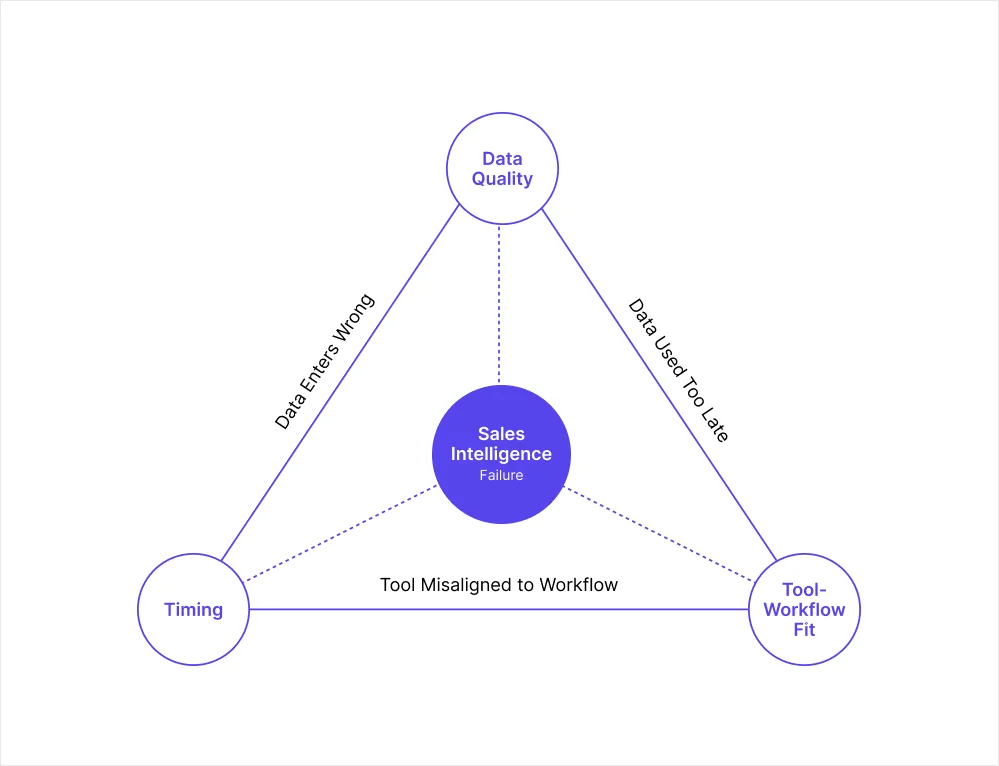
Three root causes show up consistently across underperforming programs:
Data quality: The signals feeding decisions are wrong or incomplete before anyone acts on them
Timing: Accurate data becomes inaccurate before the pipeline uses it
Tool-to-workflow mismatch: Teams buy intelligence software without defining the specific problem it needs to solve, then wonder why adoption stays low and ROI stays unclear
The seven challenges below each trace back to one or more of these root causes. Understanding which one is driving the problem determines which fix will actually work.
7 Most-Common Challenges in Sales Intelligence
The table below summarizes each challenge, its root cause, and the fix at a glance before the detailed breakdowns.
Challenge | Root cause | Core fix |
Data decays faster than teams refresh it | Timing | Point-of-execution enrichment and event monitoring |
Single-source data leaves coverage gaps | Data quality | Multi-source waterfall enrichment |
Too many signals, no clear prioritization | Tool-workflow mismatch | Signal scoring framework based on ICP |
Poor data quality corrupts automated pipelines | Data quality + Timing | Validate at entry, enrich at execution |
Sales and marketing operate from different data | Tool-workflow mismatch | Single shared enrichment layer |
Tool adoption fails without a clear workflow | Tool-workflow mismatch | Define the workflow before choosing the tool |
Compliance and privacy add friction at scale | Data quality | Providers with built-in compliance frameworks |
1. Data Decays Faster Than Teams Refresh It
Most teams enrich their CRM on an annual or quarterly schedule, then treat that data as reliable until the next refresh cycle runs. Contacts change roles, companies restructure, funding rounds close, and headcount shifts in ways that alter where an account sits in your ICP. A quarterly refresh still leaves weeks where the data feeding your pipeline is already outdated.
The problem compounds in automated workflows. A contact who changed roles two weeks ago, or a company that crossed your headcount threshold last month, will not appear in a database enriched before those changes occurred. Every automated action depending on that record runs on a false picture of the account.
Why it happens:
Batch enrichment is cheaper and easier to manage than real-time enrichment
Teams set a refresh cadence based on cost and calendar convenience, not on how fast their data actually changes
The impact stays invisible until a campaign fails or a deal falls apart at a late stage
The fix: Enrich at the point of execution rather than on a fixed schedule. Pair this with event monitoring so your team finds out about relevant account changes when they happen, not during the next scheduled data pull. The table below shows where different cadences are appropriate:
Pipeline stage | Recommended enrichment cadence |
Cold accounts, top of funnel | Quarterly minimum |
Active outreach sequences | Monthly or before each sequence starts |
Accounts in open opportunities | Before each major touchpoint |
Automated AI agent workflows | Point-of-execution enrichment |
2. Single-Source Enrichment Leaves Coverage Gaps
No single data provider covers the entire B2B market. Teams relying on one vendor target a subset of their ICP without knowing it. The accounts that do not appear in the provider's database never enter the pipeline, regardless of how well they fit your ICP.
The coverage problem is hardest to diagnose because the gap is invisible. Low match rates on enrichment requests are usually the first signal, but by then the damage has already compounded across weeks of campaigns.
Why it happens:
Single-vendor contracts are simpler to manage and negotiate
Low match rates get attributed to ICP quality rather than provider coverage
Teams never see the accounts they are missing, only the ones they find
The fix: Multi-source enrichment, where the system queries several providers in sequence until a verified record is found, consistently delivers higher coverage and better accuracy. This matters most for AI data enrichment workflows where a missed record means a missed automated action, not just a missed research task.
3. Too Many Signals, No Clear Prioritization
The challenge in 2026 is no longer access to signals. It is translating them into clear, prioritized action. Prospecting Is the workflow where impact is hardest to operationalize precisely because signal volume has outpaced the ability to act on it consistently.
Reps who receive high volumes of alerts, including job change notifications, funding events, intent spikes, and news mentions, tend to act on none of them consistently. Signal overload produces the same outcome as no signals at all.
Why it happens:
Platforms surface everything they track rather than filtering to what matters for a specific ICP
Teams add signal sources without removing the ones they are not acting on
No scoring layer sits between raw signals and rep action
The fix: Define the two or three event types that are most predictive of a buying window for your specific ICP before configuring any tool. Build a scoring layer on top of those signals. Ignore everything else until the framework is proven. For teams building this into automated pipelines, the account research layer for SDRs and AEs covers how to structure prioritization in practice.
4. Poor Data Quality Corrupts Automated Pipelines
In manual prospecting, one bad record wastes one rep's time. In an automated pipeline, one wrong field can misroute dozens of accounts before anyone notices. A routing rule built around "VP of Sales" misses every contact titled "VP, Sales" or "Vice President of Sales." A scoring model depending on accurate revenue estimates for private companies produces unreliable results when those estimates vary significantly between providers.
The firmographic data accuracy challenges that teams often dismiss as minor data hygiene issues become structural problems the moment they feed automated decisions rather than human review.
Why it happens:
Data quality issues are invisible until they surface in downstream metrics
Teams prioritize adding new data over maintaining the accuracy of existing records
Automated systems amplify errors at scale rather than catching them
The fix: Validate at point of entry, enrich at point of execution, and monitor for changes continuously. The warning signs that data quality is corrupting your pipeline include:
Email bounce rate above 2% across outbound campaigns
Lead scoring returning accounts that clearly fall outside your ICP
Pipeline reports that do not match what reps report in deal reviews
Enrichment tools returning low match rates on existing records
5. Sales and Marketing Operate From Different Data
When sales and marketing pull from different enrichment sources, the same account looks different depending on who ran the last lookup. Marketing qualifies a lead based on revenue estimates from one provider.
Sales disqualifies the same account based on estimates from another. Neither team is wrong based on the data they have, but the mismatch breaks the handoff and erodes trust between functions.
This is one of the most underdiagnosed reasons sales intelligence programs underdeliver. The technology works. The data quality is acceptable. But because both teams are not working from a consistent picture of the same accounts, intelligence never fully translates into coordinated action.
Why it happens:
Sales and marketing procure tools independently without aligning on a shared data source
Different tools return different values for the same field, like revenue or headcount, with no agreed standard for which to trust
Handoff failures get attributed to process problems rather than data inconsistency
The fix: A single enrichment layer that both teams pull from, with consistent field definitions, refresh cadences, and source prioritization. Building a CRM enrichment workflow that stays fresh across both functions removes the source-of-truth problem before it breaks handoffs downstream.
6. Tool Adoption Fails Without a Clear Workflow
Tool adoption failure follows a consistent pattern. A platform gets purchased, configured, and trained on, then quietly stops being used within months. The workflow it was meant to fit was never clearly defined before the contract was signed, so reps never see how it connects to their day-to-day selling motion and default back to what they already know.
Sales intelligence software does not create a workflow. It enhances one that already exists.
Why it happens:
Tools get bought to solve vague problems like "improve prospecting" without defining the specific step that needs to change
Implementation gets treated as a launch event rather than an ongoing process
Reps do not see how the tool connects to their day-to-day selling motion
The fix: Start with one clearly defined problem before evaluating any tool. Write out which specific step in your pipeline is failing, what triggers the action, what success looks like after the fix, and who is responsible for each step. Then find the tool that fits that workflow.
For teams benchmarking B2B data providers for AI SDRs, this principle applies directly. The right provider is the one whose data fits the specific workflow, not the one with the largest database.
7. Compliance and Privacy Add Friction at Scale
GDPR, CCPA, and evolving regional privacy regulations create real operational constraints around how contact and behavioral data can be collected, stored, and used. Inconsistent data standards and privacy regulations are among the primary factors restraining market growth.
For teams prospecting into European markets, non-compliant data is not just a legal risk. It affects deliverability, damages sender reputation, and creates friction in markets where buyers are sensitive to how their data is handled.
Why it happens:
Compliance gets treated as a legal review step rather than a data sourcing criterion
Teams use providers that collect data through scraping or non-consent-based methods without checking the underlying collection methodology
Regulations change faster than vendor evaluation processes catch up
The fix: Prioritize data providers with built-in compliance frameworks and consent-based collection. Confirm that your provider maintains GDPR and CCPA compliance natively, publishes a data processing agreement, and documents its opt-out process. For teams operating across multiple markets, compliance should sit in the provider evaluation criteria from the start, not as a retroactive filter after a contract is signed.
How to Build a Sales Intelligence Process That Actually Works
Getting sales intelligence right is a process problem more often than a technology problem. These steps address the root causes rather than the symptoms.
Start with one clearly defined problem: Before evaluating any tool, write out the specific step in your pipeline that is failing, what triggers the action, and what success looks like after the fix. Most programs underdeliver because the problem they are solving is too vague to measure.
Enrich at the point of action: Batch enrichment introduces a gap between when data is collected and when it is used. For accounts in active sequences or automated pipelines, that gap directly affects the accuracy of every decision the pipeline makes. Point-of-execution enrichment removes it.
Set a signal prioritization framework before adding more signals: More signals without prioritization is noise. Define which two or three event types are most predictive of a buying window for your ICP. Build a scoring layer on top. Ignore everything else until you can prove the framework works.
Build a consistent data layer across sales and marketing: Both teams should pull from the same enrichment source with the same field definitions and refresh cadences. Data inconsistency between functions is a structural problem that process alignment will not fix on its own.
Measure outcomes, not activity: The right metric for a sales intelligence program is pipeline quality and conversion rate, not signal volume or database size. If signal volume is increasing but conversion rate is not moving, the prioritization framework needs work, not more data.
How Crustdata Addresses the Core Sales Intelligence Challenges
The root causes that make sales intelligence challenging come down to two things most data providers do not solve simultaneously: data that is accurate at the moment of execution, and coverage that does not leave qualified accounts out of the pipeline.
Most enrichment tools pull from a stored database refreshed on a fixed schedule. That introduces a timing gap that compounds in automated pipelines. A company that raised a round last week, a contact who changed roles on Monday, or an account that crossed your headcount threshold yesterday will not appear until the next refresh cycle runs.
Crustdata crawls 10+ verified sources at the moment of each API request, so the record your pipeline receives reflects where the account is right now. For each company your workflow targets, a single API call returns:
Firmographic data: Covers industry, headcount, revenue range, headquarters, and company type
Headcount growth percentages: Tracks changes across six-month, one-year, and two-year windows
Funding signals: Surfaces total investment raised, funding stage, and most recent round date from live sources
Technographic signals: Pulls tool usage from job postings and company descriptions
Web traffic trends and employee skill distribution: Indicates company scale and growth trajectory at the moment of request
Hiring signals: Surfaces real-time job postings and hiring velocity from target company career pages
90+ person-level data points: Returns current job title, employer, verified contact details, and career history alongside company data
95+ company filters and 60+ people filters: Builds precise ICP queries using nested boolean logic across multiple combined criteria
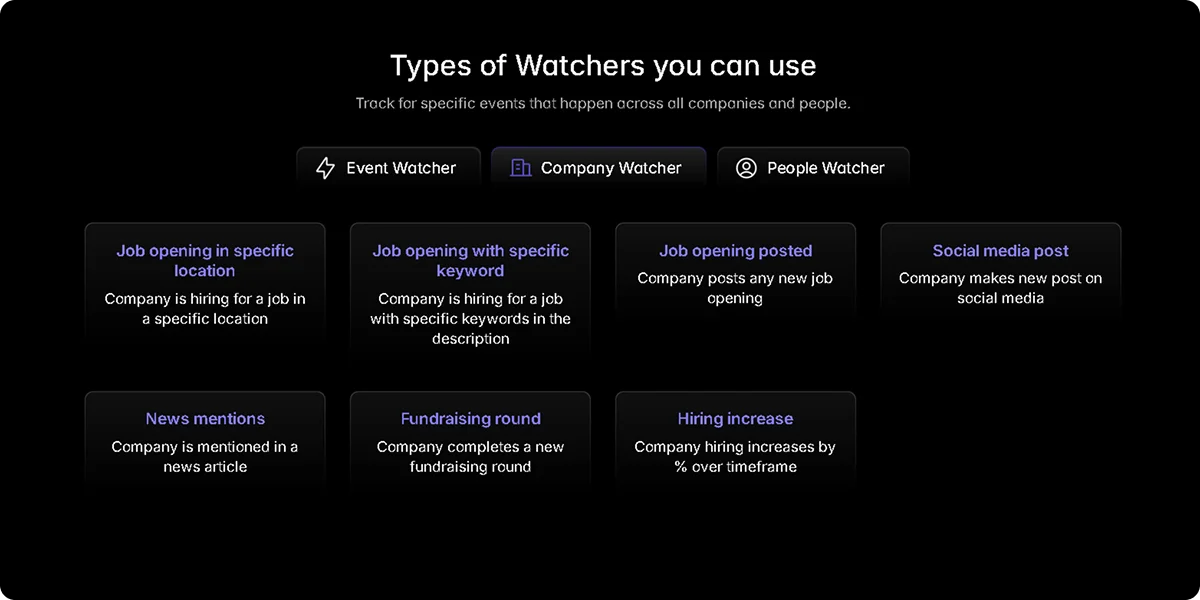
The Watcher API solves the monitoring problem that point-in-time enrichment alone cannot. Rather than re-running a search to catch what has changed, Watcher monitors a defined account set and fires a webhook the moment a qualifying event occurs:
A company closes a new funding round
An executive joins or leaves a key function
Headcount crosses your ICP threshold
A new office opens or a location changes
For teams automating lead enrichment or building pipelines where every downstream action depends on the data feeding it being accurate at execution, the combination of live enrichment and event-triggered alerts removes the two biggest structural causes of sales intelligence failure from the workflow entirely.
Want to see how your current pipeline holds up against live data?
Book a demo to see Crustdata's enrichment and Watcher APIs in action.
FAQs
What is the main challenge with sales intelligence data?
Accuracy at the moment of use. B2B records change constantly, and a database enriched weeks ago introduces a timing gap that corrupts every automated action depending on those records. Enriching at the point of execution rather than on a fixed schedule is what closes that gap.
Why do sales intelligence tools fail to deliver ROI?
The tool gets purchased before the workflow is defined. Sales intelligence software enhances a process that already exists. When teams buy it to solve a vague problem without defining the specific step that needs to change, adoption drops and the tool never gets embedded into daily work.
How do you know if your sales intelligence data is accurate?
Test it against accounts you already know well, like current customers or recently closed deals. Check whether key fields like headcount, funding stage, and industry sub-vertical match reality. Also check fill rate: what percentage of records have those fields populated at all. A provider that performs well on a demo set but poorly on your actual ICP is not a reliable source for production workflows.


Products
Popular Use Cases
Competitor Comparisons
95 Third Street, 2nd Floor, San Francisco,
California 94103, United States of America
© 2026 Crustdata Inc.
Products
Popular Use Cases
Competitor Comparisons
95 Third Street, 2nd Floor, San Francisco,
California 94103, United States of America
© 2026 CrustData Inc.
Products
Popular Use Cases
Competitor Comparisons
95 Third Street, 2nd Floor, San Francisco,
California 94103, United States of America
© 2026 Crustdata Inc.
🎉 We hit $10M ARR!
$600k to $10m in 1.5 years. Our entire GTM is powered by our own APIs.
🎉 We hit $10M ARR in 1.5 years!
